
1. Product Overview
This manual provides essential information for the EPtech 2-Prong Polarized Power Cable Cord, designed as a replacement power solution for various electronic devices, including JVC TV models EM39T, EM39FT, EM48FTR, BC50R, EM55FT, and EM55FTR, as well as printers, laptop adapters, VCRs, DVD players, cable boxes, and other audio/video equipment.
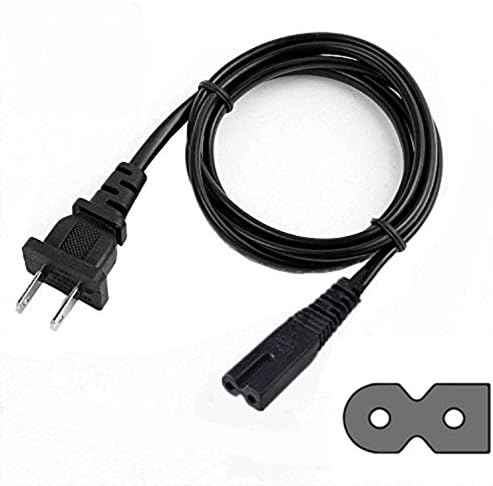
Image: The EPtech 2-Prong Polarized Power Cable Cord, featuring a standard US 2-prong plug on one end and a figure-8 (C7) connector on the other, designed for various electronic devices.
2. Key Features
- Advanced Design: Engineered for high portability and reliable performance.
- Universal Compatibility: Suitable for LED HDTVs, printers, laptop notebook computer adapters, VCRs, DVD players, cable boxes, and various audio/video equipment.
- Standard Connectors: Features a 2-prong polarized plug and a figure-8 (C7) connector.
- Optimal Length: Cable length of 6 feet (approximately 1.8 meters) for flexible placement.
- Safety Features: Incorporates multiple protection mechanisms including over current protection, total power protection, over voltage protection, and short circuit protection.
- Quality Construction: Manufactured with high-quality materials, including high-quality copper wire and a PVC insulation jacket, ensuring durability and safety.
- Certifications: Complies with FCC, CE, and RoHS standards.

Image: An illustration detailing the internal structure of a high-quality power cable, highlighting the high-quality copper wire and PVC insulation jacket for enhanced durability and safety.

Image: A visual representation of the safety features, including icons for Over-Temperature Protection, Over Voltage Protection, Over Current Protection, and Short Circuit Protection, alongside a power adapter.

Image: An illustration emphasizing the durable and compact design of the power cable and its associated adapter, highlighting quality control and portability.
3. Setup and Installation
The EPtech power cable is designed for simple plug-and-play installation. Follow these steps to connect your device:
- Ensure the electronic device (e.g., TV, printer, DVD player) is powered off and unplugged from its power source.
- Locate the power input port on your device. This is typically a figure-8 shaped (C8) receptacle.
- Insert the figure-8 (C7) connector of the EPtech power cable firmly into the device's power input port. Ensure it is fully seated.
- Plug the 2-prong polarized end of the power cable into a standard wall outlet (100-240V AC). Ensure the outlet is functioning correctly.
- Once connected, you may power on your device.
Note: Always ensure the power cable is compatible with your device's power requirements before connecting. This cable is designed for devices requiring a 2-prong polarized C7 power cord.
4. Operating Instructions
Once the EPtech power cable is correctly installed and connected to a power source, it will supply power to your electronic device. There are no specific operational controls on the cable itself.
- Ensure the cable is not kinked, twisted, or placed under heavy objects, which could damage the internal wiring.
- Verify that the connection at both the device and the wall outlet is secure to prevent intermittent power supply.
5. Maintenance
Proper maintenance ensures the longevity and safe operation of your power cable:
- Cleaning: Disconnect the cable from all power sources before cleaning. Wipe the cable and connectors with a dry, soft cloth. Do not use liquid cleaners or abrasive materials.
- Storage: When not in use, store the cable in a cool, dry place, away from direct sunlight and extreme temperatures. Avoid tightly coiling the cable to prevent internal wire damage.
- Inspection: Periodically inspect the cable for any signs of damage, such as frayed insulation, exposed wires, or bent/damaged prongs. If any damage is observed, discontinue use immediately and replace the cable.
- Handling: Always grasp the plug when disconnecting the cable from an outlet or device; do not pull by the cord itself.
6. Troubleshooting
If you experience issues with your EPtech power cable, consider the following troubleshooting steps:
- No Power to Device:
- Ensure both ends of the power cable are securely plugged into the device and the wall outlet.
- Test the wall outlet with another known working appliance to confirm it has power.
- Check if the device's power switch is in the "On" position.
- Inspect the power cable for any visible damage (cuts, kinks, frayed wires). If damaged, replace the cable.
- Intermittent Power:
- Ensure connections are tight at both the device and the wall outlet. A loose connection can cause intermittent power.
- Avoid placing the cable where it can be tripped over or pulled, which might loosen connections.
If the problem persists after performing these checks, contact customer support.
7. Specifications
| Attribute | Specification |
|---|---|
| Product Type | 2-Prong Polarized Power Cable Cord |
| Model Number | JAE170921172 |
| Connector Type (Male) | US 2-Prong Polarized (Type A) |
| Connector Type (Female) | Figure-8 (C7) |
| Cable Length | 6 feet (1.8 meters) |
| Color | Black |
| Input Voltage Compatibility | 100-240V AC (as per adapter image) |
| Certifications | FCC, CE, RoHS |
8. Warranty and Support
For information regarding warranty coverage or technical support for your EPtech power cable, please contact the manufacturer directly.
Customer Support Email: epcustomerservice@yahoo.com
When contacting support, please provide your product model number (JAE170921172) and a detailed description of your issue.