
1. Introduction
This user manual provides detailed instructions for the LG AKB75055701 Television Remote Control. This genuine LG replacement remote is designed to provide seamless control over your compatible LG television. Please read this manual thoroughly to ensure proper setup, operation, and maintenance of your remote control.
2. Safety Information
Observe the following safety precautions to prevent damage to the remote control or injury:
- Do not mix old and new batteries.
- Do not mix alkaline, standard (carbon-zinc), or rechargeable (nickel-cadmium) batteries.
- Ensure batteries are inserted with correct polarity (+ and -).
- Remove batteries if the remote control will not be used for an extended period.
- Keep batteries out of reach of children.
- Do not expose the remote control to direct sunlight, heat sources, or moisture.
3. Product Overview
The LG AKB75055701 remote control features a standard layout for intuitive operation of your LG television.

Figure 1: Front view of the LG AKB75055701 Television Remote Control, showing all buttons including power, number pad, volume, channel, and navigation controls.
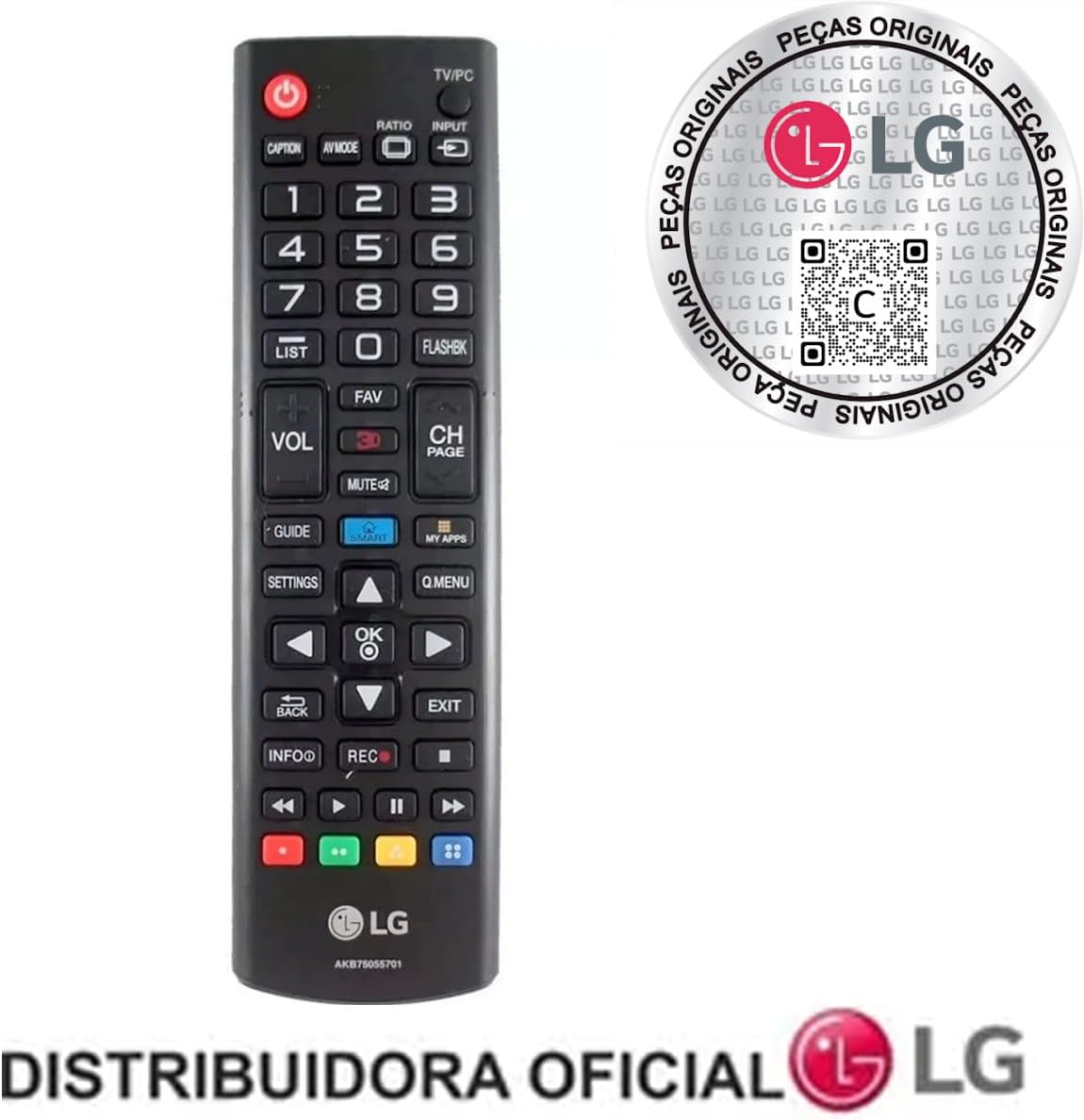
Figure 2: Angled view of the LG AKB75055701 remote control, highlighting the ergonomic design and button placement.
Figure 3: Back view of the LG AKB75055701 remote control, showing the battery compartment cover.
Key Buttons and Functions:
- Power Button (⏻): Turns the TV on or off.
- Number Pad (0-9): Direct channel selection.
- Volume Up/Down (VOL +/-): Adjusts the sound level.
- Channel Up/Down (CH PAGE +/-): Changes TV channels.
- Input (INPUT): Selects input sources (HDMI, AV, etc.).
- Q.MENU / SETTINGS: Accesses quick menu or main settings.
- Navigation Buttons (Up, Down, Left, Right, OK): Navigates menus and confirms selections.
- Back (BACK): Returns to the previous screen or menu.
- Exit (EXIT): Exits the current menu or application.
- Mute (MUTE): Mutes or unmutes the TV sound.
- Guide (GUIDE): Displays the electronic program guide.
- Colored Buttons (Red, Green, Yellow, Blue): Functions vary depending on the TV model and current screen.
4. Setup
4.1 Battery Installation
The LG AKB75055701 remote control requires two (2) AA batteries for operation.
- Locate the battery compartment cover on the back of the remote control.
- Slide the cover downwards or press the latch and lift to open.
- Insert two new AA batteries, ensuring the positive (+) and negative (-) terminals align correctly with the markings inside the compartment.
- Replace the battery compartment cover by sliding it back into place until it clicks securely.
4.2 Initial Use
This is a genuine LG replacement remote control. No programming is required for compatible LG televisions. Once batteries are installed, the remote is ready for use.
5. Operation
The LG AKB75055701 remote control is compatible with a wide range of LG LED, OLED, and LCD TVs, with or without Smart TV features. It is also compatible with various LG remote models, including AKB74915305, AKB75095315, AKB74475468, AKB74475401, AGF76631052, AKB73715608, and AGF76692601.
Basic Functions:
- Power On/Off: Point the remote at the TV and press the ⏻ button.
- Channel Selection: Use the number pad for direct channel input or the CH PAGE +/- buttons to cycle through channels.
- Volume Adjustment: Use the VOL +/- buttons.
- Input Source: Press the INPUT button to cycle through available input sources (e.g., HDMI 1, AV, Component).
- Menu Navigation: Use the Q.MENU or SETTINGS button to access menus, then use the navigation arrows and OK button to make selections.
6. Maintenance
6.1 Cleaning
To clean the remote control, wipe it gently with a soft, dry cloth. Do not use liquid cleaners, abrasive cleaners, or chemical solvents, as these may damage the remote's surface or internal components.
6.2 Battery Replacement
Replace batteries when the remote control's response becomes sluggish or stops working. Follow the battery installation steps in Section 4.1. Always replace both batteries at the same time with new ones.
6.3 Battery Disposal
Dispose of used batteries according to local regulations. Do not dispose of batteries in household waste. Many retailers offer battery recycling programs.
7. Troubleshooting
If you experience issues with your remote control, refer to the following common solutions:
| Problem | Possible Cause | Solution |
|---|---|---|
| Remote not responding | Dead or incorrectly inserted batteries; Obstruction between remote and TV; Remote out of range. | Replace batteries; Ensure correct polarity; Remove obstructions; Move closer to the TV. |
| Some buttons not working | Dirt or debris under buttons; Internal malfunction. | Clean the remote; If problem persists, consider replacement. |
| TV not responding to remote | TV's IR sensor blocked or faulty; TV is off. | Ensure TV's IR sensor is clear; Power on the TV manually. |
8. Specifications
- Model Number: AKB75055701
- Brand: LG
- Color: Black
- Batteries Required: 2 AA batteries
- Item Weight: 2.89 ounces
- Package Dimensions: 8.5 x 2.56 x 1.14 inches
- Special Feature: Universal (for compatible LG TVs)
- Compatible Devices: Television
9. Warranty and Support
For warranty information or further technical support, please refer to the documentation provided with your LG television or visit the official LG website for your region. You can find general support information and contact options at www.lg.com/us/support.