Introduction
The Onkyo CR-N765 is a high-fidelity Network CD Receiver designed to deliver exceptional audio performance from a variety of sources. This manual provides essential information for setting up, operating, and maintaining your CR-N765 to ensure optimal performance and longevity.
Setup Guide
1. Unpacking and Contents Verification
Carefully remove the CR-N765 unit and all accessories from the packaging. Please ensure all items listed below are present:
- Onkyo CR-N765 Network CD Receiver Unit
- Remote Control
- Batteries for Remote Control
- User Manual (this document)
- FM Antenna
2. Placement
Place the receiver on a stable, flat surface with adequate ventilation. Avoid placing it near heat sources or in direct sunlight. Ensure there is sufficient space around the unit for proper airflow.
3. Connections
Before making any connections, ensure the CR-N765 is unplugged from the power outlet.
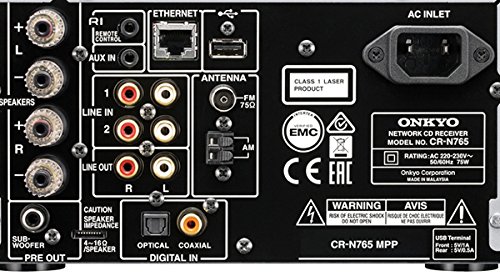
Figure 1: Rear Panel Connections. This image displays the comprehensive array of input and output terminals on the back of the Onkyo CR-N765, including speaker terminals, analog audio inputs, digital audio inputs (optical, coaxial), Ethernet port, USB ports, FM/AM antenna connections, and the AC inlet.
Speaker Connections
Connect your passive bookshelf speakers to the speaker terminals on the rear panel. The CR-N765 provides 22 W + 22 W (4 Ohms, 1 kHz, 0.4%, 2 Channels, Driven, IEC) of power output. Ensure correct polarity (+ to + and - to -) for each speaker.
Subwoofer Connection
If you have a powered subwoofer, connect its input to the 'SUBWOOFER PRE OUT' terminal on the rear panel.
Audio Input Connections
- Analog Inputs: Use RCA cables to connect external audio devices (e.g., a turntable with a phono pre-amp, or another audio player) to the 'LINE IN 1' or 'LINE IN 2' terminals.
- Digital Inputs: For digital audio sources, use an optical cable for the 'OPTICAL DIGITAL IN' or a coaxial cable for the 'COAXIAL DIGITAL IN'.
- USB Inputs: The unit features two USB ports (one front, one rear) for connecting USB flash drives or compatible iPod/iPhone devices.
Antenna Connections
Connect the supplied FM antenna to the 'FM 75Ω' terminal and the AM loop antenna to the 'AM' terminals for radio reception.
Network Connection
For network features, connect an Ethernet cable from your router to the 'ETHERNET' port on the rear panel. This enables access to internet radio, music streaming services, and network audio playback.
Power Connection
Once all audio and network connections are made, connect the power cord to the 'AC INLET' on the rear panel and then to a wall outlet.
Operating Instructions
1. Power On/Off
Press the ON/STANDBY button on the front panel or the remote control to turn the unit on or off.
2. Source Selection
Use the INPUT selector knob on the front panel or the dedicated input buttons on the remote control to choose your desired audio source (e.g., CD, Network, USB, FM/AM, Bluetooth, Line In).

Figure 2: Front Panel Display. This image shows the front of the Onkyo CR-N765, highlighting the display screen which indicates the currently selected input source, in this case, 'NET' for network audio.
3. Volume Control
Adjust the listening volume using the large VOLUME knob on the front panel or the VOLUME +/- buttons on the remote control.
4. CD Playback
Insert a CD into the front-loading CD slot. The unit will automatically switch to the CD input and begin playback. Use the playback controls (Play, Pause, Stop, Skip) on the front panel or remote.
5. Network Audio Playback
Once connected to your network, you can access internet radio and music streaming services (e.g., TuneIn Radio, Deezer, AUPEO!) via the Onkyo remote app on your smartphone or tablet. The CR-N765 supports high-resolution audio formats including gapless 192 kHz/24-bit FLAC and native 5.6 MHz DSD.

Figure 3: Network Media Display. This image shows the front of the Onkyo CR-N765, with the display indicating 'Home Media', signifying that the unit is ready to access content from your local network.
6. USB Playback
Connect a USB flash drive to the front or rear USB port. Use the remote control to navigate and select audio files. The unit supports various formats, including MP3, and is iPod/iPhone-certified.
7. Bluetooth Streaming
To stream music from your smartphone or tablet via Bluetooth, select the Bluetooth input. Pair your device with the CR-N765 following the instructions in your device's Bluetooth settings. Once paired, you can stream audio wirelessly.
8. FM/AM Radio
Select the FM or AM input. Use the tuning controls on the remote or front panel to find stations. You can store up to 40 preset FM/AM stations for quick access.
9. Headphone Use
Connect headphones to the 6.3mm headphone jack on the front panel. The CR-N765 features discrete headphone amplifier circuitry capable of driving 600-ohm headphones.
Maintenance
To ensure the longevity and optimal performance of your Onkyo CR-N765, follow these maintenance guidelines:
- Cleaning: Use a soft, dry cloth to wipe the exterior of the unit. For stubborn smudges, slightly dampen the cloth with water. Avoid using abrasive cleaners, solvents, or chemical sprays, as these can damage the finish.
- Ventilation: Ensure that the ventilation openings on the top and sides of the unit are not blocked. Proper airflow is crucial to prevent overheating.
- Dust Removal: Periodically use a soft brush or a low-power vacuum cleaner with a brush attachment to gently remove dust from the vents and surfaces.
- CD Tray: Keep the CD tray clean and free of debris. Avoid forcing the tray open or closed.
- Power Cord: Regularly check the power cord for any signs of damage. If damaged, discontinue use and contact qualified service personnel.
Troubleshooting
If you experience issues with your Onkyo CR-N765, please refer to the following common problems and solutions before seeking professional service.
| Problem | Possible Cause | Solution |
|---|---|---|
| No Power | Power cord disconnected; Power outlet issue; Unit in standby mode. | Ensure power cord is securely plugged in. Test the outlet with another device. Press the ON/STANDBY button. |
| No Sound | Incorrect input selected; Volume too low; Speakers not connected properly; Mute function active. | Select the correct input source. Increase volume. Check speaker connections and polarity. Deactivate mute. |
| CD Not Playing | CD inserted incorrectly; Disc is dirty or scratched; Disc format not supported. | Insert CD correctly with label side up. Clean the disc. Ensure it is an audio CD or supported data CD. |
| Network Connection Issues | Ethernet cable loose; Router/modem issue; Network settings incorrect. | Check Ethernet cable connection. Restart your router/modem. Verify network settings in the unit's menu. |
| Bluetooth Pairing Failure | Device not in pairing mode; Unit too far from device; Interference. | Ensure both devices are in pairing mode. Move devices closer. Reduce interference from other electronic devices. |
If the problem persists after trying these solutions, please contact Onkyo customer support or a qualified service technician.
Specifications
| Feature | Specification |
|---|---|
| Model | Onkyo CR-N765 |
| Power Output | 22 W + 22 W (4 Ohms, 1 kHz, 0.4%, 2 Channels, Driven, IEC) |
| Total Harmonic Distortion + Noise (THD+N) | 0.4% (1 kHz, 1 W) |
| Speaker Surround Sound Channel Configuration | 2.1 (Stereo with Subwoofer Pre-out) |
| Tuner Technology | AM/FM (40 Preset Stations) |
| Compatible Devices | iPhone, iPod, Android Devices |
| Special Features | Subwoofer Pre-out, FM Tuner, Built-in Bluetooth |
| Audio Output Type | Headphones, Speakers |
| Supported Media Types | CD, MP3, Bluetooth, USB, Headphone Jack |
| Supported Audio Formats (Network/USB) | Hi-Res PCM (up to 192 kHz/24-bit FLAC), DSD (up to 5.6 MHz), MP3, WMA, WAV, AAC, Apple Lossless (ALAC) |
| Connectivity Technology | Bluetooth, USB, Ethernet |
| Dimensions (W x H x D) | Approx. 21.5 cm x 11.9 cm x 33.1 cm (Package Dimensions: 33.1 x 21.5 x 11.9 cm) |
| Item Weight | 5 kg |
| Power Supply | AC 220-230V~ 50/60Hz |
Warranty and Support
For detailed warranty information, please refer to the warranty card included with your product or visit the official Onkyo website for your region. Warranty terms and conditions may vary by country.
If you require technical assistance, service, or have questions not covered in this manual, please contact Onkyo customer support. Contact information can typically be found on the official Onkyo website or in the product packaging.


