
1. Introduction
This manual provides detailed instructions for the proper installation, operation, and maintenance of your Nobsound Lepy LP-269S 4-Channel Bluetooth Power Amplifier. Please read this manual thoroughly before using the device to ensure optimal performance and safety. The LP-269S is a versatile audio amplifier designed for both car and home use, featuring multiple input options including Bluetooth, USB, SD card, and FM radio.
2. Safety Information
- Power Supply: Use only the provided power adapter or a compatible 12V DC, 3A power supply. Incorrect voltage can damage the unit.
- Ventilation: Ensure adequate ventilation around the amplifier. Do not block ventilation openings. Overheating can lead to malfunction.
- Moisture: Keep the device away from water, moisture, and high humidity environments.
- Placement: Place the amplifier on a stable, flat surface. Avoid placing it in direct sunlight or near heat sources.
- Cleaning: Disconnect power before cleaning. Use a soft, dry cloth. Do not use liquid cleaners or aerosols.
- Servicing: Do not attempt to open or repair the unit yourself. Refer all servicing to qualified personnel.
3. Package Contents
Verify that all items are present in the package:
- 1 x Nobsound Lepy LP-269S Amplifier
- 1 x 5A Power Supply
- 1 x Remote Controller

4. Product Overview
4.1 Front Panel Features
- SD/MMC: Slot for SD or MMC memory cards.
- USB: USB port for connecting USB flash drives.
- Display: LED screen showing current mode, track information, or FM frequency.
- IR Receiver: For remote control signals.
- Mode: Button to switch between input sources (Bluetooth, USB, SD, FM, AUX).
- Prev: Previous track/station button.
- Play/Pause: Play/pause button for media, or scan for FM radio.
- Next: Next track/station button.
- Treble: Knob to adjust high-frequency audio levels.
- Bass: Knob to adjust low-frequency audio levels.
- Volume/Power: Knob to adjust overall volume and power on/off the unit.
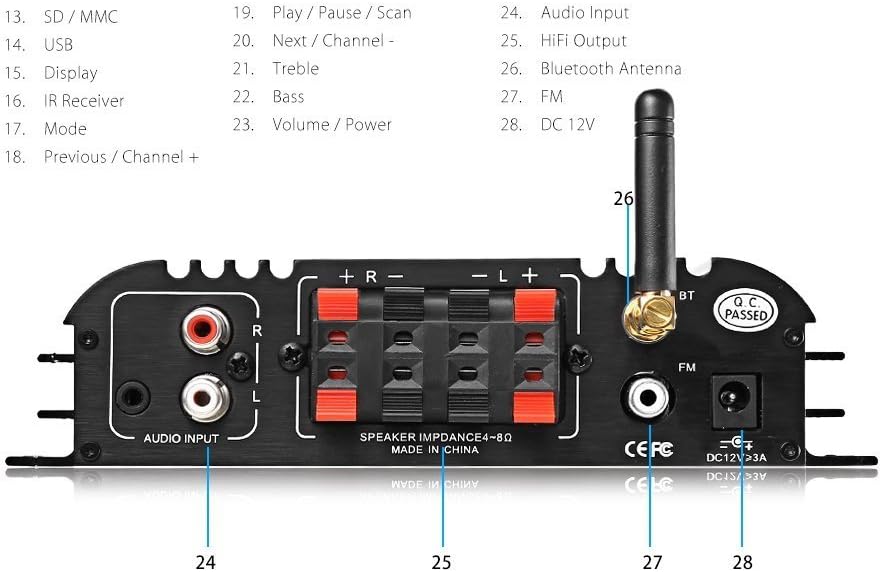
4.2 Rear Panel Features

- Audio Input (RCA): Connect external audio sources via RCA cables.
- Speaker Terminals: Connect passive speakers (4-8Ω impedance).
- Bluetooth Antenna: Connector for the included Bluetooth antenna.
- FM Antenna: Port for connecting an FM antenna.
- DC 12V: Power input for the 12V DC power adapter.
4.3 Remote Control

The remote control allows for convenient operation of the amplifier from a distance. Functions include power on/off, mode selection, volume adjustment, EQ presets, track navigation, repeat functions, and FM radio scanning.
5. Setup
5.1 Connecting Speakers
- Ensure the amplifier is powered off.
- Connect your passive speakers to the speaker terminals on the rear panel. Match the positive (+) and negative (-) terminals of the amplifier to those of your speakers. The amplifier supports 4-8 Ohm speakers.
- For a 4-channel setup, connect two speakers to the 'R' (Right) terminals and two speakers to the 'L' (Left) terminals.
5.2 Connecting Audio Sources
- RCA Input: Connect your CD player, DVD player, or other audio devices to the 'AUDIO INPUT' RCA ports using an RCA cable.
- USB/SD Card: Insert a USB flash drive into the USB port or an SD/MMC card into the SD/MMC slot on the front panel. The amplifier will automatically detect and play compatible audio files.
- Bluetooth Antenna: Screw the included Bluetooth antenna onto the 'BT' connector on the rear panel.
- FM Antenna: Connect an FM antenna to the 'FM' port for radio reception.
5.3 Power Connection
- Connect the 5A power supply to the 'DC 12V' input on the rear panel of the amplifier.
- Plug the power supply into a standard electrical outlet.
6. Operating Instructions
6.1 Power On/Off
Turn the 'Volume/Power' knob clockwise until the display illuminates to power on the amplifier. Turn it counter-clockwise until it clicks to power off.
6.2 Input Selection (Mode)
Press the 'MODE' button on the front panel or the remote control to cycle through available input sources: Bluetooth, USB, SD, FM, and AUX (RCA input).
6.3 Volume, Bass, and Treble Adjustment
Use the 'Volume', 'Bass', and 'Treble' knobs on the front panel to adjust the audio output to your preference. The remote control also provides volume adjustment.
6.4 Bluetooth Pairing
- Switch the amplifier to 'BLUE' (Bluetooth) mode using the 'MODE' button. The display will flash, indicating it is ready for pairing.
- On your Bluetooth-enabled device (smartphone, tablet, etc.), search for available Bluetooth devices.
- Select 'LP-269S' from the list of devices.
- Once paired, the display will stop flashing, and you can stream audio from your device.
6.5 USB/SD Card Playback
When a USB drive or SD card is inserted, the amplifier will automatically switch to the corresponding mode and begin playing compatible audio files (MP3, APE, FLAC, WAV, WMA). Use the 'PREV', 'PLAY/PAUSE', and 'NEXT' buttons to control playback.
6.6 FM Radio Operation
- Switch the amplifier to 'FM' mode.
- Press the 'PLAY/PAUSE' button (or 'SCN' on the remote) to initiate an automatic scan for FM stations. The amplifier will save found stations.
- Use the 'PREV' and 'NEXT' buttons to navigate through the saved FM stations.
7. Maintenance
- Cleaning: Regularly wipe the exterior of the amplifier with a soft, dry, lint-free cloth. Avoid using harsh chemicals or abrasive materials.
- Storage: If storing the unit for an extended period, disconnect it from power and store it in a cool, dry place away from direct sunlight and extreme temperatures.
- Ventilation: Ensure the heat sinks on the sides of the amplifier remain clear of dust and obstructions to maintain proper cooling.
8. Troubleshooting
| Problem | Possible Cause | Solution |
|---|---|---|
| No power | Power adapter not connected; Power outlet faulty; Volume/Power knob off. | Check power connections; Try a different outlet; Turn Volume/Power knob clockwise. |
| No sound output | Incorrect input mode; Speaker wires loose/incorrectly connected; Volume too low; Mute activated. | Select correct input mode; Check speaker connections; Increase volume; Deactivate mute. |
| Bluetooth not connecting | Amplifier not in Bluetooth mode; Device too far; Bluetooth antenna not connected; Device already paired to another unit. | Switch to Bluetooth mode; Move device closer; Ensure antenna is connected; Disconnect from other devices. |
| Distorted audio | Volume too high; Source audio quality poor; Speaker impedance mismatch. | Reduce volume; Use a higher quality audio source; Ensure speakers are 4-8 Ohm. |
| USB/SD card not playing | Unsupported file format; Corrupted files; Card/drive not inserted correctly. | Ensure files are MP3, APE, FLAC, WAV, WMA; Reformat card/drive; Reinsert card/drive. |
9. Specifications
| Feature | Specification |
|---|---|
| Brand | Nobsound |
| Model Number | LP 269S |
| Output Power | 180 Watts (45W x 4 Channels) |
| Number of Channels | 4 |
| Voltage | 12 Volts (DC) |
| Minimum Supply Voltage | 12 Volts (DC) |
| Maximum Supply Voltage | 12 Volts (DC) |
| Supply Current | 3 Amps |
| Material | Aluminum |
| Mounting Type | Surface Mount |
| Package Dimensions | 12.32 x 7.87 x 2.56 inches |
| Item Weight | 1.85 pounds |
| Connectivity | Bluetooth, USB, SD/MMC, RCA Audio Input, FM Radio |
| Supported Audio Formats | MP3, APE, FLAC, WAV, WMA |
10. Warranty Information
This product is covered by a manufacturer's warranty. Please refer to the warranty card included with your purchase or contact the retailer for specific warranty terms and conditions. Keep your proof of purchase for warranty claims.
11. Support
For technical assistance, troubleshooting beyond this manual, or customer service inquiries, please contact Nobsound customer support through the retailer where the product was purchased or visit the official Nobsound website for contact information.