1. Introduction
Thank you for choosing the Bosch BFL524MW0 Series 6 Built-in Microwave Oven. This appliance is designed for quick and efficient heating, defrosting, and cooking of various foods. To ensure safe and optimal performance, please read this manual thoroughly before using the appliance and keep it for future reference.
2. Safety Information
Always adhere to the following safety precautions to prevent personal injury or damage to the appliance:
- Do not operate the microwave oven if the door is damaged, or if the seals or hinges are faulty.
- Do not heat liquids or other foods in sealed containers, as they are liable to explode.
- Only use microwave-safe utensils.
- Regularly clean the oven cavity and remove any food deposits.
- Do not attempt to service or repair the appliance yourself. Contact authorized service personnel.
- Ensure proper ventilation around the appliance.
- Keep children away from the appliance during operation.
3. Product Overview
The Bosch BFL524MW0 is a 20-liter built-in microwave oven featuring 800W microwave power and AutoPilot 7 automatic programs. It is designed for integration into a 38 cm niche.
3.1 Key Features
- Microwave Function: For rapid preparation, defrosting, and reheating of food.
- AutoPilot 7: Ensures perfect results with 7 pre-set automatic programs.
- Electronic Door Opening: Convenient door opening by simply touching a sensor button.
- White LED Display: Easy operation with direct access to time functions.
- Retractable Knobs: For a sleek design and easy cleaning.
- Inverter Technology: Provides even heating and defrosting.
- Turntable: 25.5 cm glass turntable for uniform cooking.
- Interior Light: For clear visibility of food during cooking.
3.2 Components
The microwave oven consists of the following main components:
- Control Panel with LED Display and Rotary Knob
- Electronic Door Open Button
- Oven Cavity
- Glass Turntable
- Turntable Support
- Oven Door


4. Setup and Installation
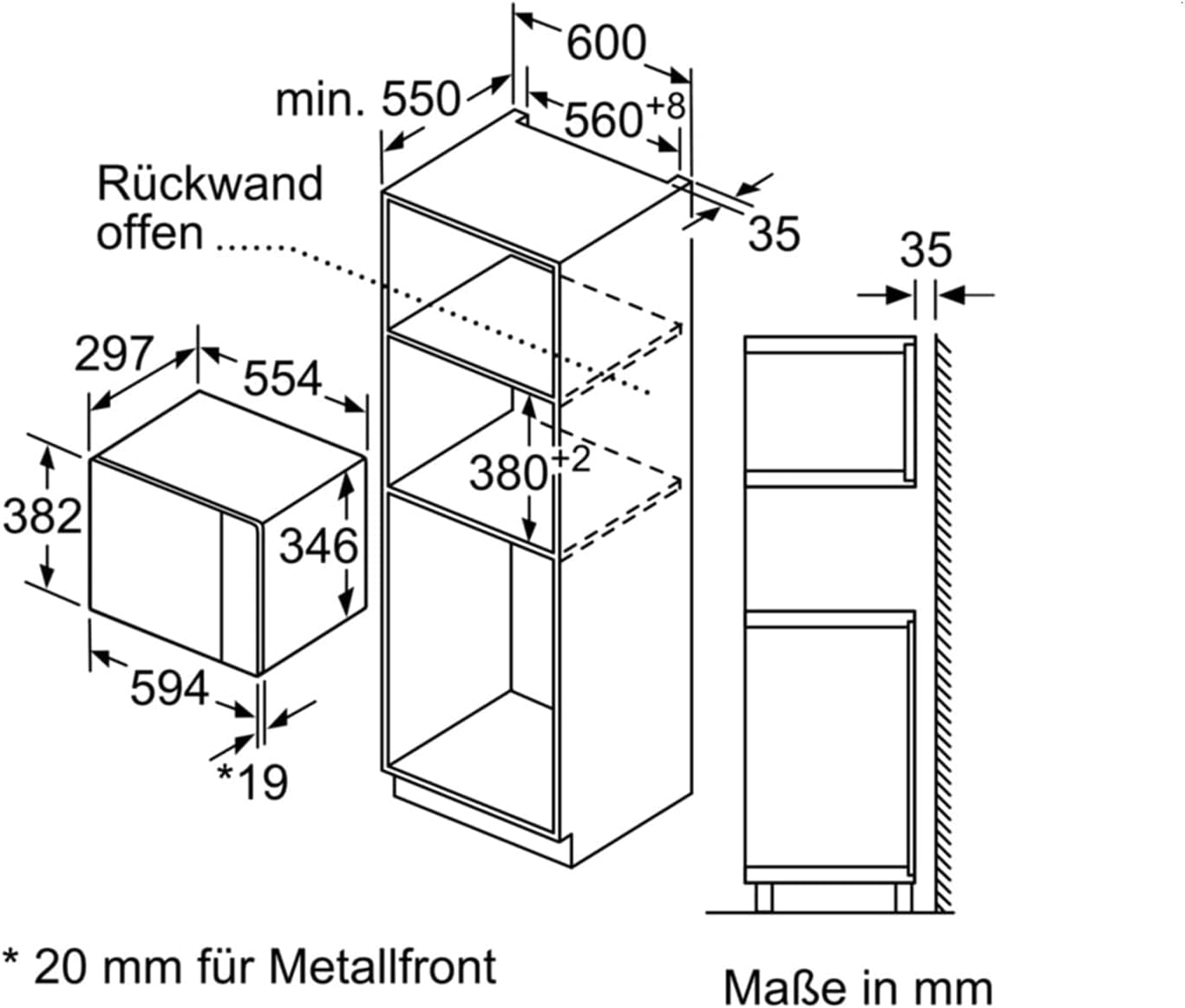
This microwave oven is designed for built-in installation. Ensure that the installation niche meets the specified dimensions for proper fit and ventilation.
4.1 Installation Requirements
- Appliance Placement: Built-in.
- Installation Compartment Dimensions (WxDxH): 560 x 300 x 365 mm (minimum).
- Electrical Connection: 220-230 V AC, 50 Hz, 10 A.
- Power Cord Length: 1.3 m.

4.2 Initial Use
Before first use, clean the interior of the microwave oven with a damp cloth. Ensure the turntable and its support are correctly placed. Plug the appliance into a grounded electrical outlet.
5. Operating Instructions
The microwave oven is controlled via the rotary knob and touch buttons on the LED display.
5.1 Basic Microwave Operation
- Place food in a microwave-safe container on the glass turntable.
- Close the oven door securely.
- Select the desired power level (e.g., 800W, 600W, 360W, 180W, 90W) using the buttons.
- Set the cooking time using the rotary knob. The display will show the time.
- Press the 'Start' button to begin cooking.
- To pause or stop cooking, press the 'Stop' button.
5.2 AutoPilot 7 Programs
The AutoPilot 7 feature simplifies cooking by automatically setting the optimal time and power for various dishes. There are 7 pre-set automatic programs, including 3 cooking programs and 4 defrosting programs.
- Place the food in the microwave oven.
- Select the desired AutoPilot program using the 'M' button or by rotating the knob to the AutoPilot menu.
- Confirm the program and, if prompted, enter the weight of the food (e.g., using the 'kg' button and rotary knob).
- Press 'Start'. The microwave will automatically determine the cooking time and power.
5.3 Defrost Function
The defrost function allows for gentle and even thawing of frozen foods. Use the dedicated defrost programs within AutoPilot 7 or manually set a lower power level (e.g., 90W or 180W) and time.
- For best results, turn food over halfway through the defrosting process.
- Allow defrosted food to stand for a few minutes to ensure even thawing.
5.4 Setting the Clock
The microwave features an integrated electronic clock. To set the time:
- When the appliance is first connected, the clock symbol will flash.
- Use the rotary knob to set the current time.
- Press the clock symbol or 'Start' to confirm.
6. Maintenance and Cleaning
Regular cleaning helps maintain the performance and longevity of your microwave oven.
6.1 Cleaning the Interior
- Wipe the interior cavity with a soft cloth and mild detergent after each use.
- For stubborn food residues, place a bowl of water with lemon juice inside and heat for a few minutes to loosen the grime, then wipe clean.
- The glass turntable can be removed and washed by hand or in a dishwasher.
- Do not use abrasive cleaners, scouring pads, or harsh chemicals.
6.2 Cleaning the Exterior
Wipe the exterior surfaces with a soft, damp cloth. For stainless steel parts, use a specialized stainless steel cleaner if necessary. Ensure no water enters the ventilation openings.
7. Troubleshooting
If you encounter issues with your microwave oven, refer to the following table before contacting service.
| Problem | Possible Cause | Solution |
|---|---|---|
| Microwave does not start. | Door not closed properly; power outage; fuse blown. | Ensure door is fully closed. Check power supply. Check household fuse. |
| Food not heating evenly. | Food not stirred or turned; turntable not rotating. | Stir or turn food during cooking. Ensure turntable is correctly placed and rotates freely. |
| Display shows an error code. | Internal fault. | Switch off the appliance at the main power supply for a few minutes, then switch it back on. If the error persists, contact customer service. |
| Unusual noise during operation. | Turntable not correctly seated; foreign object in cavity. | Check turntable placement. Remove any foreign objects. |
8. Specifications
| Feature | Detail |
|---|---|
| Brand | Bosch |
| Model Number | BFL524MW0 |
| Appliance Placement | Built-in |
| Product Type | Solo Microwave |
| Interior Capacity | 20 Liters |
| Microwave Power | 800 W |
| Power Levels | 5 |
| Control Type | Rotary, Touch |
| Display Type | LED |
| Turntable Size | 25.5 cm |
| Turntable Material | Glass |
| Color | White |
| Material | Stainless Steel (interior) |
| Connected Load | 1270 W |
| AC Input Voltage | 220 - 230 V |
| AC Input Frequency | 50 Hz |
| Current | 10 A |
| Power Cord Length | 1.3 m |
| Width | 594 mm |
| Depth | 317 mm |
| Height | 382 mm |
| Weight | 16 kg |
| Installation Compartment Dimensions (WxDxH) | 560 x 300 x 365 mm (min) |
| Number of Auto Programs | 7 |
| Defrost Function | Yes |
| Inverter Technology | Yes |
| Retractable Knobs | Yes |
9. Warranty and Support
Bosch appliances come with a manufacturer's warranty. Please refer to the warranty card included with your appliance for specific terms and conditions, or visit the official Bosch website for detailed warranty information.
For technical assistance, spare parts, or to schedule a service appointment, please contact Bosch Customer Service. Have your model number (BFL524MW0) and serial number ready when contacting support.
Online Support: www.bosch-home.com/us/support (Example link, actual link may vary by region)


