
SKMEI 1068
SKMEI Digital Sports Watch Model 1068 - Instruction Manual
Brand: SKMEI
Model: 1068
1. Introduction
Thank you for choosing the SKMEI Digital Sports Watch Model 1068. This watch is designed for durability and functionality, featuring a large LED display, 5ATM water resistance, and multiple functions suitable for various outdoor and indoor activities.
The watch shell is made of durable PC material, providing excellent protection. Its shock-resistant design makes it ideal for sports such as running, climbing, and fishing.

Figure 1.1: Front view of the SKMEI Digital Sports Watch Model 1068, displaying the time, date, and day of the week on its large LED screen.

Figure 1.2: The SKMEI Digital Sports Watch in an outdoor climbing environment, demonstrating its robust design for active use.

Figure 1.3: The SKMEI Digital Sports Watch worn on a wrist, showcasing its comfortable fit and clear display in a casual setting.
Package Contents:
- 1 x SKMEI Digital Sports Watch Model 1068
- 1 x Instruction Manual (this document)
- 1 x Gift Box
2. Initial Setup
Before using your watch, it is recommended to familiarize yourself with the button functions and set the correct time and date.
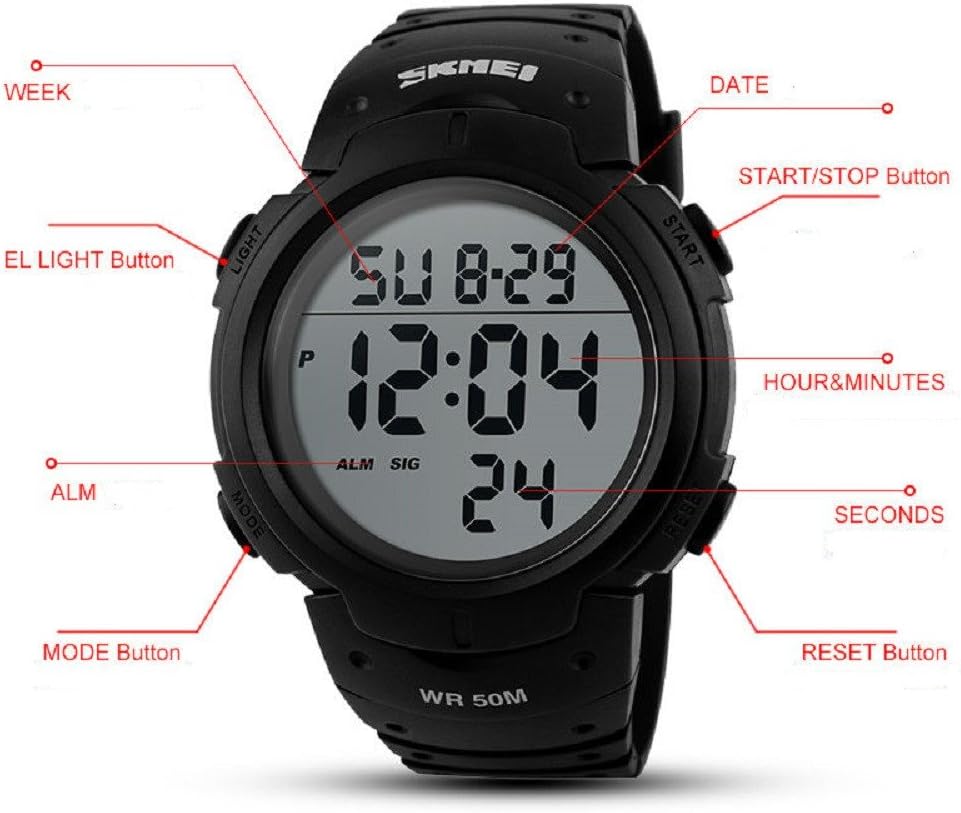
Figure 2: Labeled diagram of the SKMEI Digital Sports Watch, indicating the various buttons and display elements.
Setting Time and Date:
- From the normal time display mode, press the MODE button repeatedly until the seconds start flashing. This indicates you are in time setting mode.
- Press the RESET button to cycle through the settings: Seconds → Hour → Minute → Month → Date → Day of the Week.
- Use the START/STOP button to adjust the flashing value.
- Once all settings are correct, press the MODE button to exit the setting mode and return to the normal time display.
3. Operating Instructions
Your SKMEI Digital Sports Watch features several modes and functions. Refer to Figure 2 for button identification.
Button Functions:
- LIGHT Button: Activates the EL backlight for viewing in low-light conditions.
- MODE Button: Cycles through different modes: Time Display → Stopwatch → Alarm Setting → Time Setting.
- START/STOP Button: Used to start/stop the stopwatch, or to adjust values during setting modes.
- RESET Button: Used to reset the stopwatch, or to select the next setting item during setting modes.
Using the Stopwatch:
- From the normal time display, press the MODE button once to enter Stopwatch mode. The display will show "00:00:00".
- Press the START/STOP button to start the stopwatch.
- Press the START/STOP button again to pause the stopwatch.
- While paused, press the RESET button to reset the stopwatch to "00:00:00".
- Press the MODE button to exit Stopwatch mode and return to the normal time display.
Setting the Alarm:
- From the normal time display, press the MODE button twice to enter Alarm setting mode. The alarm hour will flash.
- Press the START/STOP button to adjust the alarm hour.
- Press the RESET button to switch to setting the alarm minute.
- Press the START/STOP button to adjust the alarm minute.
- Press the MODE button to exit Alarm setting mode.
- To turn the alarm ON/OFF, in Alarm mode, press the START/STOP button. An alarm icon (ALM) will appear or disappear on the display.
4. Maintenance and Care
Proper care will ensure the longevity and performance of your SKMEI Digital Sports Watch.
Water Resistance (5ATM):
Your watch is 5ATM water resistant, meaning it is suitable for daily life activities such as hand washing, rain, and brief immersion in water. It supports swimming and bathing in cold water.
Important Note:
- DO NOT press any buttons underwater. Pressing buttons underwater can compromise the waterproof seal.
- Keep the watch away from steam and hot water. High temperatures and steam can damage the waterproof ring and internal components.
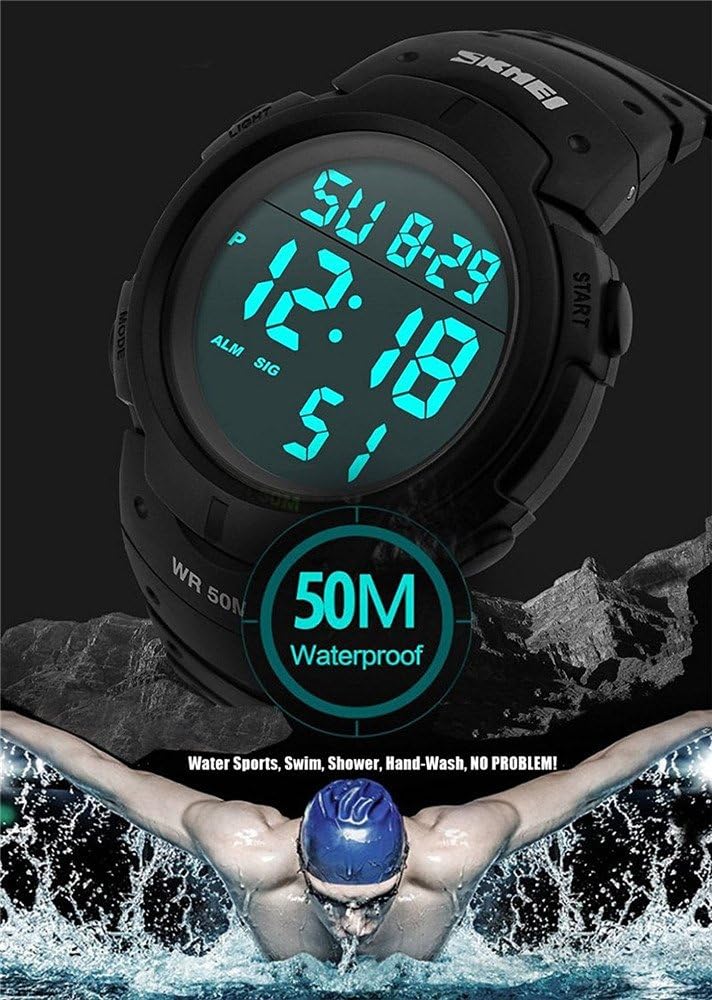
Figure 3: The watch is rated 50M (5ATM) waterproof, suitable for water sports, swimming, showering, and hand-washing.
General Cleaning:
Wipe the watch case and band with a soft, damp cloth to remove dirt and sweat. Avoid using harsh chemicals or abrasive materials, as these can damage the watch's finish.
5. Troubleshooting
If you encounter any issues with your watch, please refer to the following common problems and solutions:
Display is Blank or Faint:
- Possible Cause: Low battery.
- Solution: The watch uses a standard button cell battery. If the display is blank or faint, the battery may need replacement. It is recommended to have the battery replaced by a professional watch repair service to ensure the waterproof seal is maintained.
Buttons are Unresponsive:
- Possible Cause: Watch is in a frozen state or internal malfunction.
- Solution: Try pressing all buttons simultaneously for a few seconds to attempt a soft reset. If the issue persists, contact customer support.
Water Inside the Watch:
- Possible Cause: Buttons pressed underwater, exposure to hot water/steam, or damage to the waterproof seal.
- Solution: Immediately stop using the watch. Do not attempt to dry it with heat. Seek professional watch repair to prevent further damage from corrosion.
6. Specifications
| Movement Type | Digital |
| Water Resistance | 5ATM (50 meters / 164 feet) - Shower Proof |
| Dial Diameter | 5 cm (approx.) |
| Dial Thickness | 1.2 cm |
| Case Material | Stainless Steel (Case back), PC (Shell) |
| Case Shape | Round |
| Band Material | PU (Polyurethane) |
| Band Width | 2.4 cm |
| Band Length | 25 cm |
| Clasp Type | Buckle |
| Net Weight | Approx. 122g |
| Display Type | Large LED Number Display |
| Special Features | Auto Date, Alarm, LED Display, Shock Resistant, Stopwatch, Backlight (Luminous) |
7. Warranty and Support
For warranty information and customer support, please refer to the specific terms provided by your retailer or the manufacturer at the time of purchase. Typically, electronic products come with a limited warranty covering manufacturing defects.
If you require assistance or have questions not covered in this manual, please contact the seller or the official SKMEI customer service channel.
For more information about SKMEI products, you may visit the official SKMEI store on Amazon: SKMEI Store
Ask a question about this manual
Ask about setup, troubleshooting, compatibility, parts, safety, or missing instructions. Manuals+ will review the question and use this page’s manual context to help answer it.