
BONAI BNAC17081404IT
BONAI LCD Fast Battery Charger
Model: BNAC17081404IT
User Instruction Manual
1. Product Overview
The BONAI LCD Fast Battery Charger is designed to efficiently charge 1-4 AA/AAA Ni-MH/Ni-CD rechargeable batteries. It features an intelligent LCD display that shows the charging progress for each battery independently, along with multiple safety protections.

Image: The BONAI LCD Fast Battery Charger, a white rectangular device with four battery slots and a blue LCD screen, shown next to its white USB charging cable.
2. Package Contents
Please verify that all items are present in the package:
- 1 x BONAI LCD Fast Battery Charger
- 1 x USB Charging Cable
- 1 x User Manual
Note: Rechargeable batteries are not included and must be purchased separately.

Image: The BONAI charger, its coiled USB cable, and the user manual laid out on a white surface, illustrating the package contents.
3. Setup Instructions
3.1 Power Connection
To power the charger, connect the provided USB cable to the charger's input port and then to a compatible USB power source. A 5V/2A adapter is recommended for optimal charging speed.
- Compatible Power Sources:
- USB wall adapter (5V/2A recommended)
- Computer/Laptop USB port
- Power bank
- Car charger with USB output

Image: The charger connected via USB to a laptop, a wall adapter, a power bank, and a car charger, demonstrating various compatible power sources.
4. Operating Instructions
4.1 Inserting Batteries
Insert 1 to 4 AA or AAA Ni-MH/Ni-CD rechargeable batteries into the charging slots. Ensure correct polarity by matching the positive (+) and negative (-) ends of the battery with the markings in the charger slots.
4.2 Charging Process and LCD Display
The charger features an intelligent LCD display that provides real-time charging status for each individual battery slot.
- CHG: Indicates that charging is in progress.
- ERROR: Indicates a charging failure (e.g., incorrect battery type, short circuit).
- Flashing Battery Icon: Charging is in progress.
- Solid Battery Icon: Battery is fully charged. The icon will stop flashing when charging is complete.

Image: A close-up of the charger's LCD screen showing the "CHG" status and battery icons, with a table explaining the meaning of "CHG", "ERROR", solid battery icon, and flashing battery icon.
4.3 Independent Charging Slots
Each of the four slots operates independently, allowing you to charge any number of AA or AAA batteries simultaneously without affecting the charging of other batteries.
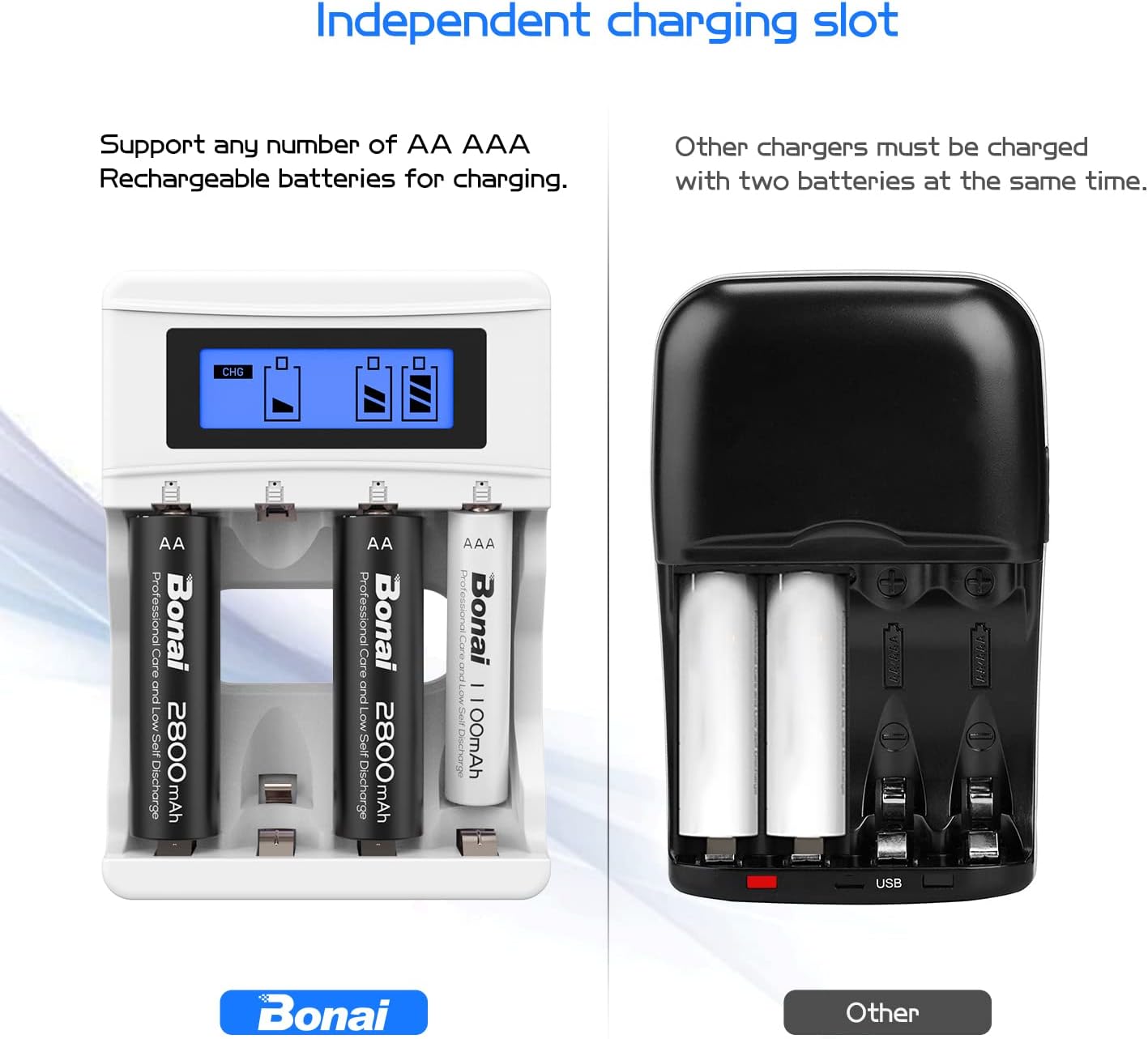
Image: A comparison showing the BONAI charger with four independently charging batteries versus another charger that requires batteries to be charged in pairs, highlighting the independent slot feature.
4.4 Safety Features
The charger incorporates advanced MCU control and safety mechanisms to protect your batteries and the device:
- Overcharge Protection: Automatically stops charging when batteries are full.
- Overcurrent Protection: Prevents excessive current flow.
- Overvoltage Protection: Protects against voltage spikes.
- Short Circuit Protection: Automatically stops operation in case of a short circuit.
- Temperature Protection: Monitors and regulates internal temperature.
- Reverse Polarity Protection: Prevents damage if batteries are inserted incorrectly.
- Advanced -ΔV Function: Detects full charge to prevent overcharging.

Image: The BONAI charger surrounded by six circular icons representing its safety features: Overcharge Protection, Overcurrent Protection, Overvoltage Protection, Short Circuit Protection, Temperature Protection, and Prevent Reverse Current.
5. Maintenance
- Cleaning: Disconnect the charger from the power source before cleaning. Use a soft, dry cloth to wipe the surface. Do not use abrasive cleaners or immerse the charger in water.
- Storage: Store the charger in a cool, dry place away from direct sunlight and extreme temperatures when not in use.
- Handling: Avoid dropping the charger or subjecting it to strong impacts, as this may damage internal components.
6. Troubleshooting
- Charger not powering on:
- Ensure the USB cable is securely connected to both the charger and the power source.
- Verify that the USB power source is active and providing power (e.g., wall outlet is working, laptop is on).
- Try a different USB cable or power adapter.
- "ERROR" displayed on LCD:
- Check if the battery is inserted with correct polarity.
- Ensure the battery type is compatible (AA/AAA Ni-MH/Ni-CD).
- The battery might be faulty or non-rechargeable. Try a different battery.
- A short circuit might be detected. Remove all batteries and reinsert them one by one to identify the problematic battery or slot.
- Slow charging speed:
- Ensure you are using a 5V/2A USB power adapter. Lower amperage adapters (e.g., 5V/1A) will result in slower charging.
- The charging speed can vary depending on the battery capacity and its current charge level.
7. Specifications
| Feature | Detail |
|---|---|
| Brand | BONAI |
| Model Number | BNAC17081404IT |
| Compatible Battery Types | AA/AAA Ni-MH/Ni-CD |
| Input Voltage | 5 Volts |
| Input Current | 2 A |
| Output Voltage | 1.2 Volts |
| Product Dimensions (L x W x H) | 9.5 x 6.5 x 2.8 cm |
| Compliant Specifications | Energy Star |
| Country of Origin | China |
8. Warranty and Support
For warranty information and customer support, please refer to the documentation included with your product or contact BONAI customer service directly. Details regarding warranty periods and support channels are typically provided by the manufacturer or seller at the time of purchase.
You may also visit the official BONAI website for the most up-to-date information and support resources.
Ask a question about this manual
Ask about setup, troubleshooting, compatibility, parts, safety, or missing instructions. Manuals+ will review the question and use this page’s manual context to help answer it.