
Introduction
This manual provides essential information for the safe and efficient operation of your Antarion 19-inch LED TV with an integrated DVD player. This television is designed for versatile use, compatible with 12V, 24V, and 220V power sources, making it suitable for various environments including recreational vehicles (RVs) and homes. Please read this manual thoroughly before using the product and retain it for future reference.

Image: Front view of the Antarion 19-inch LED TV.
Safety Information
To ensure safe operation and prevent damage, observe the following precautions:
- Power Source: Ensure the correct voltage is used. This TV supports 12V, 24V, and 220V. Use only the provided power adapters.
- Ventilation: Do not block ventilation openings. Allow adequate space around the TV for proper airflow to prevent overheating.
- Moisture: Do not expose the TV to rain, moisture, or excessive humidity. Avoid placing liquids near the unit.
- Cleaning: Disconnect the power cord before cleaning. Use a soft, dry cloth. Do not use liquid or aerosol cleaners.
- Placement: Place the TV on a stable, level surface. Avoid direct sunlight or heat sources.
- Servicing: Do not attempt to service this product yourself. Refer all servicing to qualified personnel.
Package Contents
Verify that all items are present in the package:
- Antarion 19" LED TV with Integrated DVD Player
- Remote Control
- 12V Cigarette Lighter Power Cord
- 220V AC Power Adapter
- User Manual (this document)
Setup
1. Power Connection
Your Antarion TV is designed for flexible power input. Choose the appropriate power cord for your environment.
- For 12V/24V DC Power (e.g., Car, RV): Connect the provided 12V cigarette lighter cord to the TV's DC input port and then to your vehicle's 12V or 24V power outlet.
- For 220V AC Power (e.g., Home): Connect the provided 220V AC power adapter to the TV's DC input port, then plug the adapter into a standard 220V wall outlet.
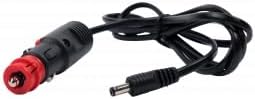
Image: 12V cigarette lighter power cord for vehicle use.

Image: 220V AC power adapter for household use.
2. Antenna/Cable Connection
Connect your antenna or cable TV source to the ANT/CABLE input port on the rear of the TV.
3. VESA Mounting
The TV supports VESA wall mounting with a 200 x 200 mm pattern. Ensure you use a compatible VESA mount and appropriate screws (not included) for secure installation.
Operating Instructions
Remote Control Overview
Familiarize yourself with the remote control for easy navigation and function access.

Image: Antarion TV remote control with various function buttons.
- POWER (Red Button): Turns the TV on or off.
- INPUT (Green Button): Selects input source (TV, HDMI, USB, DVD).
- Number Buttons (0-9): Direct channel selection.
- VOL +/-: Adjusts volume level.
- CH +/-: Changes TV channels.
- MENU: Accesses the main menu for settings adjustments.
- OK: Confirms selections in menus.
- Navigation Arrows: Move through menu options.
- EXIT: Exits current menu or function.
- DVD TITLE / DVD MENU: Specific controls for the integrated DVD player.
- USB: Accesses media files from a connected USB device.
Basic TV Operation
- Power On/Off: Press the POWER button on the remote or the TV.
- Initial Setup (First Use): Upon first power-on, the TV will guide you through language selection, country, and channel scanning. Follow the on-screen prompts.
- Channel Scan: If channels are not found, go to MENU > Channel > Auto Scan to search for available DVB-T2 channels.
- Input Source Selection: Press the INPUT button to cycle through available sources (TV, HDMI, USB, DVD).
Integrated DVD Player
To play a DVD:
- Gently insert a DVD disc into the slot on the side of the TV with the label facing forward.
- The TV should automatically switch to DVD mode. If not, press the INPUT button and select "DVD".
- Use the remote control's DVD-specific buttons (e.g., Play, Pause, Stop, DVD MENU) to control playback.
USB Media Playback
To play media from a USB device:
- Insert a USB flash drive into the USB port on the TV.
- Press the INPUT button and select "USB".
- Navigate through your files using the remote control and select the desired audio or video file to play. The TV supports various audio/video formats.
Maintenance
- Screen Cleaning: Gently wipe the screen with a soft, lint-free cloth. For stubborn marks, slightly dampen the cloth with water or a specialized screen cleaner (apply to cloth, not directly to screen).
- Cabinet Cleaning: Use a soft, dry cloth to wipe the TV cabinet.
- Dust Removal: Regularly dust the ventilation openings to prevent dust buildup, which can affect performance and lifespan.
- Disc Care: Keep DVD discs clean and free of scratches to ensure smooth playback.
Troubleshooting
If you encounter issues, refer to the following common solutions:
| Problem | Possible Solution |
|---|---|
| No power | Check power cord connection to TV and outlet. Ensure the power source (12V/24V/220V) is active. |
| No picture/sound | Verify correct input source is selected (TV, HDMI, DVD, USB). Check antenna/cable connection. Perform a channel scan. |
| DVD not playing | Ensure the disc is inserted correctly with the label facing forward. Clean the disc. Select "DVD" input source. |
| Remote control not working | Check batteries and replace if necessary. Ensure there are no obstructions between the remote and the TV's IR sensor. |
| USB media not recognized | Ensure the USB device is properly inserted. Check if the file format is supported by the TV. |
Specifications
Detailed technical specifications for the Antarion TV19DVDBTUNER4K model:
| Model Number | TV19DVDBTUNER4K |
| Screen Size | 19 inches (48 cm) |
| Display Technology | LED |
| Resolution | HD (1366 x 768 pixels) |
| Refresh Rate | 60 Hz |
| Aspect Ratio | 16:9 |
| Power Compatibility | 12V, 24V, 220V |
| Power Consumption | 17 Watts (Class A) |
| Annual Energy Consumption | 24.82 kWh/year |
| Integrated Features | DVD Player (DVIX compatible), ULTRA HD DVB-T2 Tuner |
| Connectivity | 1x HDMI, 1x USB (audio/video), Antenna Input |
| Audio Output | 2.0 channels, SRS Surround Sound |
| Video Encoding | H.265 (HEVC) |
| Dimensions (W x H x D) | 44 cm x 26.5 cm x 5 cm (approximate product dimensions) |
| Weight | 3.2 Kilograms |
| VESA Mount Standard | 200 x 200 mm |
| Control Method | Remote Control |
| Color | Black |
For detailed energy efficiency information, refer to the energy label:
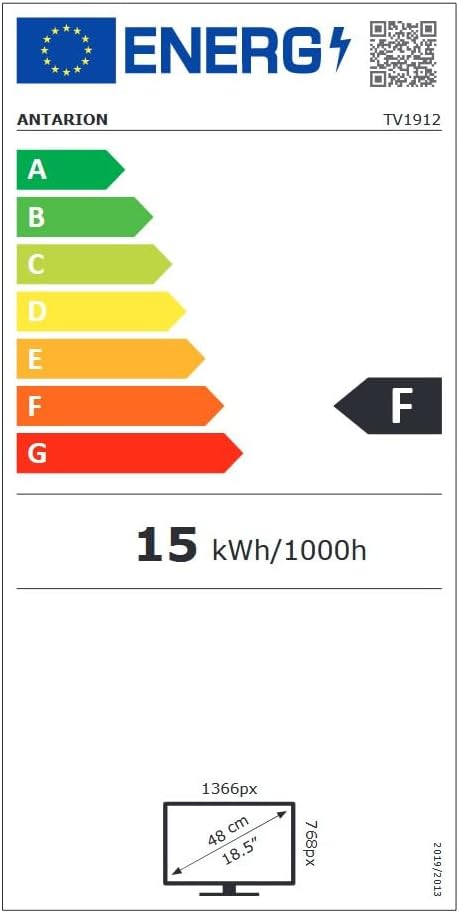
Image: Energy efficiency label for the Antarion TV.
You can find more information on the EPREL database.
Warranty and Support
This product comes with a limited warranty. For specific warranty terms and conditions, please refer to the documentation included with your purchase or contact Antarion customer support.
For technical assistance or further inquiries, please visit the official Antarion website or contact their customer service department.