
1. Product Overview
The Intellitronix LED Digital Gauge Panel is designed as a direct replacement for the original instrument cluster in Ford 1973-1979 trucks. This modern gauge panel provides precise digital readouts for essential vehicle parameters, enhancing both functionality and the aesthetic appeal of your vehicle's dashboard.
Key Features:
- Digital display for various vehicle metrics.
- Designed for specific Ford truck models (1973-1979).
- Durable construction with an acrylic material face.
- Compact and integrated design for easy installation.
What's in the Box:
- 1 x LED Digital Gauge Panel for Ford 1973-1979 Truck
- Necessary sensors and wiring for installation (as depicted in component images).

Figure 1.1: The Intellitronix LED Digital Gauge Panel installed, displaying various digital readouts including speed, fuel, oil pressure, voltage, and temperature. The panel features a clean, modern design with bright green LED digits.
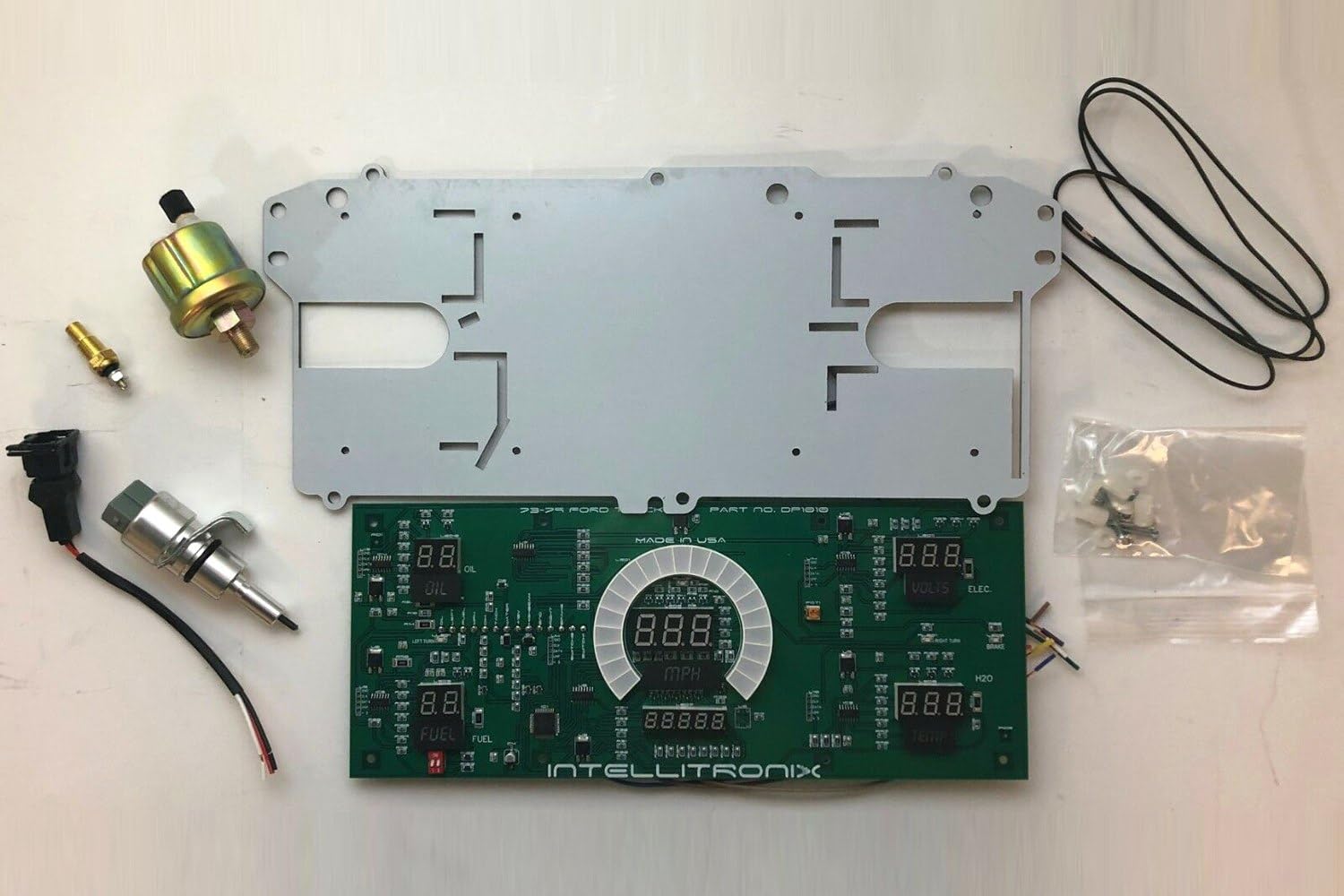
Figure 1.2: All components included in the Intellitronix LED Digital Gauge Panel kit. This includes the primary circuit board with integrated digital displays, a metal backing plate for mounting, and a selection of sensors (such as oil pressure and temperature) and wiring required for a complete installation.

Figure 1.3: A detailed view of the Intellitronix LED Digital Gauge Panel's circuit board. This image highlights the intricate electronic components, microcontrollers, and the individual LED segments that form the digital readouts for speed, fuel, oil, volts, and temperature.
2. Setup and Installation
Installation of the Intellitronix LED Digital Gauge Panel requires basic automotive electrical knowledge and tools. It is highly recommended that installation be performed by a qualified automotive technician to ensure proper functionality and avoid damage to the vehicle or the product.
General Installation Steps (Consult a professional or detailed vehicle-specific manual for precise instructions):
- Disconnect Battery: Always disconnect the vehicle's negative battery terminal before beginning any electrical work.
- Remove Existing Cluster: Carefully remove the original instrument cluster from the dashboard. This may involve removing trim pieces and fasteners.
- Connect Wiring: Identify and connect the appropriate wiring harnesses from the vehicle to the new digital gauge panel. This typically includes power, ground, illumination, and signal wires for each gauge (speedometer, tachometer, fuel, oil pressure, water temperature, voltage). Refer to the vehicle's wiring diagram for accurate connections.
- Install Sensors: Install the provided sensors (e.g., oil pressure sender, water temperature sender) into their respective locations on the engine or transmission.
- Mount New Panel: Securely mount the Intellitronix LED Digital Gauge Panel into the dashboard opening using the provided mounting hardware.
- Reconnect Battery: Once all connections are secure and the panel is mounted, reconnect the vehicle's negative battery terminal.
- Test Functionality: Turn the ignition to the "ON" position (do not start the engine immediately) and verify that all gauges illuminate and display readings correctly. Start the engine and check for proper operation of all functions.
Ensure all connections are tight and insulated to prevent short circuits. Improper installation can lead to damage to the gauge panel or vehicle electrical system.
3. Operating the Digital Gauge Panel
The Intellitronix LED Digital Gauge Panel provides real-time digital readouts for critical vehicle information. Operation is largely automatic once installed and powered.
Understanding the Displays:
- Speedometer (MPH): Displays vehicle speed in miles per hour.
- Tachometer (RPM): Displays engine revolutions per minute (if applicable and connected).
- Fuel Level: Indicates the approximate fuel level in the tank.
- Oil Pressure: Shows the engine's oil pressure.
- Volts: Displays the vehicle's battery voltage.
- Water Temperature: Shows the engine coolant temperature.
- Warning Indicators: Integrated warning lights (e.g., "FASTEN BELTS", "BRAKE") will illuminate as required by vehicle status.
The digital displays are designed for clear visibility in various lighting conditions. Some models may feature adjustable brightness settings, which can typically be accessed via a small button or switch on the unit or through specific wiring connections.
4. Maintenance
The Intellitronix LED Digital Gauge Panel is designed for long-term reliability with minimal maintenance. Follow these guidelines to ensure its longevity and optimal performance:
- Cleaning: Use a soft, lint-free cloth dampened with water or a mild, non-abrasive glass cleaner to wipe the acrylic face. Avoid harsh chemicals, abrasive cleaners, or solvents, as these can damage the display surface.
- Connections: Periodically check all electrical connections to ensure they remain secure and free from corrosion.
- Environmental Factors: While designed for automotive environments, extreme temperatures or prolonged direct sunlight can affect electronic components. Ensure proper ventilation around the dashboard area.
5. Troubleshooting
If you experience issues with your Intellitronix LED Digital Gauge Panel, consider the following common troubleshooting steps:
- No Display/Power:
- Check the vehicle's fuse box for any blown fuses related to the instrument cluster or accessory power.
- Verify that the power and ground connections to the gauge panel are secure and correctly wired.
- Ensure the vehicle battery has sufficient charge.
- Inaccurate Readings:
- Speedometer: Ensure the speed sensor (VSS) is correctly installed and calibrated (if applicable). Check for loose or damaged wiring to the sensor.
- Fuel/Oil/Temp/Volts: Verify that the corresponding sensors are correctly installed and functioning. Check wiring from the sensors to the gauge panel for continuity and proper connection. Ensure the correct type of sensor is used if replacements were made.
- Intermittent Operation:
- Inspect all wiring for loose connections, frayed wires, or signs of corrosion.
- Check for proper grounding of the unit and sensors.
For persistent issues, it is recommended to consult a professional automotive electrician or contact Intellitronix customer support.
6. Specifications
| Attribute | Detail |
|---|---|
| Product Type | Electromechanical Gauge |
| Brand | Intellitronix |
| Model Compatibility | Ford 1973-1979 Truck |
| Material | Acrylic |
| Product Dimensions (L x W x H) | 20.2 x 8.3 x 4.8 inches |
| Item Weight | 3 Pounds |
| Screen Size | 20.2 Inches (overall panel width) |
| Manufacturer | Intellitronix |
| ASIN | B075GSBWW3 |
7. Warranty and Support
Intellitronix products are manufactured to high standards and are typically backed by a manufacturer's warranty. For specific warranty terms and conditions, please refer to the documentation included with your purchase or visit the official Intellitronix website.
Customer Support:
If you require technical assistance, have questions about installation, or need to report a defect, please contact Intellitronix customer support directly. Contact information can usually be found on their official website or on the product packaging.
For the most up-to-date information and support resources, please visit: www.intellitronix.com


