
Wahl 7045-700
Wahl Smart Shave Replacement Blades User Manual
Model: 7045-700
Product Overview
The Wahl Smart Shave Replacement Blades are designed to restore your Wahl Smart Shave shaver to optimal performance. These blades feature dual floating foil heads with symmetrical and asymmetrical patterns, engineered to lift and cut hair regardless of its growth direction, ensuring a close and comfortable shave in fewer passes.

Image: Wahl Smart Shave Replacement Foil and Cutter Bars, showing the two cutter bars and the assembled foil head.
Key Features:
- Fully washable stainless steel filaments for easy cleaning.
- Bidirectional cutting bar intercepts long hairs, allowing shaving even after 3-4 days of growth for unbeatable head-to-toe shaving results.
- Restores your shaver to 100% cutting performance.
- Recommended replacement every 12 to 18 months, depending on usage.
Installation and Setup
Proper installation of the replacement foil and cutter bars is essential for optimal performance. Follow these steps carefully to replace the components of your Wahl Smart Shave shaver.
Step 1: Removing the Foil Head
Before replacing the cutter bars, the foil head must be removed from the shaver body.
- Push the Release Buttons: Locate and press the release buttons on the sides of the shaver body.
- Lift the Foil Head Upward: While holding the release buttons, gently lift the foil head straight upward to detach it from the shaver.
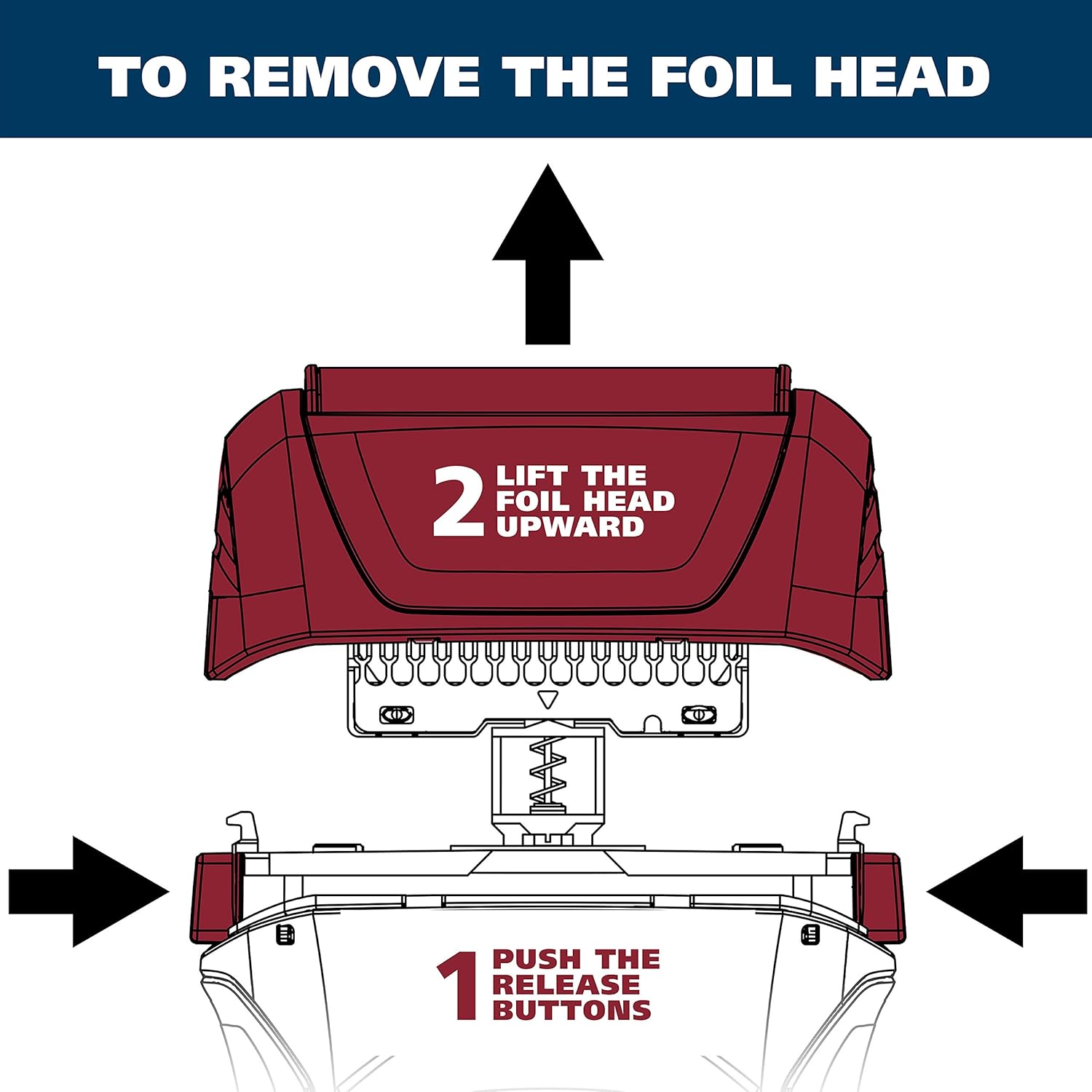
Image: Diagram illustrating the process of removing the foil head. Arrows indicate pushing side release buttons and lifting the head upwards.
Step 2: Removing the Cutter Bars
Once the foil head is removed, you can access the individual cutter bars for replacement.
- Gently Pull Up: Carefully pull each cutter bar upward from its seated position on the shaver.

Image: Diagram illustrating the removal of cutter bars. Hands are shown gently pulling the bars upwards from the shaver base.
Step 3: Replacing the Cutter Bars
Install the new cutter bars into the shaver body.
- Gently Press Down: Align the new cutter bars with their respective slots and gently press them down until they snap securely into place.

Image: Diagram illustrating the replacement of cutter bars. Hands are shown pressing the new bars downwards into the shaver base until they snap into place.
After replacing the cutter bars, reattach the foil head by aligning it and pressing it down until it clicks securely into place.
Operating Instructions
The Wahl Smart Shave replacement blades are designed for efficient and comfortable shaving. Once installed, the shaver can be used in any direction to achieve desired results.

Image: A man using the Wahl Smart Shave shaver on his face in front of a mirror, demonstrating typical usage.
The Smart Shave foil head is engineered to provide a faster, closer, and more comfortable shave due to its advanced design that effectively captures and cuts hair.

Image: Close-up view of the Smart Shave foil head, highlighting its design for an improved shaving experience.
Maintenance and Care
To ensure the longevity and optimal performance of your Wahl Smart Shave shaver and its replacement blades, regular maintenance is crucial.
- Cleaning: The stainless steel filaments are fully washable. After each use, remove the foil head and rinse the cutter bars and foil under running water to remove hair clippings and debris. Ensure the shaver is turned off and unplugged if applicable before cleaning.
- Drying: Allow all components to air dry completely before reassembling the shaver.
- Replacement Schedule: For best results and continued cutting performance, it is recommended to replace the foil head and cutter bars every 12 to 18 months. This period may vary depending on the frequency and intensity of use.
Troubleshooting
This section addresses common issues you might encounter with your Wahl Smart Shave replacement blades. If you experience problems not listed here, please refer to the shaver's main user manual or contact Wahl customer support.
| Problem | Possible Cause | Solution |
|---|---|---|
| Poor Shaving Performance / Pulling Hair |
|
|
| Foil Head Detaches Easily |
|
|
Product Specifications
| Specification | Detail |
|---|---|
| Brand | Wahl |
| Model Number | 7045-700 |
| Product Dimensions (L x W x H) | 3.81 x 8.89 x 15.24 cm (1.5 x 3.5 x 6 inches) |
| Item Weight | 22.68 grams (0.8 ounces) |
| Number of Blades | 32 (implied by cutter bar design) |
| Recommended Uses | Shaving |
| Material | Stainless Steel Filaments |
| Country of Origin | China |
| UPC | 043917102498 |
Important Safety Information

Image: Warning label stating that the product may expose users to chemicals, including nickel, known to cause cancer in California. Provides a link for more information.
WARNING: This product can expose you to chemicals including nickel, which is known to the State of California to cause cancer. For more information, go to www.P65Warnings.ca.gov.
Always handle replacement blades with care. Keep out of reach of children.
Warranty and Support
Specific warranty details for replacement parts may vary. Please refer to the original product's warranty information or contact Wahl customer service for details regarding the warranty for these replacement blades.
For technical support, product inquiries, or to purchase additional accessories, please visit the official Wahl website or contact their customer service department. Contact information can typically be found on the Wahl packaging or their official website.
Ask a question about this manual
Ask about setup, troubleshooting, compatibility, parts, safety, or missing instructions. Manuals+ will review the question and use this page’s manual context to help answer it.