
Introduction
This manual provides detailed instructions for the installation, operation, and maintenance of your 1 Factory Radio RBK Slider AM FM CD Player with Bluetooth. Please read this manual thoroughly before using the product to ensure proper function and to maximize your listening experience. This unit is a professionally remanufactured OEM unit designed for compatibility with various 2002-2007 Chrysler, Jeep, and Dodge vehicles.
Product Overview
The 1 Factory Radio RBK Slider unit integrates AM/FM radio, a CD player, and Bluetooth audio streaming capabilities into a single, factory-style head unit. It features a slider control for audio adjustments.

Figure 1: Front View. This image displays the front panel of the radio, showing the volume knob, push-button controls, display screen, CD slot, and the slider control for bass and treble.
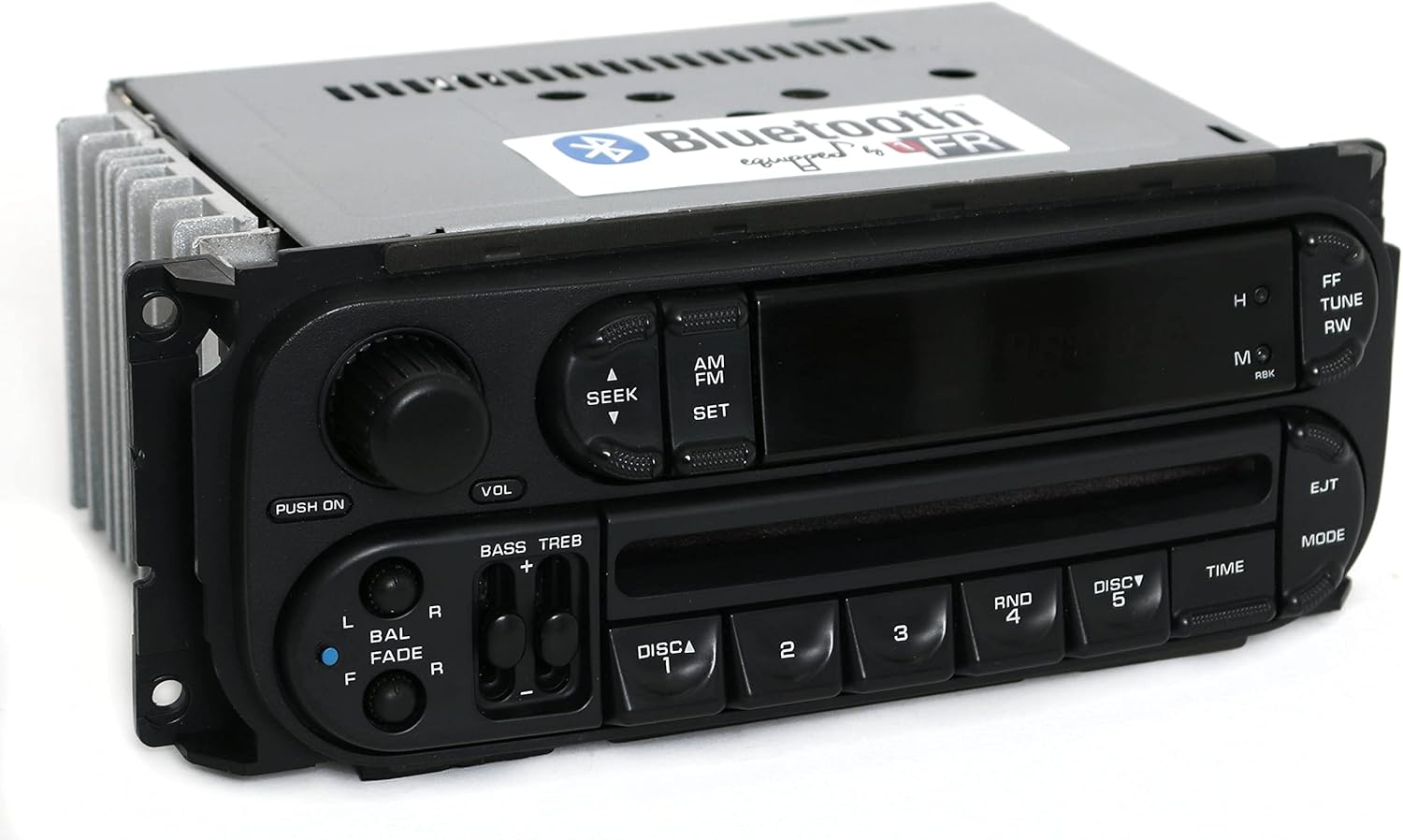
Figure 2: Angled Front View. An angled perspective of the radio's front, providing a clearer view of the button layout and the overall design.

Figure 3: Side View. This image shows the side of the radio unit, highlighting the heat sinks designed for thermal management.

Figure 4: Rear View. The rear panel of the radio, illustrating the various wiring harnesses and antenna input for connection to the vehicle's electrical system.
Installation
Professional installation is recommended for this unit. Ensure the vehicle's battery is disconnected before beginning installation to prevent electrical damage.
Compatibility Notes:
- This unit is the RBK Slider version and is not interchangeable with the "Digital" version of Chrysler/Jeep/Dodge radios.
- The radio utilizes the new style Chrysler plugs (22-pin and 10-pin connectors). Verify your vehicle's existing wiring harness matches these connectors.
- If downgrading from a CD cassette (RBP), 6-disc (RBQ), or navigation (RB1) radio, you may encounter issues such as incorrect radio display, intermittent sound, scrambled text, or non-functional CD player.
Installation Steps (General):
- Carefully remove the existing radio from your vehicle. Refer to your vehicle's service manual for specific instructions on dash panel removal.
- Connect the vehicle's wiring harnesses to the corresponding ports on the rear of the 1 Factory Radio unit (refer to Figure 4).
- Connect the antenna cable.
- Slide the new radio into the dashboard opening and secure it with the appropriate mounting hardware.
- Reconnect the vehicle's battery.
- Test all functions of the radio before fully reassembling the dashboard.
Operating Instructions
Basic Controls:
- Power On/Off: Press the PUSH ON/VOL knob.
- Volume Control: Rotate the VOL knob clockwise to increase volume, counter-clockwise to decrease.
- Audio Adjustment: Use the BASS TREB slider to adjust bass and treble levels. Use the BAL FADE slider to adjust left/right balance and front/rear fade.
Radio Operation (AM/FM):
- Press the AM/FM button to select the desired radio band.
- Use the SEEK buttons (up/down arrows) to automatically search for the next strong station.
- For manual tuning, use the FF TUNE and RW TUNE buttons.
- To set a preset station, tune to the desired station, then press and hold one of the numbered preset buttons (DISC 1-5) until you hear a confirmation beep.
CD Player Operation:
- Insert a CD into the CD slot. The unit will automatically switch to CD mode and begin playback.
- Use the FF TUNE and RW TUNE buttons to skip tracks forward or backward.
- Press the EJT button to eject the CD.
- The numbered buttons (DISC 1-5) may function as track selection or disc selection for multi-disc changers (if applicable and connected).
Setting the Time:
Press the TIME button. Use the FF TUNE and RW TUNE buttons to adjust the hours and minutes. Press TIME again to confirm.
Bluetooth Operation
This unit features integrated Bluetooth for audio streaming from compatible devices.
Pairing Your Device:
- Ensure Bluetooth is enabled on your mobile device.
- On the radio, press the dedicated Bluetooth button (if present, or select Bluetooth mode via MODE button). The radio display may indicate "PAIRING" or similar.
- On your mobile device, search for available Bluetooth devices. Select the radio's Bluetooth name (e.g., "1 Factory Radio BT" or similar).
- If prompted for a passkey, enter 0000.
- Once paired, you can stream audio from your device.
Audio Streaming:
After successful pairing, play audio from any application on your mobile device (e.g., music player, streaming services like Pandora, Spotify, YouTube). The audio will play through the vehicle's speakers, utilizing the radio's sound controls.
Important Notes:
- This Bluetooth functionality is designed for audio streaming only. It does not support hands-free phone calls, as phone manufacturers typically require dedicated Bluetooth microphone systems for call functionality.
- To stop Bluetooth audio, simply unpair your device or turn off Bluetooth on your mobile device.
Maintenance
Cleaning the Unit:
- Use a soft, dry cloth to wipe the front panel.
- Do not use abrasive cleaners, waxes, or solvents.
CD Care:
- Handle CDs by their edges to avoid fingerprints.
- Keep CDs in their cases when not in use.
- Clean dirty CDs with a soft, lint-free cloth, wiping from the center outwards.
Troubleshooting
| Problem | Possible Cause | Solution |
|---|---|---|
| No power to the unit. | Blown fuse, incorrect wiring, vehicle battery disconnected. | Check vehicle fuses. Verify wiring connections. Ensure vehicle battery is connected. |
| No sound. | Volume too low, mute activated, speaker wiring issues. | Increase volume. Check if mute is active. Inspect speaker connections. |
| CD does not play or eject. | Dirty or damaged CD, incorrect insertion, mechanical error. | Clean or replace CD. Ensure CD is inserted correctly. If issue persists, seek technical support. |
| Bluetooth connection issues. | Device not paired, Bluetooth off on device, interference. | Ensure Bluetooth is enabled on your device and the radio is in pairing mode. Try unpairing and re-pairing the device. Disconnecting the car battery for a few minutes and then reconnecting it can sometimes resolve persistent Bluetooth issues. |
| Radio display not working correctly, intermittent sound, scrambled text, or CD player not functioning (after downgrading from RBP, RBQ, or RB1). | Incompatibility issues due to downgrading from a more advanced factory radio. | These are known potential issues when replacing certain factory radios with this unit. Consult with a professional installer or 1 Factory Radio technical support for possible solutions or alternative units. |
Specifications
- Model: P05091506AG (RBK Slider)
- Brand: 1 Factory Radio
- Part Number: P05091506AG
- Product Dimensions: 12 x 10 x 8 inches (approximate)
- Item Weight: 5 pounds
- Tuner Technology: AM/FM
- Special Feature: Bluetooth Audio Streaming
- Connectivity Technology: Automotive
- Power Source: DC (Vehicle Electrical System)
- Compatible Devices: Automotive
- UPC: 842582112951
- Compatible Vehicles: 2002-2007 Chrysler, Jeep, Dodge models (refer to product listing for full compatibility list)
Warranty and Support
This product is a professionally remanufactured OEM unit. For specific warranty details, please refer to the documentation provided with your purchase or contact 1 Factory Radio directly. Technical support is provided by 1 Factory Radio for assistance with installation, operation, or troubleshooting.
For technical assistance, please contact 1 Factory Radio support through their official channels.