
1. Product Overview
This manual provides essential instructions for the safe and efficient use of your Accessory USA AC DC Adapter, specifically designed for Adapter TECH. Model ATS065-A180. Please read this manual thoroughly before use and retain it for future reference.
Product Image
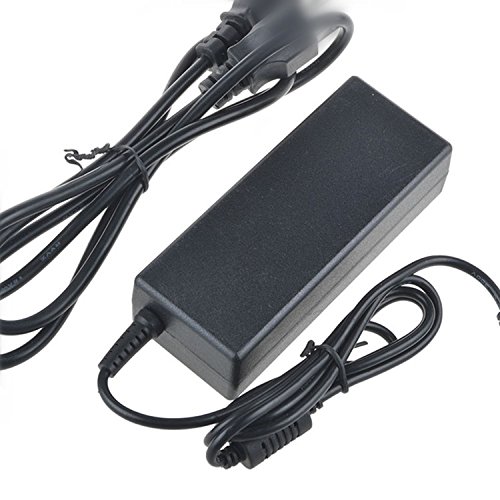
Image: The Accessory USA AC DC Adapter, featuring a compact design with a barrel connector and a standard 2-pin North American power plug.
2. Safety Information
Your safety is paramount. Please observe the following precautions:
- Our products are CE / FCC / RoHS certified, ensuring compliance with safety and environmental standards.
- Features OVP (Over Voltage output Protection), OCP (Over Current output Protection), and SCP (Short Circuit output Protection) to safeguard your devices.
- Always ensure the adapter's voltage and current ratings match your device's requirements before connecting.
- Do not expose the adapter to water, moisture, or extreme temperatures.
- Avoid dropping or subjecting the adapter to severe impacts.
- Unplug the adapter from the power outlet when not in use for extended periods.
3. Setup Instructions
3.1 Compatibility Check
Before connecting, verify that your device requires an AC DC adapter with specifications compatible with the ATS065-A180 model. Refer to your device's manual for its power requirements.
3.2 Connecting the Adapter
- Ensure both the adapter and your device are powered off.
- Connect the barrel connector end of the adapter cable securely into the power input port of your device.
- Plug the 2-pin North American power plug of the adapter into a standard wall outlet (100-240V AC, 60Hz).
- Once connected, you may power on your device.
4. Operating Instructions
The Accessory USA AC DC Adapter is designed for straightforward operation. Once properly connected as described in the 'Setup Instructions' section, the adapter will supply the necessary power to your compatible device. No additional user interaction is typically required during operation.
- Ensure the adapter is placed in a well-ventilated area to prevent overheating.
- Do not cover the adapter during operation.
- If the adapter feels excessively hot, disconnect it immediately and check for proper ventilation or potential device issues.
5. Maintenance
Proper maintenance ensures the longevity and reliable performance of your adapter.
- Cleaning: Disconnect the adapter from both the power outlet and your device before cleaning. Use a soft, dry cloth to wipe the exterior. Do not use liquid cleaners or solvents.
- Storage: When not in use, store the adapter in a cool, dry place, away from direct sunlight and moisture. Avoid tightly winding the cable to prevent damage.
- Inspection: Periodically inspect the adapter cable and connectors for any signs of wear, fraying, or damage. If any damage is observed, discontinue use and replace the adapter.
6. Troubleshooting
If you encounter issues with your adapter, please refer to the following common troubleshooting steps:
- No Power to Device:
- Ensure the adapter is securely plugged into both the wall outlet and your device.
- Check if the wall outlet is functional by plugging in another device.
- Verify that your device's power input requirements match the adapter's output specifications.
- Adapter Overheating:
- Ensure the adapter is in a well-ventilated area and not covered.
- Confirm that your device is not drawing more power than the adapter is rated for.
- Loose Connection:
- Check the barrel connector for a snug fit into your device's power port.
- Inspect the power cable for any visible damage.
If problems persist after following these steps, please contact customer support.
7. Product Specifications
| Feature | Specification |
|---|---|
| Brand | Accessory USA |
| Model Number | ATS065-A180 (P/N: ATS065A180418201) |
| Compatible Devices | Adapter TECH. Model: ATS065-A180 |
| Connector Type | Barrel Connector |
| Input Voltage | 100-240 Volts AC |
| Frequency Range | 60 hertz |
| Power Plug | Type A - 2 pin (North American) |
| Power Source | Corded Electric |
| Specification Met | CE, RoHS, FCC |
| Special Feature | Travel, Portable |
| Form Factor | Rectangular |
| Mounting Type | Wall Mount |
| UPC | 707296830020 |
8. Warranty and Support
8.1 Warranty Information
This product comes with a comprehensive warranty:
- 30 Days Money Back Guarantee: If you are not satisfied, you may return the product within 30 days for a full refund.
- 60 Days Free Exchange: Enjoy a free exchange within 60 days with a paid return label.
- 365 Days Worry-Free Warranty: A full year of worry-free warranty coverage for peace of mind.
8.2 Customer Support
For any questions, technical assistance, or warranty claims, please contact Accessory USA customer support through the retailer's platform or the official Accessory USA website. Please have your product model number (ATS065-A180) and purchase details ready when contacting support.