
USB Charger Cord
Sky Viper Drone USB Charger Cord User Manual
Brand: Generic
Model: USB Charger Cord
Introduction
This user manual provides essential information for the safe and effective use of your Sky Viper Drone USB Charger Cord. This cable is designed specifically for charging various Sky Viper drone models. Please read this manual thoroughly before use to ensure proper operation and longevity of your charger.
Product Overview
Components
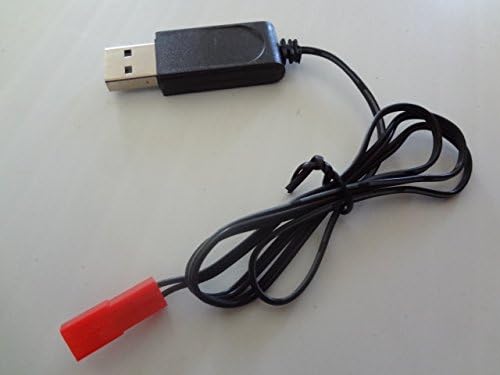
- 1 x USB Charging Cable (65cm / 25.4 inches in length)
Compatibility
This USB charging cable is compatible with the following Sky Viper drone models:
- Sky Viper Stunt Quadcopter
- Sky Viper Camera Drone
- Sky Viper X-Quad
- Sky Viper s670 Stunt
- Sky Viper v950HD/STR
- Sky Viper s1700
- Sky Viper v2400HD/FPV
- Sky Viper Hover Racer
Product Images


Setup
The USB Charger Cord requires minimal setup. Ensure you have a compatible USB power source (e.g., computer USB port, USB wall adapter, power bank) that provides 5V output.
- Uncoil the USB charging cable.
- Locate a suitable USB power source.
- Ensure the drone's battery is accessible and ready for charging.
Operating Instructions
Follow these steps to charge your Sky Viper drone battery using the USB Charger Cord:
- Insert the USB-A plug of the charging cable into your chosen USB power source.
- Connect the red drone connector end of the cable to the charging port on your Sky Viper drone's battery. Ensure the connection is firm and secure.
- Observe the charging indicator light on the charger (if present) or on your drone. The light typically indicates charging status (e.g., red for charging, green for fully charged). Refer to your specific drone's manual for details on its charging indicator.
- Allow the battery to charge fully. Charging times may vary depending on the battery capacity and the power output of your USB source.
- Once charging is complete, disconnect the cable from the drone battery first, then from the USB power source.
Instructional Video
Video 1: A demonstration of the USB Charger for the Drone SVCHA, showing the cable and its connectors. This video provides a visual overview of the product.
Maintenance
- Cleaning: Wipe the cable and connectors with a dry, soft cloth. Do not use liquid cleaners or solvents.
- Storage: Store the cable in a cool, dry place away from direct sunlight and extreme temperatures. Avoid tightly coiling or bending the cable excessively to prevent damage.
- Inspection: Periodically inspect the cable for any signs of wear, fraying, or damage to the connectors. Discontinue use if any damage is observed.
Troubleshooting
| Problem | Possible Cause | Solution |
|---|---|---|
| Drone battery not charging. | Loose connection; faulty USB power source; damaged cable; drone battery issue. | Ensure both ends of the cable are securely connected. Try a different USB port or power adapter. Inspect the cable for damage. Consult your drone's manual for battery troubleshooting. |
| Charging is slow. | Low power output from USB source. | Use a USB power source with higher amperage (e.g., a dedicated wall adapter instead of a computer USB port). |
| Cable appears damaged. | Physical wear and tear. | Discontinue use immediately and replace the cable. |
Specifications
- Material: Plastic
- Length: 65 cm (25.4 inches)
- Input Voltage: 240 Volts (Note: This refers to the maximum input voltage the charger is designed to handle from a power adapter, not the typical USB 5V output it expects from a source.)
- Compatibility: Sky Viper Stunt Quadcopter, Camera Drone, X-Quad, s670 Stunt, v950HD/STR, s1700, v2400HD/FPV, Hover Racer.
Warranty and Support
Information regarding specific warranty terms or direct support contacts for this Generic brand product is not available in the provided data. Please refer to the retailer or original point of purchase for any warranty claims or support inquiries.
 | [pdf] Document LEGRAND Даташит PW29111 Legrand Pbplus eu Desktop unit 3 skt 2 P E double usb charger cord 3m f02570fr 00 pbplus public products files ||| LEGRAND Даташит PW29111 Legrand Pbplus eu Desktop unit 3 skt 2 P E double usb charger cord 3m f02570fr 00 pbplus public products files ||| score:17 filesize: 816.59 K page_count: 3 document date: 2018-01-25 |
 | [pdf] Guide 111 Cable for Charging Kindle Paperwhite Fire Amazon Tablet USB Charger Cord SMAYS 6FT MICRO CABLE User Guide Smays 812DExyefaL m media amazon images I ||| 111 Cable for Charging Kindle Paperwhite Fire Amazon Tablet USB Charger Cord SMAYS 6FT MICRO CABLE User Guide Smays 812DExyefaL m media amazon images I ||| score:17 filesize: 424.17 K page_count: 1 document date: 2024-09-23 |
 | [pdf] User Manual User manual 120 66w 4 IN 1 Retractable Car 12V USB Charger Cord Cigarette Lighter Mobile Phone Type C Cable For iPhone Fast Charge Adapter S1c516b06f71d4d2d853da3c706bd35dbO ae pic a1 aliexpress media kf Starlight Roof Star S0e51f3d3c7db45bf81e378f7d7290a31a User manual 120 66w 4 IN 1 Retractable Car 12V USB Charger Cord Cigarette Lighter Mobile Phone Type C Cable For iPhone Fast Charge Adapter S1c516b06f71d4d2d853da3c706bd35dbO ae pic a1 aliexpress media kf Starlight Roof Star S0e51f3d3c7db45bf81e378f7d7290a31a score:15 filesize: 70.77 K page_count: 3 document date: 2026-03-03 |
 | [pdf] Specifications Product Number BE01536 M1 120 Byrne Mini Tap® Front Power Data Configuration 1 USB Charger* Cord Option Inches Corded Specifications Standard Details To order this product please reference the above number and contact Customer Relations at 616 866 3449 or Specification Sheet for byrne Report SpecificationSheet partID 3891 ||| Product Number BE01536 M1 120 Byrne Mini Tap® Front Power Data Configuration 1 USB Charger* Cord Option Inches Corded Specifications Standard Details To order this product please reference the above number and contact Customer Relations at 616 866 3449 or Specification Sheet for byrne Report SpecificationSheet partID 3891 ||| score:13 filesize: 316.98 K page_count: 1 document date: 2022-01-28 |
 | [pdf] Specifications Product Number BE01536 M1 72 Byrne Mini Tap® Front Power Data Configuration 1 USB Charger* Cord Option Inches Corded Specifications Standard Details To order this product please reference the above number and contact Customer Relations at 616 866 3449 or Specification Sheet for byrne Report SpecificationSheet partID 3890 ||| Product Number BE01536 M1 72 Byrne Mini Tap® Front Power Data Configuration 1 USB Charger* Cord Option Inches Corded Specifications Standard Details To order this product please reference the above number and contact Customer Relations at 616 866 3449 or Specification Sheet for byrne Report SpecificationSheet partID 3890 ||| score:13 filesize: 317.47 K page_count: 1 document date: 2022-01-28 |
 | MDHearingAid UV-Clean & Dry Box User Guide User guide for the MDHearingAid UV-Clean & Dry Box, detailing assembly, instructions for use, product information, and warnings for cleaning and drying hearing aids. score:11 filesize: 213.54 K page_count: 1 document date: 2020-06-09 |
Ask a question about this manual
Ask about setup, troubleshooting, compatibility, parts, safety, or missing instructions. Manuals+ will review the question and use this page’s manual context to help answer it.