
CHAMBERLAIN B970
Chamberlain B970T Smart Garage Door Opener User Manual
Comprehensive instructions for the Chamberlain B970T Smart Garage Door Opener, covering installation, operation, maintenance, and troubleshooting.
1. Product Overview
The Chamberlain B970T is an advanced smart garage door opener designed for quiet operation and robust performance. It features a steel-reinforced belt drive, myQ smartphone control, and a battery backup system to ensure functionality during power outages. This model is engineered for durability and ease of use, providing maximum lifting capacity for residential garage doors.
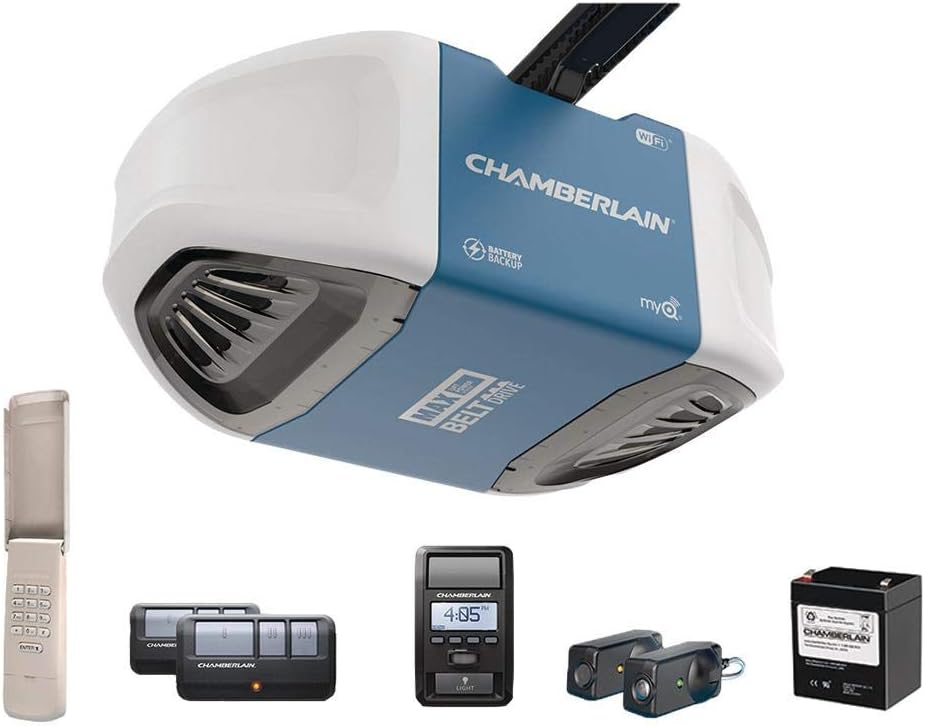
Figure 1.1: The Chamberlain B970T Smart Garage Door Opener system, including the main unit, remote controls, keypad, safety sensors, and battery backup.
2. Safety Information
Always prioritize safety during installation, operation, and maintenance. Read all warnings and instructions carefully. This product contains chemicals known to the State of California to cause cancer and birth defects or other reproductive harm. For more information, visit www.P65Warnings.ca.gov.
- Ensure the garage door is balanced and in good working order before installation.
- Do not allow children to play with the garage door opener or its controls.
- Keep remote controls out of reach of children.
- Install the wall control panel at least 5 feet (1.5 m) above the floor, away from all moving parts of the door.
- Always keep the moving door in sight until it is completely closed.
- Disconnect power to the garage door opener before performing any maintenance or repairs.
3. Setup and Installation
The Chamberlain B970T is designed for screw-in installation. It includes a 7 FT Rail Kit suitable for standard garage doors. For 8-foot and 10-foot garage doors, extension kits are required and sold separately.
3.1 Component Assembly
Begin by assembling the rail kit and attaching it to the opener head. Follow the detailed instructions provided in the full user manual for proper alignment and secure fastening. Ensure all wires for the safety sensors and wall control are correctly routed and connected.

Figure 3.1: The Chamberlain B970T opener installed in a garage, demonstrating its overhead placement.
3.2 Power Connection and Initial Setup
Once the unit is securely mounted and all safety components are in place, connect the opener to a power outlet. The system will guide you through setting the open and close limits for your garage door. This process is crucial for safe and efficient operation.

Figure 3.2: Installing a light bulb into the opener unit. The B970T accepts two 100-watt max non-halogen or 26-watt max CFL light bulbs.
3.3 Programming Remotes and Keypad
The B970T comes with two 3-button remote controls and a wireless keypad. Instructions for programming these accessories to your opener are provided in the full manual. The exclusive Triband technology enhances remote range up to 1,500 feet.
4. Operating Instructions
The Chamberlain B970T offers multiple ways to operate your garage door, including remote controls, a full-function wall control, a wireless keypad, and smartphone control via the myQ app.
4.1 myQ Smartphone Control
With built-in Wi-Fi and the myQ app, you can open, close, and monitor the status of your garage door from anywhere using your smartphone. The app also provides real-time alerts for added security and convenience.

Figure 4.1: The myQ app interface, allowing remote control and monitoring of your garage door.
4.2 Battery Backup Functionality
The integrated battery backup system ensures that your garage door opener remains operational even during power failures. This feature provides peace of mind, allowing you to enter and exit your garage safely at all times.

Figure 4.2: Visual representation of the battery backup feature, highlighting its importance during power outages.
4.3 Daily Use
Operate the garage door using the provided remote controls, the wall control panel, or the wireless keypad. Ensure the path of the garage door is clear before activation. The ultra-quiet belt drive system provides smooth and reliable operation.

Figure 4.3: The Chamberlain B970T in a typical home setting, demonstrating its seamless integration into daily life.
5. Maintenance
Regular maintenance ensures the longevity and optimal performance of your Chamberlain B970T garage door opener. Always disconnect power before performing any maintenance.
- Monthly Inspection: Check the garage door balance, springs, cables, rollers, and tracks. Lubricate moving parts as recommended by your garage door manufacturer.
- Safety Sensor Test: Periodically test the safety reversal system by placing an object in the door's path. The door should reverse upon contact.
- Light Bulb Replacement: Replace light bulbs as needed. Use only non-halogen incandescent bulbs up to 100 watts or CFL bulbs up to 26 watts.
- Battery Backup Check: Test the battery backup by unplugging the unit and operating the door. The battery should provide sufficient power for several cycles. Replace the battery when its performance degrades.
6. Troubleshooting
This section provides solutions to common issues you might encounter with your Chamberlain B970T garage door opener. For more complex problems, refer to the comprehensive user manual or contact customer support.
| Problem | Possible Cause | Solution |
|---|---|---|
| Opener does not respond to remote/keypad. | Dead batteries in remote/keypad; remote/keypad out of range; opener unplugged or power outage. | Replace batteries; move closer to opener; check power connection; verify battery backup is active during outage. |
| Door does not close completely or reverses. | Safety sensors misaligned or obstructed; travel limits need adjustment; something is blocking the door path. | Clear obstruction and realign sensors; refer to manual for travel limit adjustment; ensure door path is clear. |
| Lights on opener do not turn on. | Light bulbs are burnt out or loose; incorrect bulb type. | Replace bulbs; ensure bulbs are tightened; use recommended bulb types (non-halogen incandescent or CFL). |
For detailed troubleshooting steps and error codes, consult the full user manual available for download.
7. Specifications
| Feature | Detail |
|---|---|
| Model Number | B970 |
| Lifting Power | Equivalent to 1 1/4 HP |
| Drive Type | Steel-reinforced Belt Drive |
| Power Source | DC |
| Item Weight | 35 pounds |
| Product Dimensions | 18 x 10 x 6.5 inches |
| Included Components | 7 FT Rail Kit, Full Function Wall Control, Garage Door Opener, Keyless Entry Keypad, Safety Sensors, Two 3 Button Remotes Transmitters |
| Battery Type | 2 Lithium Metal batteries (included) |
| Radio Frequencies | 310, 315, 390 MHz |
| Manufacturer | Chamberlain |
8. Warranty and Support
8.1 Product Warranty
The Chamberlain B970T Smart Garage Door Opener comes with the following warranty:
- Motor & Belt: Lifetime
- Parts: 5 Years
- Accessories: 1 Year
Please retain your proof of purchase for warranty claims.
8.2 Additional Resources
- For a complete and detailed user manual, download the PDF version: Chamberlain B970T User Manual (PDF)
- Visit the official CHAMBERLAIN Store for more products and information: CHAMBERLAIN Store on Amazon
Related documentsB970


Ask a question about this manual
Ask about setup, troubleshooting, compatibility, parts, safety, or missing instructions. Manuals+ will review the question and use this page’s manual context to help answer it.