
B.FRIENDIT KB1430
B.FRIENDIT KB1430 Wired USB Keyboard User Manual
Model: KB1430
1. Introduction
This manual provides comprehensive instructions for the B.FRIENDIT KB1430 Wired USB Keyboard. Designed for comfort and efficiency, this ultra-slim, full-size keyboard features quiet scissor-switch keys and a durable construction. It is compatible with various Windows operating systems, offering a reliable plug-and-play experience for both home and office environments.
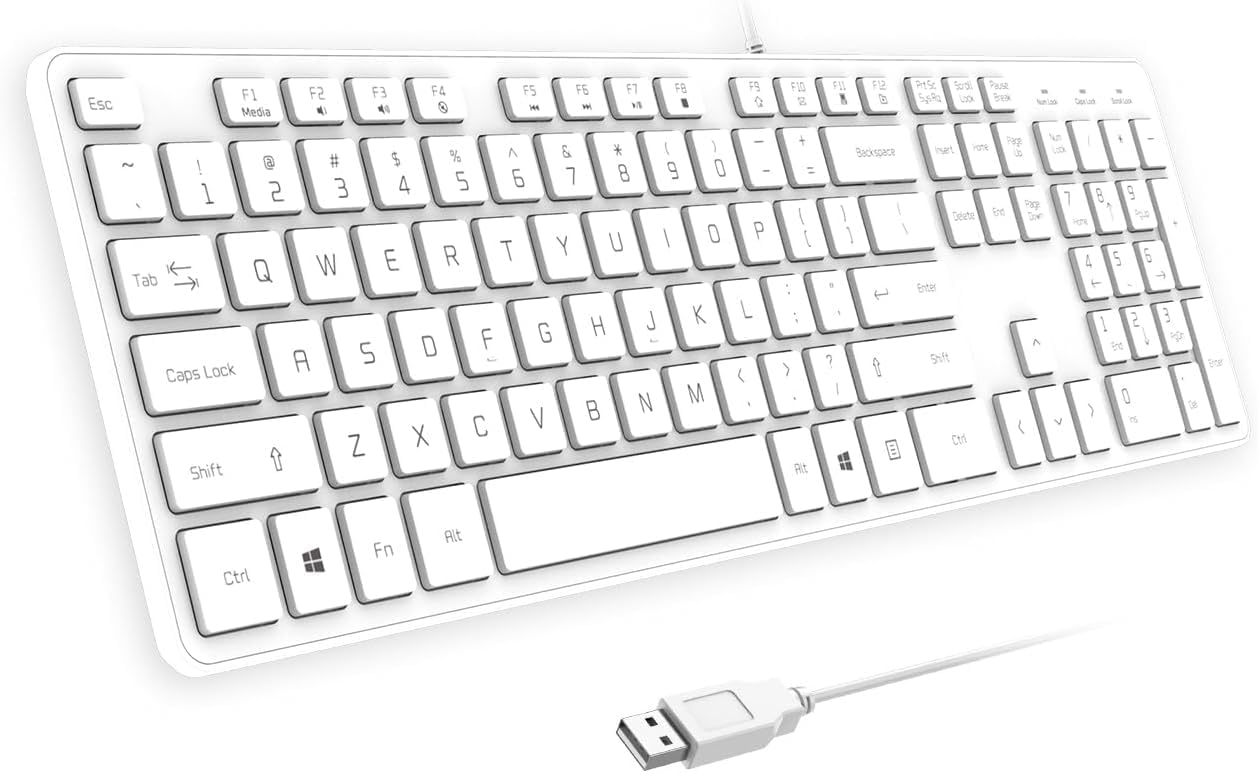
Front view of the B.FRIENDIT KB1430 Wired USB Keyboard in white, showcasing its full QWERTY layout and numeric keypad.
2. Package Contents
Verify that all items are present in the package:
- 1 x B.FRIENDIT KB1430 Wired USB Keyboard
- 1 x Keyboard Cover/Protector Skin
- 1 x User Manual (this document)
3. Setup Instructions
The B.FRIENDIT KB1430 keyboard is designed for simple plug-and-play functionality. No additional drivers are required for most Windows operating systems.
- Locate an available USB-A port on your computer (PC or Laptop).
- Insert the USB connector of the keyboard into the USB-A port.
- Your operating system will automatically detect and install the necessary device drivers. This process may take a few moments.
- Once installation is complete, the keyboard is ready for use.

The B.FRIENDIT KB1430 keyboard connected via its USB cable to a laptop, illustrating the simple plug-and-play setup.
4. Operating the Keyboard
4.1 Basic Typing
The keyboard features a standard QWERTY layout with a full numeric keypad. The scissor-switch keys provide a comfortable and quiet typing experience with a 2mm key travel and moderate rebound.

An exploded view of a key on the B.FRIENDIT KB1430 keyboard, emphasizing the low-profile design and scissor mechanism that contributes to 90% noise reduction.
4.2 Multimedia Function Keys
The keyboard includes 12 dedicated multimedia function keys (F1-F12) that can be accessed by pressing the Fn key simultaneously with the desired function key. These keys provide quick access to common media controls and system functions.
| Key Combination | Function |
|---|---|
| Fn + F1 | Media Player |
| Fn + F2 | Volume Down |
| Fn + F3 | Volume Up |
| Fn + F4 | Mute |
| Fn + F5 | Previous Track |
| Fn + F6 | Next Track |
| Fn + F7 | Play/Pause |
| Fn + F8 | Stop |
| Fn + F9 | Website/Homepage |
| Fn + F10 | |
| Fn + F11 | My Computer |
| Fn + F12 | Favorites |

Detailed layout of the B.FRIENDIT KB1430 keyboard highlighting the 12 multimedia function keys and their corresponding actions.
5. Maintenance
5.1 Cleaning the Keyboard
To ensure longevity and optimal performance, regular cleaning is recommended:
- Disconnect the keyboard from your computer before cleaning.
- Use a soft, lint-free cloth slightly dampened with water or a mild cleaning solution to wipe the keycaps and surface.
- Avoid using harsh chemicals, abrasive cleaners, or spraying liquids directly onto the keyboard.
- For dust and debris between keys, use compressed air.
5.2 Using the Keyboard Cover
The included silicone keyboard cover helps protect against spills, dust, and crumbs, while also reducing typing noise. Place the cover directly over the keys for added protection.

Image showing the transparent silicone keyboard cover placed over the B.FRIENDIT KB1430 keyboard, designed for spill protection and noise reduction.
6. Troubleshooting
If you encounter issues with your B.FRIENDIT KB1430 keyboard, refer to the following common solutions:
- Keyboard Not Responding:
- Ensure the USB cable is securely connected to both the keyboard and the computer.
- Try plugging the keyboard into a different USB port on your computer.
- Restart your computer.
- Test the keyboard on another computer to determine if the issue is with the keyboard or the computer's USB port/drivers.
- Keys Duplicating or Not Registering:
- Clean the affected keys and the area around them using compressed air to remove any debris.
- Ensure the keyboard cover is properly seated and not interfering with key presses.
- If the issue persists, it may indicate a hardware malfunction. Refer to the warranty section for support.
- Multimedia Keys Not Working:
- Ensure you are pressing the Fn key simultaneously with the desired function key (F1-F12).
- Check your computer's operating system settings for any conflicting hotkey assignments or driver issues.
7. Specifications
| Feature | Detail |
|---|---|
| Model Number | KB1430 |
| Connectivity Technology | USB-A Wired |
| Keyboard Description | Scissor Switch, Full-Size QWERTY |
| Compatible Devices | Laptop, PC |
| Operating System Compatibility | Windows 11 / 10 / 8 / 7 / 2000 / XP / Vista |
| Special Features | Ergonomic, Hotkeys and Media Keys, Lightweight, Low-Profile Key, Portable |
| Product Dimensions | 17.48"L x 4.88"W x 0.66"H (44.4cm x 12.4cm x 1.68cm) |
| Item Weight | 1.1 pounds (0.5 kg) |
| Color | White |
| Included Components | USB Cable, Keyboard Cover |

Side view of the B.FRIENDIT KB1430 keyboard showing its ergonomic tilt and foldable stands for adjustable typing comfort.
8. Warranty and Customer Support
8.1 Warranty Information
The B.FRIENDIT KB1430 Wired USB Keyboard comes with a replacement warranty within one year of purchase. This warranty covers manufacturing defects and ensures product reliability.
8.2 Customer Support
For any questions, technical assistance, or warranty claims, please contact B.FRIENDIT customer service. Our reliable and friendly customer service team is ready to respond within a 24-hour timeframe.
For more information or to contact support, please visit the official B.FRIENDIT store on Amazon: B.FRIENDIT Amazon Store