
1. Important Safety Instructions
Please read all instructions carefully before assembly and use. Keep this manual for future reference.
- Ensure all components are present and undamaged before beginning assembly.
- Assemble the desk on a soft, clean surface to prevent scratches.
- Do not overtighten screws during assembly to avoid damaging the material.
- Periodically check all connections to ensure they remain tight.
- Do not stand or sit on the desk.
- Keep small parts away from children to prevent choking hazards.
- Maximum load capacity: 50 kg (110 lbs). Do not exceed this limit.
2. Package Contents
Verify that all parts listed below are included in your package. If any parts are missing or damaged, please contact customer support.
- Desk tabletop (Engineered Wood)
- Metal frame components (Steel Alloy)
- Crossed steel bars (for stability)
- Adjustable feet
- Assembly hardware kit (screws, bolts, etc.)
- Assembly tools (e.g., Allen key)
- Illustrated instruction manual
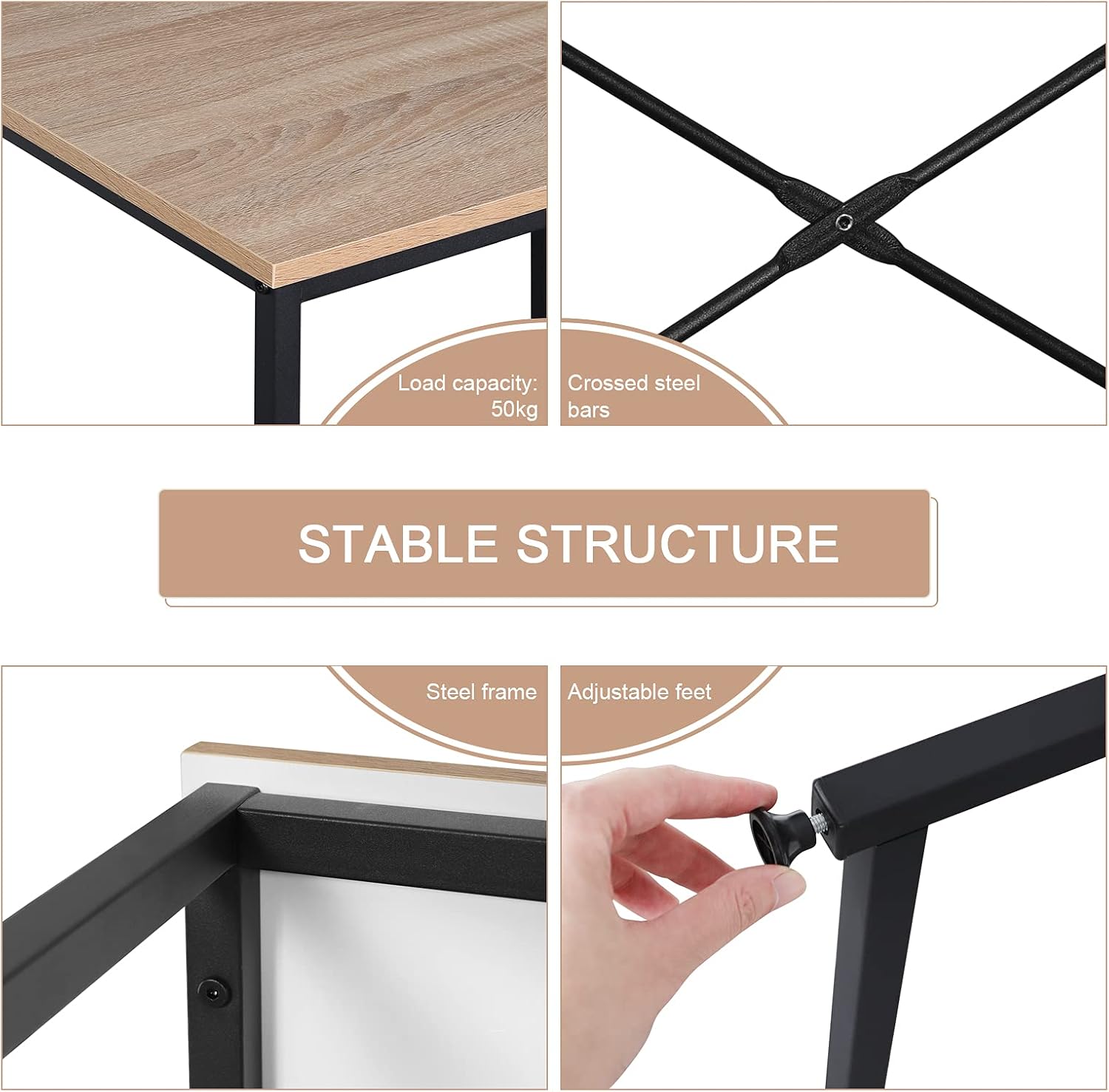
Figure 1: Key structural components including crossed steel bars and adjustable feet.
3. Assembly Instructions
Assembly is recommended for one person and includes all necessary tools. Follow the detailed, illustrated instructions provided in the package for quick and easy setup.
Step 1: Unpack and Identify Parts
Carefully remove all components from the packaging. Lay them out on a soft, clean surface. Refer to the parts list in your included manual to identify each piece.
Step 2: Assemble the Frame
Connect the metal frame components using the provided screws and tools. Ensure all connections are secure but do not fully tighten until the entire frame is assembled.

Figure 2: Initial steps of frame assembly.
Step 3: Attach Cross Bars and Adjustable Feet
Secure the crossed steel bars to the frame for enhanced stability. Install the adjustable feet at the bottom of each leg. These feet help stabilize the desk on uneven surfaces.

Figure 3: Attaching the cross bars and adjustable feet.
Step 4: Secure the Tabletop
Place the engineered wood tabletop onto the assembled frame. Align the pre-drilled holes and secure the tabletop using the remaining screws. Fully tighten all screws on the frame and tabletop.

Figure 4: The assembled desk.
4. Operating Instructions
The WOLTU Computer Desk is designed for versatile use in various home and office environments.
- Workstation: The spacious 80x60 cm tabletop provides ample room for a computer, lamp, books, and documents.
- Legroom: The open design underneath allows for comfortable leg extension, suitable for extended periods of work or study.
- Multifunctional Use: This desk can serve as a computer desk, office desk, study table, or gaming table.

Figure 5: Desk in use as a home office workstation.
5. Maintenance
Proper maintenance ensures the longevity and appearance of your WOLTU desk.
- Cleaning: Wipe the desk surfaces with a dry or damp cloth as needed. Avoid harsh chemicals that may damage the finish.
- Durability: The E1 composite wood is water-repellent and easy to clean. The metal tubes are rust-resistant.
- Stability: Periodically check and adjust the leveling feet to ensure the desk remains stable on uneven floors and to prevent scratching.
- Protection: While the tabletop is scratch-resistant, using coasters for drinks and pads for heavy objects is recommended to preserve its condition.

Figure 6: Features highlighting the desk's material durability and ease of maintenance.
6. Troubleshooting
Common issues and their solutions.
- Desk is wobbly:
- Ensure all screws are fully tightened.
- Adjust the leveling feet at the bottom of each leg to compensate for uneven flooring.
- Verify that the crossed steel bars are securely attached.
- Missing parts or damaged components:
- Refer to the package contents list. If parts are missing or damaged upon arrival, contact WOLTU customer support immediately for assistance.
7. Specifications
| Feature | Detail |
|---|---|
| Model Number | WOLTU (variant 80x60x70cm) |
| Dimensions (L x W x H) | 80 x 60 x 70 cm (31.5 x 23.6 x 27.6 inches) |
| Weight | 7.34 kg (16.18 lbs) |
| Material (Tabletop) | E1 Grade Engineered Wood (MDF board) |
| Material (Frame) | Steel Alloy |
| Color | Light Oak (tabletop) + Black (frame) |
| Max Load Capacity | 50 kg (110 lbs) |
| Assembly Required | Yes (1 person recommended, tools included) |
| Special Features | Compact design, adjustable feet, X-braced frame for stability, water-repellent and scratch-resistant surface. |

Figure 7: Desk dimensions.
8. Warranty and Support
For any questions, concerns, or issues regarding your WOLTU Computer Desk, please contact WOLTU customer support. Refer to your purchase documentation for specific warranty details.
You can often find support contact information on the official WOLTU website or through the retailer where you purchased the product.