
1. Introduction
Thank you for purchasing the ON.EARZ OE-P211 Portable Stereo Speaker. This manual provides essential information for the safe and efficient operation of your device. Please read it thoroughly before use and retain it for future reference.
2. Safety Information
- Do not expose the speaker to extreme temperatures, direct sunlight, or high humidity.
- Avoid dropping or subjecting the speaker to strong impacts.
- Do not disassemble, repair, or modify the speaker yourself. Contact qualified service personnel for any repairs.
- Keep the speaker away from water and other liquids.
- Use only the provided charging cable or a certified equivalent.
- Do not operate the speaker at excessively high volumes for prolonged periods to prevent hearing damage.
3. Package Contents
Please check that all items are present:
- ON.EARZ OE-P211 Portable Stereo Speaker
- 1 x Charging Cable
- User Manual (this document)
4. Product Overview
Familiarize yourself with the speaker's components:
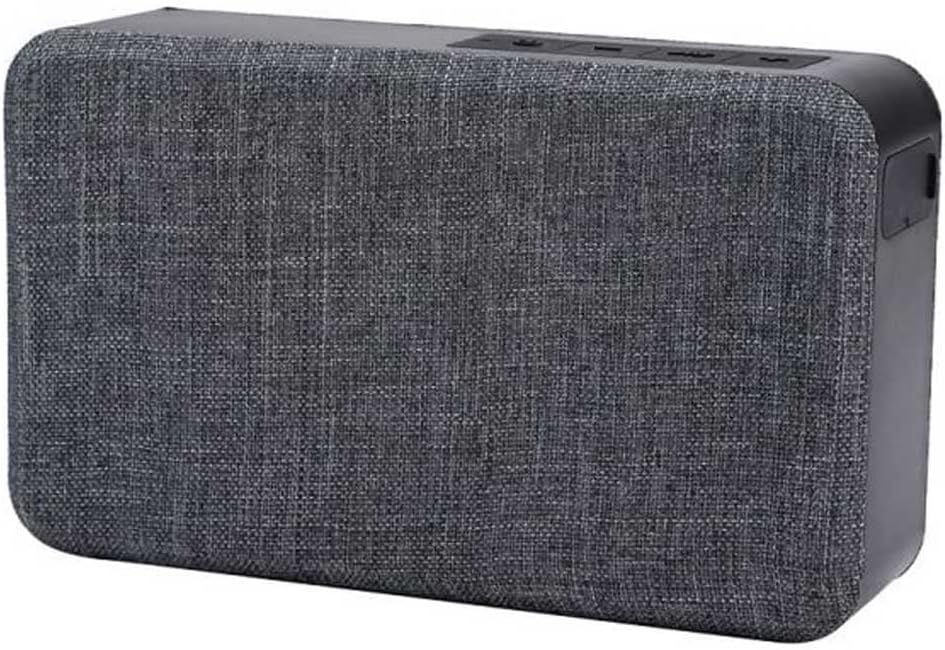
Figure 1: Front view of the ON.EARZ OE-P211 Portable Stereo Speaker. The speaker features a dark grey fabric grille covering the front, with a black plastic casing on the sides and top. On the top panel, several control buttons are visible, including power, volume, and playback controls. The overall design is rectangular with rounded edges.
(Specific button functions and port locations are typically detailed here. For this generic manual, we assume standard controls.)
- Front Grille: Covers the speaker drivers.
- Top Panel: Contains control buttons (Power, Volume Up/Next Track, Volume Down/Previous Track, Play/Pause/Call Answer).
- Side/Rear Panel: Charging port (USB), AUX-in port.
5. Setup
5.1. Charging the Speaker
- Connect the provided charging cable to the speaker's charging port.
- Connect the other end of the cable to a USB power adapter (not included) or a computer's USB port.
- The charging indicator light will illuminate. Charging time is approximately 3-4 hours.
- Once fully charged, the indicator light will change or turn off. Disconnect the speaker from the power source.
A full charge provides approximately 5-8 hours of playback time.
5.2. Powering On/Off
- To Power On: Press and hold the Power button for a few seconds until you hear an audible prompt or see an indicator light.
- To Power Off: Press and hold the Power button again for a few seconds until you hear an audible prompt or the indicator light turns off.
6. Operating Instructions
6.1. Bluetooth Pairing
- Ensure the speaker is powered on and in Bluetooth pairing mode (an indicator light may flash, or an audible prompt may sound).
- On your Bluetooth-enabled device (smartphone, tablet, computer), go to the Bluetooth settings.
- Search for available devices. The speaker should appear as "OE-P211" or similar.
- Select "OE-P211" to connect. Once paired, you will hear a confirmation sound, and the indicator light will become solid.
- You can now stream audio wirelessly from your device to the speaker. The working distance is up to 10 meters in open space.
6.2. AUX-in Connection
For devices without Bluetooth, you can use the 3.5mm AUX-in port:
- Connect one end of a 3.5mm audio cable (not included) to the AUX-in port on the speaker.
- Connect the other end of the cable to the headphone jack or audio output of your device.
- The speaker will automatically switch to AUX mode, or you may need to press a mode button (if available).
6.3. Hands-Free Calling
When connected via Bluetooth to a smartphone, the speaker can be used for hands-free calls:
- Answer Call: Press the Play/Pause button once to answer an incoming call.
- End Call: Press the Play/Pause button once to end an active call.
- Reject Call: Press and hold the Play/Pause button for a few seconds to reject an incoming call.
6.4. Music Playback Controls
- Play/Pause: Press the Play/Pause button once.
- Volume Up: Press the '+' button.
- Volume Down: Press the '-' button.
- Next Track: Press and hold the '+' button.
- Previous Track: Press and hold the '-' button.
7. Maintenance
7.1. Cleaning
- Wipe the speaker with a soft, dry cloth.
- Do not use abrasive cleaners, alcohol, or chemical solvents.
7.2. Storage
- Store the speaker in a cool, dry place when not in use for extended periods.
- Avoid storing in areas with extreme temperatures or high humidity.
8. Troubleshooting
| Problem | Possible Cause | Solution |
|---|---|---|
| Speaker does not power on. | Low battery. | Charge the speaker fully. |
| Cannot pair via Bluetooth. | Speaker not in pairing mode; device Bluetooth off; too far from speaker. | Ensure speaker is in pairing mode. Turn on Bluetooth on your device. Move device closer to speaker (within 10m). Forget previous pairings on your device and try again. |
| No sound. | Volume too low; incorrect input mode; device not playing audio. | Increase speaker and device volume. Check if connected via Bluetooth or AUX. Ensure audio is playing on your source device. |
| Poor sound quality. | Interference; low battery; source audio quality. | Move speaker away from other electronic devices. Charge the speaker. Try a different audio source. |
9. Specifications
| Model Name: | OE-P211 |
| Brand: | On-Earz |
| Connectivity Technology: | Bluetooth, Auxiliary |
| Wireless Communication Technology: | Bluetooth 4.1 |
| Speaker Output Power: | 6 Watts |
| Frequency Response: | 180-20000 Hz |
| Impedance: | 4 Ohms |
| Power Source: | Battery Powered |
| Charging Time: | 3-4 hours |
| Playback Time: | 5-8 hours |
| Working Distance: | Up to 10 meters (open space) |
| Special Features: | USB Port, Hands-free function, 3.5mm AUX input |
| Dimensions (L x W x H): | 33.5 x 25.5 x 24.2 cm |
| Weight: | 380 grams |
10. Warranty and Support
For warranty information or technical support, please refer to the warranty card included with your product or contact ON.EARZ customer service through their official website or the retailer where the product was purchased.