
1. Introduction
This user manual provides essential information for the safe and efficient operation, setup, maintenance, and troubleshooting of your Kraft&DELE KD844 250A MMA TIG Electrode Welder. Please read this manual thoroughly before operating the device to ensure proper use and to prevent injury or damage. Keep this manual for future reference.
2. Safety Instructions
Welding operations involve significant risks. Always prioritize safety to prevent electric shock, burns, fire, and other hazards. Adhere to all local safety regulations and the following guidelines:
- Electric Shock: Ensure the welder is properly grounded. Do not touch live electrical parts. Wear dry welding gloves and protective clothing. Work in a dry area.
- Fumes and Gases: Welding produces fumes and gases that can be hazardous to health. Work in a well-ventilated area or use a fume extractor.
- Arc Rays: Arc rays can cause eye injury and burn skin. Always wear a welding helmet with appropriate shade filter and protective clothing.
- Fire and Explosion: Welding sparks and hot metal can cause fires. Keep flammable materials away from the welding area. Have a fire extinguisher readily available.
- Burns: Hot metal and electrodes can cause severe burns. Wear protective gloves and clothing. Allow welded materials to cool before handling.
- General Safety: Disconnect power before performing any maintenance or adjustments. Do not operate the welder if it is damaged. Ensure all connections are secure.
3. Product Overview
The Kraft&DELE KD844 is a 250A DC Inverter Welder designed for MMA (Manual Metal Arc) and TIG welding applications. It features advanced technologies for enhanced performance and user convenience.
Key Features:
- Hot Start: Automatically increases current at arc ignition for easier starting.
- Anti-Stick: Prevents electrodes from sticking to the workpiece, simplifying arc re-ignition.
- Arc Force: Automatically stabilizes the welding arc, regardless of arc length, for a smoother weld.
- LED Amperage Display for precise current control.
- Compact and lightweight design for portability.
- Efficient fan cooling system and thermal protection.
- Durable industrial-grade metal chassis.
Included Components:
- KD844 Welder Unit
- Welding Cable (2m) with Electrode Holder (DIN connector)
- Ground Cable with Ground Clamp (DIN connector)
- Welding Protection Mask
- Brush/Hammer Tool
- Sample Welding Electrodes
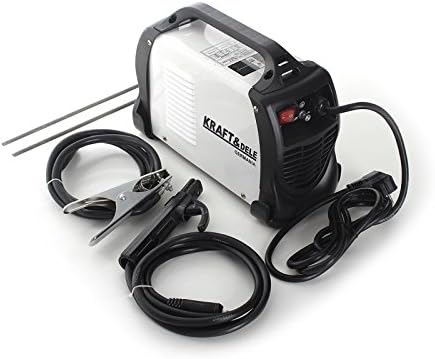
Image 3.1: The Kraft&DELE KD844 welder unit with included welding and ground cables, and electrodes.

Image 3.2: All components included in the KD844 package, including the welder, cables, mask, and brush.

Image 3.3: Rear view of the KD844 welder, highlighting the power input and cooling fan.
4. Setup
Follow these steps to set up your KD844 welder:
- Unpacking: Carefully remove all components from the packaging. Inspect for any shipping damage.
- Connect Ground Cable: Insert the DIN connector of the ground cable into the negative (-) terminal on the front panel of the welder. Twist to secure. Attach the ground clamp firmly to the workpiece or a clean, bare metal part of the welding table.
- Connect Electrode Holder Cable: Insert the DIN connector of the electrode holder cable into the positive (+) terminal on the front panel of the welder. Twist to secure.
- Insert Electrode: Open the jaws of the electrode holder and insert the welding electrode. Ensure the electrode is held securely.
- Power Connection: Ensure the welder's power switch is in the OFF position. Connect the power cord to a suitable 230V, 50/60Hz power outlet. Ensure the circuit can handle the required amperage.

Image 4.1: Front view of the KD844 welder with the electrode holder and ground clamp cables connected to their respective terminals.

Image 4.2: Close-up of the welder's front panel, showing the amperage adjustment knob and LED display.
5. Operating Instructions
Before operating, ensure all safety precautions are followed and the setup is complete.
- Power On: Flip the power switch on the rear panel to the ON position. The LED display on the front panel will illuminate.
- Adjust Welding Current: Use the amperage adjustment knob on the front panel to set the desired welding current. The LED display will show the selected amperage. Refer to electrode manufacturer guidelines for recommended current settings.
- Welding: Put on your welding helmet and protective gear. Bring the electrode into contact with the workpiece to initiate the arc. The Hot Start feature will assist with ignition. Maintain a consistent arc length. The Arc Force feature will help stabilize the arc. If the electrode sticks, the Anti-Stick function will reduce the current, allowing you to easily detach it.
- Monitor Welder: The welder is equipped with thermal protection. If the unit overheats, it will automatically shut down to prevent damage. Allow it to cool down before resuming operation.
- Power Off: After welding, turn the power switch to the OFF position. Disconnect the welder from the power outlet.
6. Maintenance
Regular maintenance ensures the longevity and safe operation of your welder.
- Cleaning: Periodically clean the welder's exterior with a dry, soft cloth. Use compressed air to blow out dust and debris from the ventilation openings. Ensure the welder is disconnected from power before cleaning.
- Cable Inspection: Regularly inspect welding cables, electrode holder, and ground clamp for damage, fraying, or loose connections. Replace damaged components immediately.
- Storage: Store the welder in a dry, clean environment, away from direct sunlight, moisture, and corrosive substances.
7. Troubleshooting
If you encounter issues with your KD844 welder, refer to the following common problems and solutions:
| Problem | Possible Cause | Solution |
|---|---|---|
| Welder does not power on | No power from outlet, power switch off, faulty power cord | Check power outlet, ensure switch is ON, inspect power cord |
| No welding arc | Poor ground connection, incorrect current setting, faulty electrode, loose cable connections | Ensure ground clamp is secure on clean metal, adjust current, replace electrode, check all cable connections |
| Weak or unstable arc | Low current setting, improper electrode, long arc length | Increase current, use correct electrode for material, maintain proper arc length |
| Welder shuts down during operation | Overheating (thermal protection activated) | Allow welder to cool down. Ensure proper ventilation and duty cycle is not exceeded. |
| Electrode sticks frequently | Low current, improper technique, Anti-Stick not functioning | Increase current, improve striking technique, ensure Anti-Stick is active (automatic feature) |
If problems persist after attempting these solutions, please contact your retailer or a qualified service technician.
8. Specifications
| Specification | Value |
|---|---|
| Manufacturer | Kraft & Dele |
| Model | KD844 |
| Input Voltage | 230V-50/60Hz |
| Welding Current (MMA) | 250A (60% Duty Cycle), 193A (100% Duty Cycle) |
| Electrode Diameter | 1.6 - 4.00 mm |
| Net Weight | 5 kg |
| Item Weight (Shipping) | 6 kg |
| Dimensions (L x W x H) | 350 x 230 x 275 mm |
| Features | Hot Start, Anti-Stick, Arc Force, LED Amperage Display, Fan Cooling, Thermal Protection |
9. Warranty and Support
For warranty information and technical support, please contact the retailer where you purchased the Kraft&DELE KD844 welder. The manufacturer is Kraft & Dele. Information regarding the availability of spare parts is currently unavailable.