
1. Introduction
Thank you for purchasing the Sony WF-1000X Wireless Noise-Canceling Headphones. This manual provides essential information for the safe and effective use of your device. Please read it thoroughly before use and retain it for future reference.
2. Product Overview
2.1 Key Features
- Industry-leading noise cancellation for an immersive audio experience.
- Customizable noise canceling settings via a dedicated application.
- Automatic power on when removed from the charging case.
- NFC for one-touch Bluetooth pairing.
- Voice assistant activation (Siri/Google Now) from your smartphone.
- Includes Triple Comfort Earbuds and Fitting Supporters for a secure and comfortable fit.
2.2 Package Contents
- WF-1000X Headphones (Left and Right)
- Carrying Charging Case
- USB Cable
- Hybrid Silicone Rubber Earbuds (SS, S, M, L - 2 each)
- Triple Comfort Earbuds (S, M, L - 2 each)
- Fitting Supporters (M, L - 2 each)
2.3 Component Identification

Figure 1: Front view of the Sony WF-1000X headphones in Champagne Gold.

Figure 2: Side view of the WF-1000X earbuds, highlighting the power/pairing button and microphone.

Figure 3: Top view of the WF-1000X earbuds, showing the sleek design.

Figure 4: The charging case with both earbuds securely placed inside for charging and storage.
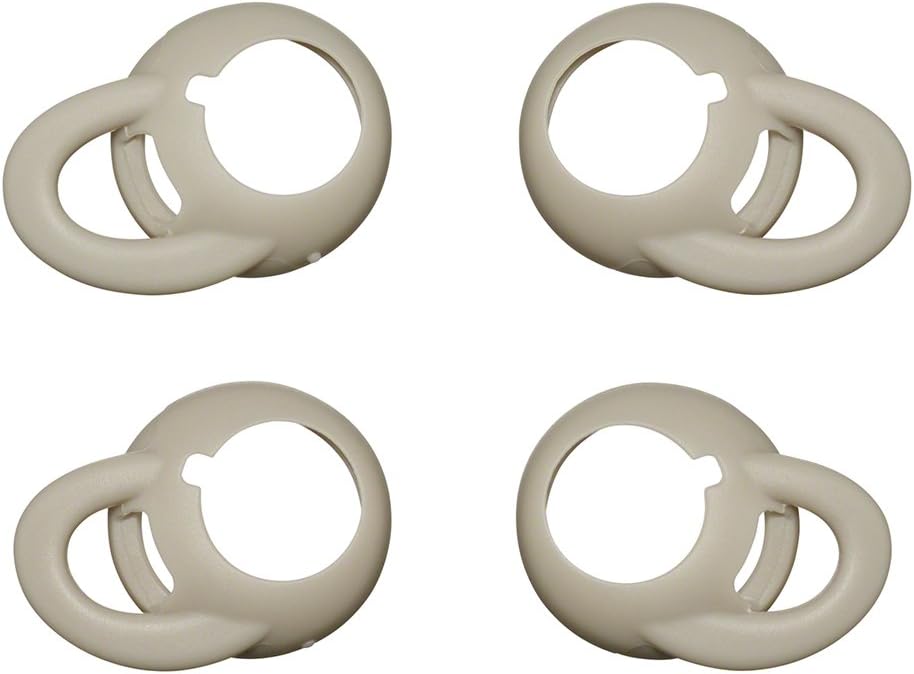
Figure 5: A selection of ear tips in different sizes and materials to ensure optimal fit and sound isolation.

Figure 6: Fitting supporters designed to enhance the stability of the earbuds in your ear.
3. Setup
3.1 Initial Charging
Before first use, fully charge the headphones and the charging case. Place the earbuds into the charging case and connect the case to a USB power source using the supplied USB cable.

Figure 7: The charging case connected to a USB power source, indicating the charging process.
- Earbud charging time: Approximately 1.5 hours.
- Charging case charging time: Approximately 3 hours for a full charge.
3.2 Bluetooth Pairing
- Ensure the headphones are charged.
- Remove both earbuds from the charging case. They will automatically power on.
- On your smartphone or audio device, enable Bluetooth and search for available devices.
- Select "WF-1000X" from the list of devices.
- If prompted, confirm the pairing. A voice guidance will confirm successful connection.
3.3 NFC One-Touch Pairing
For NFC-compatible devices, simply touch the N-Mark on the charging case to the NFC-enabled area of your device to initiate pairing.
3.4 Dedicated Application
Download the dedicated Sony Headphones Connect app for additional customization options, including noise-canceling settings and sound adjustments.
4. Operating Instructions
4.1 Power On/Off
- Power On: Remove the earbuds from the charging case. They will automatically power on.
- Power Off: Place the earbuds back into the charging case. They will automatically power off and begin charging.
4.2 Noise Canceling and Ambient Sound Mode
The WF-1000X features active noise cancellation. You can switch between Noise Canceling mode and Ambient Sound mode using the dedicated button on the left earbud or through the Sony Headphones Connect app. Ambient Sound mode allows you to hear your surroundings while listening to music.
4.3 Music Playback and Calls
- Play/Pause: Press the button on the right earbud once.
- Next Track: Press the button on the right earbud twice.
- Previous Track: Press the button on the right earbud three times.
- Answer/End Call: Press the button on the right earbud once during an incoming call or during a call.
- Volume Control: Volume is controlled via your connected smartphone or audio device. The WF-1000X does not have physical volume buttons.
4.4 Voice Assistant Activation
Press and hold the button on the right earbud to activate your smartphone's voice assistant (e.g., Siri, Google Now, Amazon Alexa).
5. Maintenance
Proper maintenance ensures the longevity and optimal performance of your headphones.
- Cleaning: Regularly clean the earbuds, especially the ear tips and sound outlets, with a soft, dry cloth. Remove ear tips and clean them separately with mild soap and water if necessary, ensuring they are completely dry before reattaching.
- Charging Terminals: Periodically clean the charging terminals on both the earbuds and the charging case with a dry cotton swab to ensure good contact.
- Storage: When not in use, store the headphones in their charging case to protect them from dust and damage. Avoid exposing them to extreme temperatures, humidity, or direct sunlight.
- Battery Care: To preserve battery life, avoid fully discharging the headphones frequently. Charge them regularly, even if not used for extended periods.
6. Troubleshooting
If you encounter issues with your WF-1000X headphones, refer to the following common solutions:
| Problem | Solution |
|---|---|
| No power / Cannot charge | Ensure the USB cable is securely connected to both the charging case and the power source. Verify that the charging terminals on the earbuds and case are clean. |
| No sound / Low volume | Check the volume level on your connected device. Ensure the earbuds are properly seated in your ears. Confirm Bluetooth connection. |
| Bluetooth connection is unstable or drops frequently | Move closer to your connected device (within 10m line of sight). Avoid areas with strong electromagnetic interference. Try re-pairing the headphones. Update the firmware via the Sony Headphones Connect app if available. |
| Noise canceling effect is weak | Ensure the ear tips provide a good seal in your ear canal. Try different sized ear tips or fitting supporters for a better fit. Adjust noise canceling settings in the Sony Headphones Connect app. |
| Sound imbalance between left and right earbuds | This can sometimes occur due to connection issues or environmental factors. Try resetting the headphones or re-pairing them. Ensure both earbuds are fully charged. |
For more detailed troubleshooting or issues not listed here, please visit the official Sony support website.
7. Specifications
| Feature | Detail |
|---|---|
| Model Name | WF-1000X |
| Connectivity Technology | Bluetooth, NFC |
| Bluetooth Version | Ver. 4.1 |
| Maximum Communication Range | Approx. 10m (line of sight) |
| Supported Bluetooth Profiles | A2DP, AVRCP, HFP, HSP |
| Supported Codecs | SBC, AAC |
| Frequency Band (A2DP) | 20Hz-20,000Hz (44.1kHz sampling) |
| Charging Time (Earbuds) | Approx. 1.5 Hours |
| Charging Time (Case) | Approx. 3 Hours (full charge) |
| Battery Life (Continuous Audio Playback) | Max 3 Hours (NC ON/OFF) |
| Battery Life (Continuous Talk Time) | Max 3.5 Hours |
| Battery Life (Standby Time) | Max 8 Hours (NC ON) / Max 35 Hours (NC OFF) |
| Weight (Earbud, each) | Approx. 6.8 grams |
| Control Type | Siri (Voice Control) |
| Headphone Type | Closed Dynamic |
| Noise Control | Active Noise Cancellation |
| Material | Plastic |
| Color | Champagne Gold |
8. Warranty and Support
For product support, warranty information, and to register your product, please visit the official Sony support website:
This website provides resources such as easy-to-understand initial setup guides, product update programs, maintenance tips, and information on accessories to enhance your product experience.