1. Introduction
Thank you for purchasing the Honeywell HSF600B Advanced QuietSet Pedestal Fan. This fan is designed to provide customizable cooling and comfort with its ultra-quiet operation, oscillation feature, and multiple power settings. Please read this manual thoroughly before operation to ensure proper use and maintenance.

Image: The Honeywell HSF600B Advanced QuietSet Pedestal Fan, black in color, standing upright. It features a round base, an adjustable height pole, and a fan head with a protective grill and the Honeywell logo.
2. Important Safety Information
Always follow basic safety precautions when using electrical appliances to reduce the risk of fire, electric shock, and injury to persons.
- Do not insert fingers or foreign objects into any openings on the fan.
- Do not operate the fan with a damaged cord or plug.
- Ensure the fan is placed on a stable, level surface to prevent tipping.
- Do not use this fan near water or in high humidity environments.
- Unplug the fan from the power outlet before cleaning or performing any maintenance.
- Keep the fan out of reach of children and pets.
3. Package Contents
Verify that all components are present in the package:
- Fan Head Assembly (front and rear grills, fan blade, motor housing)
- Adjustable Height Pole
- Round Base
- Remote Control
- User Manual (this document)
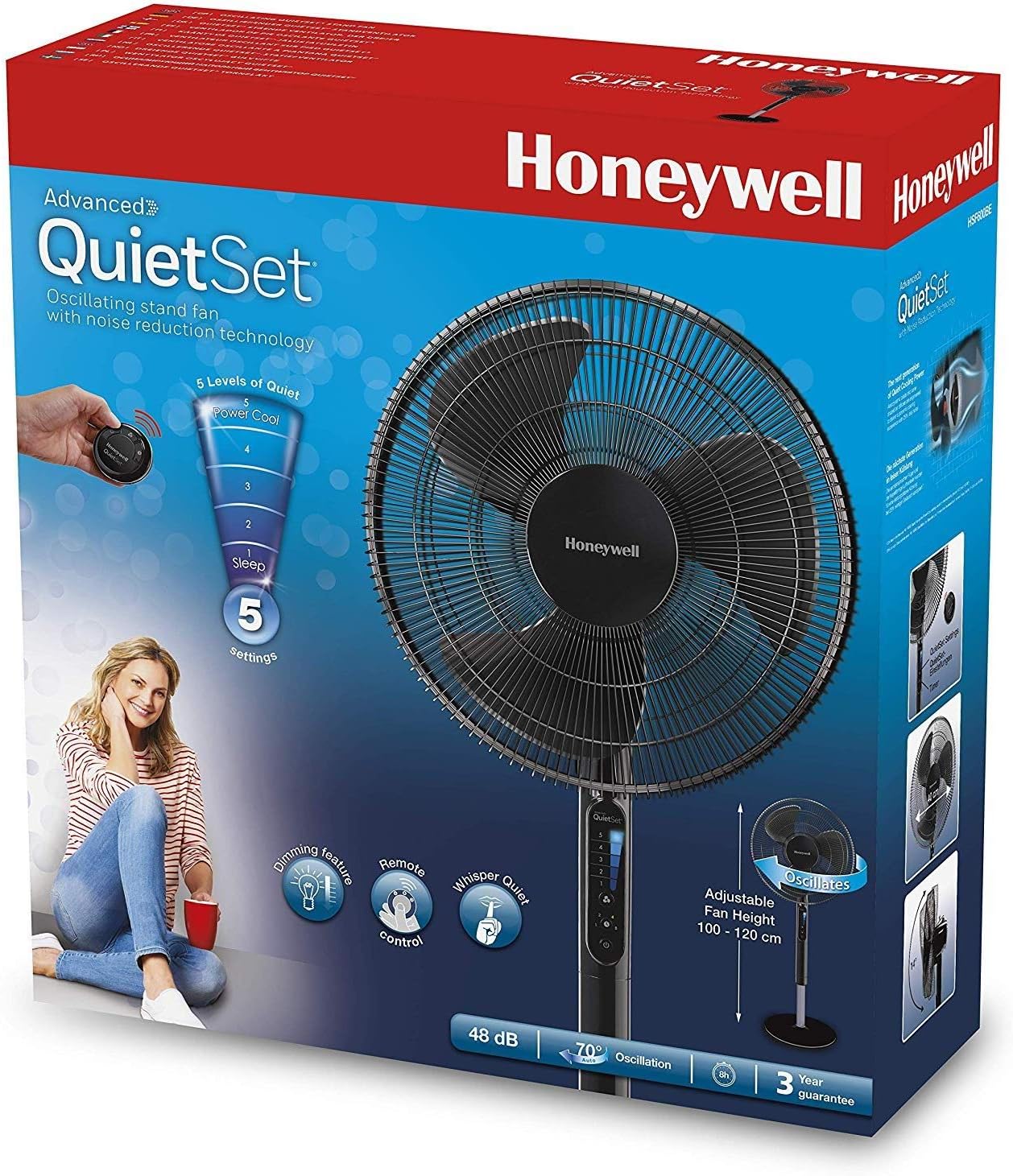
Image: The retail packaging for the Honeywell Advanced QuietSet Pedestal Fan, showing key features and the fan itself.
4. Assembly Instructions
Assembly is required for this fan. Please follow these steps carefully:
- Attach the Base: Secure the adjustable height pole to the round base using the provided screw and washer. Ensure it is tightened firmly.
- Assemble the Fan Head:
- Remove the spinner cap and plastic nut from the motor shaft.
- Place the rear grill onto the motor housing, aligning the notches. Secure it with the plastic nut.
- Slide the fan blade onto the motor shaft, ensuring the pin on the shaft aligns with the groove on the blade. Secure with the spinner cap, turning it counter-clockwise to tighten.
- Attach the front grill to the rear grill by aligning the clips and pressing them together until they snap into place.
- Connect Fan Head to Pole: Attach the assembled fan head to the top of the adjustable height pole. Ensure it clicks securely into place.
Note: Refer to the diagrams in the printed manual for visual guidance during assembly.
5. Operating Instructions
The Honeywell HSF600B fan offers various settings for optimal comfort. It can be operated using the control panel on the fan or the included remote control.
5.1 Power On/Off
Press the Power button (symbol: circle with vertical line) once to turn the fan on. Press it again to turn the fan off.
5.2 Adjusting Fan Speed (QuietSet Settings)
This fan features 5 QuietSet power and sound settings. Press the Speed button (symbol: fan blades) repeatedly to cycle through the settings:
- Setting 1 (Sleep): Ultra-quiet operation for restful nights.
- Setting 2: Low speed, quiet airflow.
- Setting 3: Medium speed, balanced airflow.
- Setting 4: High speed, strong airflow.
- Setting 5 (Power Cool): Maximum airflow for rapid cooling.

Image: A person sitting on a couch, holding the remote control and pointing it towards the Honeywell HSF600B fan, demonstrating remote operation.
5.3 Oscillation
Press the Oscillation button (symbol: two-way arrow) to activate the oscillation feature, which sweeps the fan head from side to side for wide area cooling. Press again to stop oscillation at the desired direction.

Image: A close-up view of the Honeywell HSF600B fan's front grill and blades in motion, illustrating the airflow and design.
5.4 Auto-Off Timer
Press the Timer button (symbol: clock) repeatedly to set the auto-off timer for 1, 2, 4, or 8 hours. The fan will automatically turn off after the selected time period.
5.5 Adjustable Height and Head Tilt
The fan's height can be adjusted by loosening the collar on the pole, extending or retracting the upper pole, and then tightening the collar. The fan head can also be tilted up or down to direct airflow as needed.

Image: The Honeywell HSF600B fan positioned in a bedroom, providing cooling comfort to a person relaxing on the bed, highlighting its suitability for quiet environments.
6. Maintenance
Regular cleaning will help maintain the fan's performance and appearance.
- Cleaning the Exterior: Use a soft, damp cloth to wipe the exterior surfaces of the fan. Do not use abrasive cleaners or solvents.
- Cleaning the Grills and Blades: The front and rear grills can be removed for thorough cleaning of the fan blades. Use a soft brush or vacuum cleaner to remove dust from the blades and grill components. Ensure all parts are completely dry before reassembling.
- Storage: If storing the fan for an extended period, cover it to protect from dust and store in a cool, dry place.
Important: Always unplug the fan before cleaning.
7. Troubleshooting
If you experience issues with your fan, please consult the following table before contacting support:
| Problem | Possible Cause | Solution |
|---|---|---|
| Fan does not turn on. | Not plugged in; Power outlet not working; Fan is off. | Ensure fan is securely plugged into a working outlet; Press the Power button. |
| Weak airflow. | Fan speed set too low; Grills or blades are dusty. | Increase fan speed setting; Clean the fan grills and blades. |
| Fan is noisy. | Fan not on a level surface; Loose parts; Obstruction. | Place fan on a stable, level surface; Check for loose components and tighten if necessary; Remove any obstructions. |
| Remote control not working. | Batteries are dead or incorrectly inserted; Obstruction between remote and fan. | Replace batteries (if applicable); Ensure clear line of sight to the fan's receiver. |
8. Specifications
| Feature | Detail |
|---|---|
| Model Name | HSF600B |
| Brand | Honeywell |
| Product Dimensions | 15.75"D x 15.75"W x 48"H |
| Item Weight | 13.22 Pounds |
| Power Source | Corded Electric |
| Wattage | 60 watts |
| Voltage | 120V |
| Noise Level | 25 dB (lowest setting) |
| Number of Power Levels | 5 (QuietSet) |
| Control Method | Remote, On-board controls |
| Special Features | Oscillation, Auto-off Timer, Adjustable Height, Head Tilt |
| Assembly Required | Yes |
9. Warranty and Support
This Honeywell HSF600B Advanced QuietSet Pedestal Fan comes with a 1-year manufacturer limited warranty from the date of purchase. This warranty covers defects in materials and workmanship under normal use.
For warranty claims, technical support, or any questions regarding your product, please contact Honeywell customer service. Contact information can typically be found on the product packaging or the official Honeywell website.
Please retain your proof of purchase for warranty purposes.