
Introduction
The sE Electronics sE8 is a high-performance small-diaphragm condenser microphone designed for professional audio recording and live sound applications. Its handcrafted capsule and advanced circuitry provide a clear, natural, and balanced sound with ultra-low self-noise and high dynamic range. This manual provides essential information for the proper setup, operation, maintenance, and troubleshooting of your sE8 microphone.
What's in the Box
Upon unpacking your sE8 microphone, please ensure all the following components are present:
- 1x sE8 Microphone
- 1x sE8 Capsule (pre-attached)
- 1x Mic Clip with Thread Adapters
- 1x Wind Screen
- Logo Sticker
- Warranty Card
- Product Manual (this document)
Setup
Proper setup is crucial for optimal performance of your sE8 microphone.
- Mounting the Microphone: Attach the sE8 microphone to the provided mic clip. Use the thread adapters if necessary to fit your microphone stand. Position the microphone securely on a stand appropriate for your recording or performance environment.
- Connecting to Audio Equipment: The sE8 is an XLR condenser microphone and requires 48V phantom power. Connect the microphone to your audio interface, mixer, or preamplifier using a high-quality XLR cable. Ensure that phantom power is enabled on the connected device.
- Initial Placement: For instruments like acoustic guitar or drums, experiment with microphone placement to capture the desired sound. The sE8's cardioid polar pattern is effective at rejecting off-axis sound, making it suitable for isolating sound sources.


Operating Instructions
The sE8 features controls to adapt its performance to various sound sources and environments.
Switchable Attenuation Pads
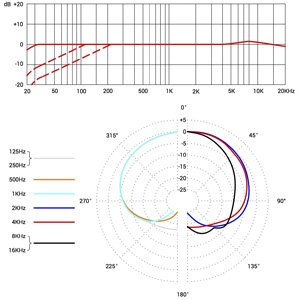
The sE8 includes two switchable attenuation pads (-10 dB and -20 dB) to prevent overloading the microphone's capsule or your preamplifier when recording very loud sound sources. These switches are located on the microphone body.
- -10 dB Pad: Use for moderately loud sources, such as close-miked acoustic instruments or vocals.
- -20 dB Pad: Engage for extremely loud sources, like drum overheads, brass instruments, or guitar amplifiers, to maintain a clean signal without distortion.
Low-Cut Filters
Two switchable low-cut filters (80 Hz and 160 Hz) are available to reduce unwanted low-frequency rumble, proximity effect, or bass buildup. These switches are also located on the microphone body.
- 80 Hz Low-Cut: Useful for reducing stage rumble, handling noise, or slight proximity effect when close-miking.
- 160 Hz Low-Cut: Apply for more aggressive low-frequency reduction, particularly effective for very close-miked sources or to clean up the low end of instruments like cymbals or hi-hats.

Polar Pattern
The sE8 features a cardioid polar pattern, which is highly effective at picking up sound from the front while rejecting sound from the sides and rear. This helps to minimize bleed from other instruments and room reflections, making it ideal for focused recording.
Maintenance
To ensure the longevity and optimal performance of your sE8 microphone, follow these maintenance guidelines:
- Cleaning: Use a soft, dry cloth to wipe the microphone body. Avoid using liquid cleaners or solvents, as these can damage the finish or internal components. Do not attempt to clean the capsule directly.
- Storage: When not in use, store the microphone in its original packaging or a protective case to shield it from dust, moisture, and physical impact.
- Environmental Conditions: Avoid exposing the microphone to extreme temperatures, high humidity, or direct sunlight for extended periods.
- Handling: Always handle the microphone with care. Avoid dropping it or subjecting it to strong vibrations, which can affect the delicate capsule.
Troubleshooting
If you encounter issues with your sE8 microphone, refer to the following common problems and solutions:
- No Sound Output:
- Ensure 48V phantom power is enabled on your audio interface or mixer.
- Check all XLR cable connections for proper seating and integrity. Try a different XLR cable if possible.
- Verify that the input gain on your audio device is set appropriately.
- Distorted Sound:
- If the sound is distorted, the input signal might be too hot. Engage the -10 dB or -20 dB attenuation pad on the microphone.
- Reduce the input gain on your audio interface or mixer.
- Excessive Low-Frequency Noise/Rumble:
- Engage the 80 Hz or 160 Hz low-cut filter on the microphone to reduce unwanted bass frequencies.
- Ensure the microphone is isolated from vibrations (e.g., using a shock mount, if available, or placing the stand on a stable surface).
- Weak or Noisy Signal:
- Confirm phantom power is active and stable.
- Check the XLR cable for damage.
- Ensure the attenuation pads are not engaged unnecessarily for quiet sources.
Specifications
Detailed technical specifications for the sE Electronics sE8 microphone:
| Brand | SE ELECTRONICS |
| Model Name | sE Electronics sE8 |
| Connectivity Technology | XLR |
| Connector Type | XLR |
| Polar Pattern | Cardioid |
| Microphone Form Factor | Small Diaphragm |
| Frequency Range | 20 Hz to 20 kHz |
| Audio Sensitivity | 34 Decibels |
| Impedance | 110 Ohms |
| Signal-to-Noise Ratio | 79 dB |
| Power Source | Corded Electric (48V Phantom Power) |
| Item Weight | 11.29 ounces |
| Item Dimensions | 7.8 x 4.96 x 3.07 inches |
| Enclosure Material | Brass |
Warranty and Support
Warranty Information
The sE Electronics sE8 microphone comes with a standard 2-year warranty. This warranty can be extended to 3 years upon online registration of your product. Please refer to the included Warranty Card for detailed terms and conditions, and instructions on how to register your product.
Customer Support
For technical assistance, service, or further inquiries regarding your sE8 microphone, please contact sE Electronics customer support. Contact information can typically be found on the sE Electronics official website or on the Warranty Card provided with your product.


