
wsiiroon Ultra-Bright LED Flashlight
Wsiiroon Ultra-Bright LED Flashlight User Manual
Model: Ultra-Bright LED Flashlight (FL-002)
Brand: Wsiiroon
1. Introduction
Thank you for choosing the Wsiiroon Ultra-Bright LED Flashlight. This manual provides essential information for the safe and effective use of your new flashlight. Designed for versatility and durability, this flashlight is ideal for a wide range of activities including camping, hiking, dog walking, hunting, boating, and general emergency preparedness. Please read this manual thoroughly before operation and retain it for future reference.

Image: Two Wsiiroon Ultra-Bright LED Flashlights, showcasing their compact design and included wrist straps.
2. Product Overview
Key Features:
- Ultra-Bright Illumination: Equipped with a CREE XML-T6 LED, providing up to 1800 lumens of brightness.
- 5 Operating Modes: Easily switch between High, Medium, Low, Strobe, and SOS modes to suit various situations.
- Zoomable Functionality: Adjustable focus allows for a wide floodlight or a concentrated spotlight beam.
- IP65 Water-Resistant: Designed to withstand splashes and heavy rain, suitable for outdoor use in various weather conditions.
- Durable Construction: Made from high-quality aluminum alloy for enhanced durability and a lightweight feel.
- Compact & Portable: Easy to carry and store, with an anti-roll body design.
Included Components:
Each package contains:
- 2 x 1800 Lumen Flashlights
- 2 x 18650 Battery Holders (for optional 18650 battery use)
- 2 x AAA Battery Adapters (for 3x AAA battery use)
- 2 x Hand Straps
- 1 x User Manual (this document)
3. Setup
Battery Installation:
The Wsiiroon LED Flashlight requires either three (3) AAA batteries or one (1) 18650 rechargeable battery (batteries are NOT included).
- Unscrew the tail cap of the flashlight by turning it counter-clockwise.
- For AAA Batteries: Insert three AAA batteries into the provided AAA battery adapter, ensuring correct polarity (+/-). Then, insert the adapter into the flashlight with the positive (+) end facing towards the head of the flashlight.
- For 18650 Battery: If using an 18650 battery, place it into the 18650 battery holder (if provided, or directly if the flashlight supports it without the holder), ensuring the positive (+) end faces towards the head of the flashlight.
- Screw the tail cap back on clockwise until it is securely tightened.
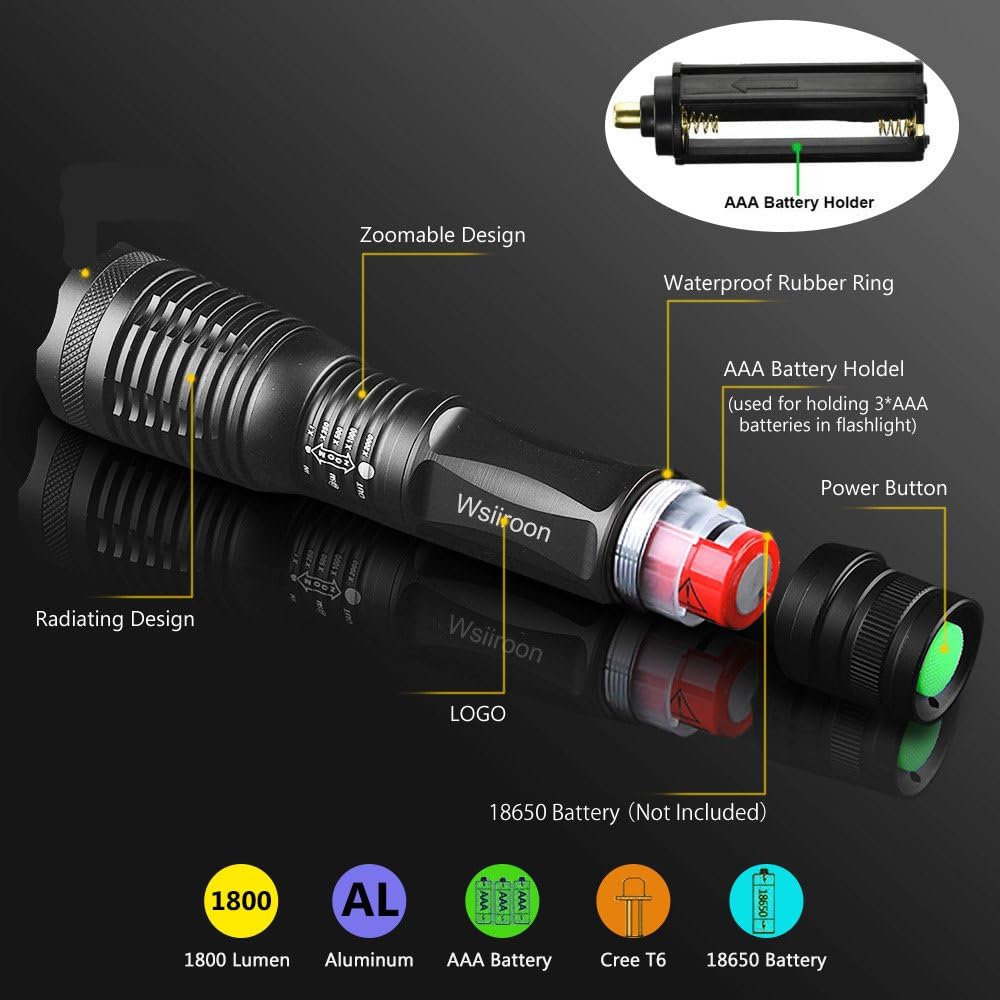
Image: An exploded view of the flashlight, illustrating the battery compartment, AAA battery holder, and the power button on the tail cap.
Important: Ensure correct battery polarity to prevent damage to the flashlight.
4. Operating Instructions
Power On/Off:
Press the green power button located on the tail cap to turn the flashlight ON or OFF.
Changing Light Modes:
With the flashlight ON, lightly press the power button (without clicking it completely) to cycle through the 5 available modes:
- Mode 1: High Brightness (100% Luminance)
- Mode 2: Medium Brightness (50% Luminance)
- Mode 3: Low Brightness (20% Luminance)
- Mode 4: Strobe (Flashing light for signaling or disorientation)
- Mode 5: SOS (Morse code signal for emergencies)

Image: The flashlight demonstrating its five distinct light modes and the location of the power button for mode selection.
Adjusting Focus (Zoom Function):
To adjust the beam focus from a wide floodlight to a narrow spotlight, simply pull the head of the flashlight outwards (zoom out) or push it inwards (zoom in). This allows you to adapt the light beam to your specific needs.

Image: The flashlight illustrating its zoomable feature, showing how to adjust the beam from a wide floodlight to a focused spotlight.
5. Maintenance
To ensure the longevity and optimal performance of your Wsiiroon LED Flashlight, follow these maintenance guidelines:
- Cleaning: Wipe the flashlight body with a soft, damp cloth. Do not use abrasive cleaners or solvents.
- Battery Care: Remove batteries if the flashlight will not be used for an extended period to prevent battery leakage and corrosion.
- Water Resistance: While the flashlight is IP65 water-resistant, meaning it can withstand splashes and heavy rain, it is not designed for submersion. Ensure the tail cap is securely tightened to maintain water resistance.
- Storage: Store the flashlight in a cool, dry place away from direct sunlight and extreme temperatures.
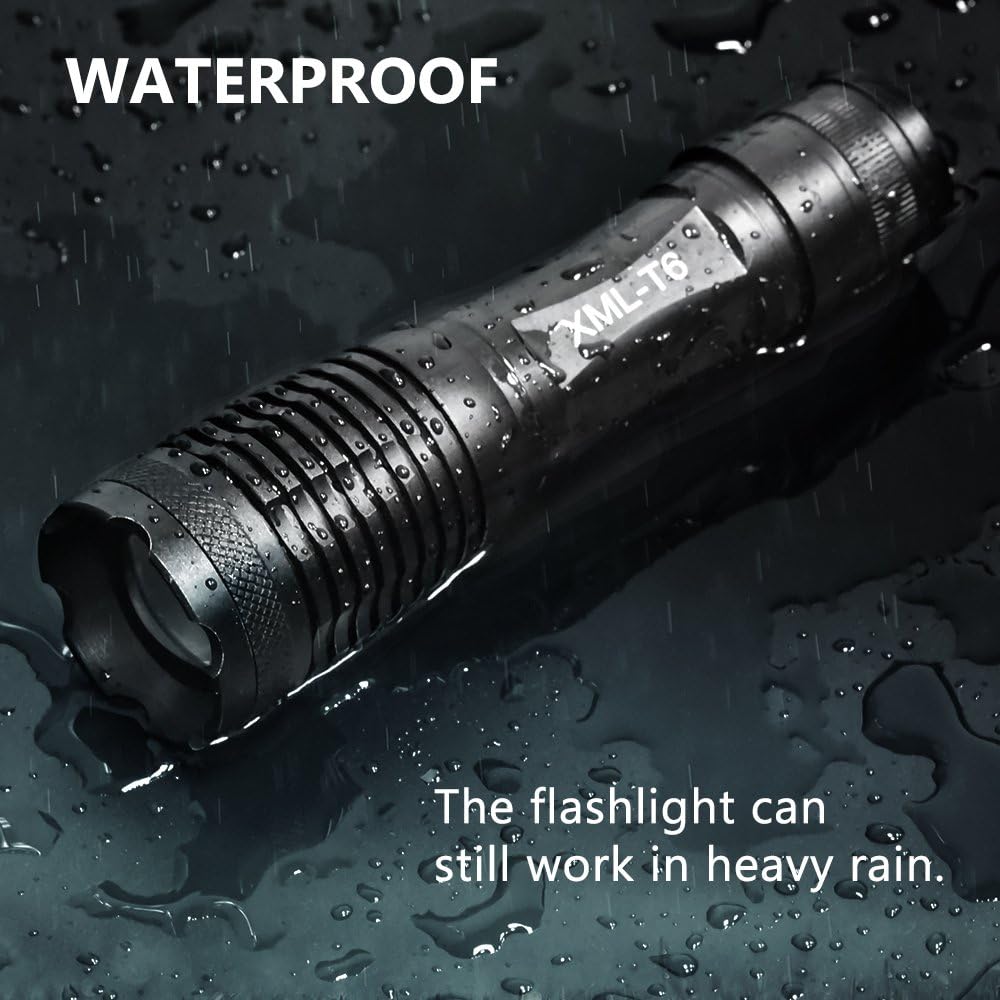
Image: The flashlight being exposed to water, visually confirming its water-resistant capabilities, suitable for use in rainy conditions.
6. Troubleshooting
If you encounter issues with your flashlight, please refer to the following common problems and solutions:
| Problem | Possible Cause | Solution |
|---|---|---|
| Flashlight does not turn on. | Batteries are dead or incorrectly inserted. | Replace batteries or check polarity. Ensure tail cap is fully tightened. |
| Light is dim or flickers. | Low battery power. Loose connections. | Replace batteries. Ensure tail cap and head are securely tightened. |
| Cannot change modes. | Button not pressed correctly. | Ensure you are lightly pressing the tail switch, not fully clicking it, to cycle modes. |
| Zoom function is stiff. | Dirt or debris in the sliding mechanism. | Gently clean the sliding parts. Avoid forcing the mechanism. |
7. Specifications
| Feature | Specification |
|---|---|
| Model Number | FL-002 |
| Light Source | CREE XML-T6 LED |
| Brightness | Up to 1800 Lumens |
| Light Modes | High, Medium, Low, Strobe, SOS (5 Modes) |
| Power Source | Battery Powered |
| Battery Type | 3 x AAA batteries (with adapter) OR 1 x 18650 rechargeable battery (batteries not included) |
| Material | Aluminum Alloy |
| Water Resistance | IP65 (Splash-proof, heavy rain resistant) |
| Dimensions (approx.) | 14.22 x 3.05 x 2.54 cm (5.6 x 1.2 x 1.0 inches) |
| Weight (approx.) | 130.41 g (4.6 ounces) |

Image: A technical diagram illustrating the dimensions of the flashlight in both zoomed-in (floodlight) and zoomed-out (spotlight) configurations.
8. Warranty and Support
Specific warranty information for this product is not provided in this manual. For details regarding warranty coverage, returns, or technical support, please refer to the product listing on the retailer's website or contact Wsiiroon customer service directly through their official channels.
When contacting support, please have your product model number (FL-002) and purchase details readily available.
Ask a question about this manual
Ask about setup, troubleshooting, compatibility, parts, safety, or missing instructions. Manuals+ will review the question and use this page’s manual context to help answer it.