
Introduction
This manual provides detailed instructions for the Magnavox MTFT716N Portable DVD/CD Player. Please read this manual thoroughly before operating the device to ensure proper use and to maximize its performance and lifespan. Keep this manual for future reference.
The Magnavox MTFT716N is a versatile portable entertainment device featuring a 7-inch TFT swivel screen, compatible with DVD, CD, CD-R, CD-RW, and JPEG formats. It includes built-in stereo speakers, a 3.5mm headphone jack, AV out jack, and a rechargeable battery providing approximately 2.5 hours of playback. The unit can be powered via the included AC adapter or car adapter.
Product Overview and What's in the Box
Familiarize yourself with the components of your portable DVD/CD player and the accessories included in the package.

Figure 1: Magnavox Portable DVD Player with remote control.

Figure 2: Included accessories: AV cables, headphones, car adapter, AC adapter, remote control, and AA batteries.
Package Contents:
- Magnavox MTFT716N Portable DVD/CD Player
- Remote control (with 2 AA batteries)
- AC/DC adapter
- Car adapter
- 3.5mm Headphones
- AV Connection Cables
Setup
1. Charging the Battery
The portable DVD player features a built-in rechargeable battery. Before first use, fully charge the battery for optimal performance.
- Connect the AC/DC adapter to the DC IN 12V port on the side of the player.
- Plug the AC/DC adapter into a standard wall outlet.
- The charging indicator light will illuminate. Allow approximately 3-4 hours for a full charge.
- Alternatively, use the car adapter to charge the unit while in a vehicle.

Figure 3: The unit features a rechargeable battery for portable use, offering approximately 2.5 hours of playback.
2. Powering On/Off
- Locate the Power switch on the side of the unit.
- Slide the switch to the 'ON' position to power on the player.
- To power off, slide the switch to the 'OFF' position.
3. Inserting a Disc
- Gently press the 'OPEN' button or latch to open the disc compartment cover.
- Place the DVD or CD onto the spindle with the label side facing up. Ensure the disc is securely seated.
- Close the disc compartment cover until it clicks into place.

Figure 4: Open the disc compartment to insert a DVD or CD.
4. Swivel Screen Adjustment
The 7-inch TFT screen can swivel and fold for various viewing angles.
- Carefully rotate the screen up to 180 degrees horizontally.
- Adjust the tilt angle for comfortable viewing.
- The screen can also be folded flat against the player, with the screen facing outwards, for compact viewing or mounting.
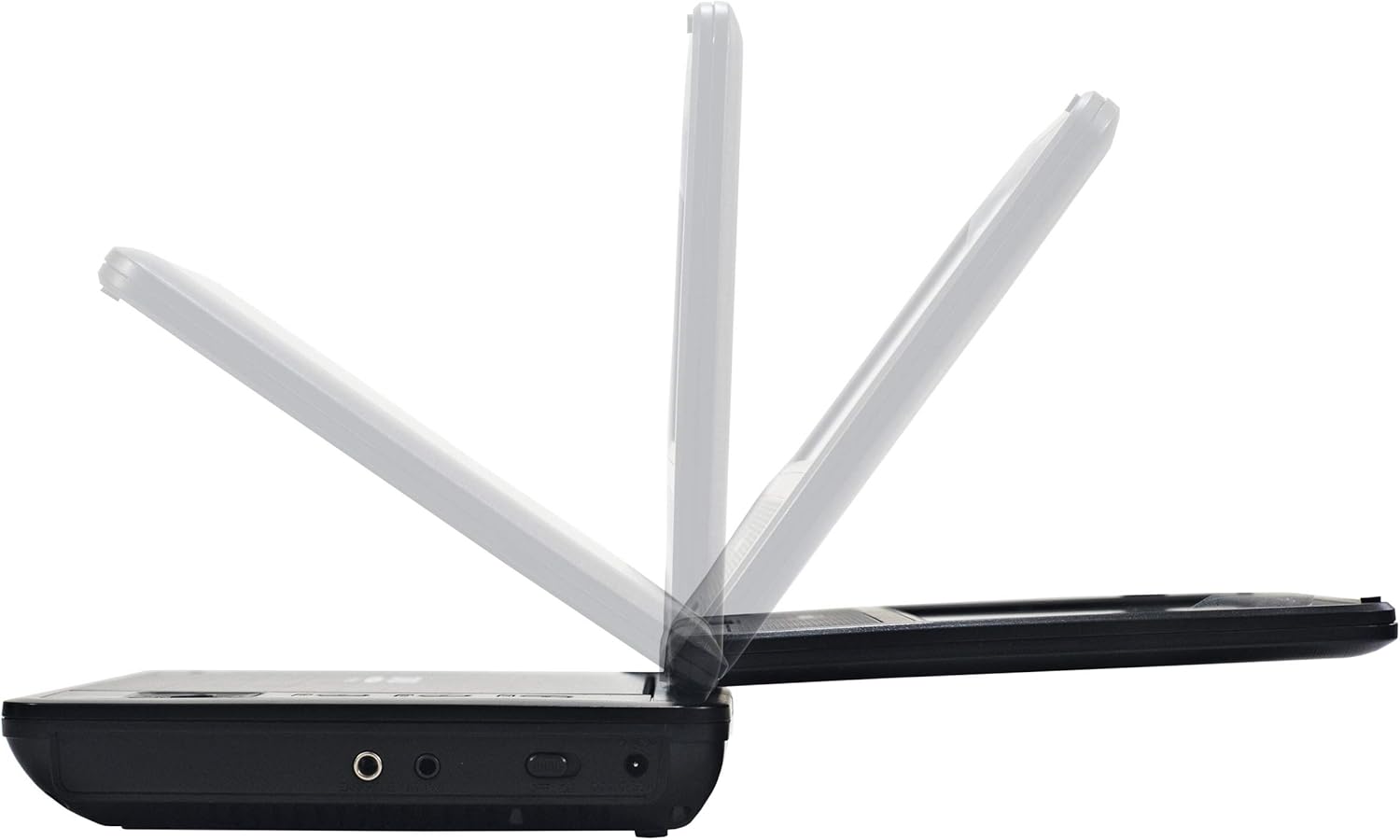
Figure 5: The swivel screen offers flexible viewing positions.
Operating
1. Basic Playback
- After inserting a disc and powering on, the player will typically begin playback automatically.
- Use the PLAY/PAUSE button to start or pause playback.
- Press the STOP button to halt playback.
- Use the SKIP FORWARD or SKIP BACKWARD buttons to navigate between tracks or chapters.
2. Volume Control
Adjust the volume using the dedicated volume buttons on the player or the remote control.
- Press VOL+ to increase volume.
- Press VOL- to decrease volume.
3. Headphone Use
For private listening, connect headphones to the 3.5mm headphone jack.
- Plug your headphones into the 'EARPHONE' jack on the side of the player.
- The built-in speakers will automatically mute when headphones are connected.

Figure 6: Enjoy private listening by connecting headphones to the 3.5mm jack.
4. AV Output Connection
You can connect the portable DVD player to an external display (e.g., a TV) using the AV OUT jack and the included AV cables.
- Connect one end of the AV cables to the 'AV OUT' jack on the player.
- Connect the other end of the AV cables to the corresponding AV input jacks on your television (typically yellow for video, red/white for audio).
- Select the correct AV input source on your television.

Figure 7: Side view of the player showing the EARPHONE, AV OUT, and DC IN 12V ports.
5. Remote Control
The included remote control provides full functionality for operating the player from a distance. Ensure the remote has 2 AA batteries installed and point it towards the player's IR sensor.
Maintenance
1. Cleaning the Unit and Screen
- Always power off and unplug the unit before cleaning.
- Use a soft, dry cloth to wipe the exterior of the player.
- For the screen, use a soft, lint-free cloth specifically designed for electronics screens. Do not use abrasive cleaners or solvents.
2. Disc Care
- Handle discs by their edges to avoid fingerprints and scratches.
- Store discs in their cases when not in use.
- Clean discs with a soft, lint-free cloth, wiping from the center outwards.
3. Battery Care
- To prolong battery life, avoid fully discharging the battery frequently.
- If storing the unit for an extended period, charge the battery to about 50% and store in a cool, dry place. Recharge every few months.
Troubleshooting
If you encounter issues with your portable DVD/CD player, refer to the following common problems and solutions.
| Problem | Possible Cause | Solution |
|---|---|---|
| Unit does not power on. | Battery is depleted or power adapter is not connected. | Connect the AC adapter and charge the battery. Ensure the power switch is in the 'ON' position. |
| Disc does not play. | Disc is dirty, scratched, or inserted incorrectly. Disc format is not supported. | Clean the disc. Reinsert the disc correctly. Ensure the disc is a supported format (DVD, CD, CD-R, CD-RW). |
| No sound from speakers/headphones. | Volume is too low or muted. Headphones not fully plugged in. | Increase the volume. Ensure headphones are fully inserted into the 'EARPHONE' jack. |
| Poor picture quality. | Disc is damaged. Screen settings are incorrect. | Try a different disc. Check the player's display settings if available. |
| Remote control not working. | Batteries are depleted or inserted incorrectly. Obstruction between remote and player. | Replace remote batteries. Ensure correct polarity. Remove any obstructions and point remote directly at the player's IR sensor. |
Specifications
| Feature | Description |
|---|---|
| Brand | Magnavox |
| Model Name | MTFT716N |
| Color | Black |
| Display | 7-inch TFT Swivel Screen |
| Compatible Media | DVD, CD, CD-R, CD-RW, JPEG |
| Audio Output | Built-in Stereo Speakers, 3.5mm Headphone Jack |
| Video Output | AV Out Jack |
| Connectivity Technology | Auxiliary |
| Power Source | AC/DC Adapter, Car Adapter, Built-in Rechargeable Battery |
| Battery Life | Approximately 2.5 hours |
| Item Dimensions (L x W x H) | 7.09" x 6.22" x 1.57" |
| UPC | 731398716012 |
Warranty and Support
For warranty information and customer support, please refer to the documentation included with your product or visit the official Magnavox website. The manufacturer of this product is World and Main.
Please retain your proof of purchase for any warranty claims.


