1. Introduction
This manual provides instructions for the proper use and maintenance of your KECHAODA K115 Dual SIM mobile phone. Please read this manual carefully before operating your device to ensure optimal performance and longevity.

Figure 1: Front view of the KECHAODA K115 mobile phone, showing the display and keypad.

Figure 2: Side view of the KECHAODA K115 mobile phone, illustrating its slim profile.
2. Package Contents
Verify that all items are present in the package:
- 1 KECHAODA K115 Mobile Phone
- 1 Battery
- 1 USB Cable
- 1 Warranty Card
Note: Earphones/headphones and a wall charger are not included with this product.

Figure 3: Illustration indicating that earphones are not included.

Figure 4: Illustration indicating that a wall charger is not included.
3. Setup
3.1. Installing the Battery
- Remove the back cover of the phone.
- Insert the 800 mAh Lithium Ion battery into the battery compartment, ensuring the contacts align.
- Replace the back cover.

Figure 5: Rear view of the KECHAODA K115, showing the battery cover and camera lens.
3.2. Installing SIM Cards
The KECHAODA K115 supports Dual SIM functionality.
- With the back cover and battery removed, locate the SIM card slots.
- Insert your GSM SIM cards into the designated slots.
- Ensure the SIM cards are correctly seated.
- Reinstall the battery and back cover.
3.3. Charging the Battery
Before first use, fully charge the phone's battery.
- Connect the provided USB cable to the phone's charging port.
- Connect the other end of the USB cable to a compatible USB wall adapter (not included) or a computer's USB port.
- The charging indicator will appear on the screen.
- Disconnect the charger once the battery is fully charged.
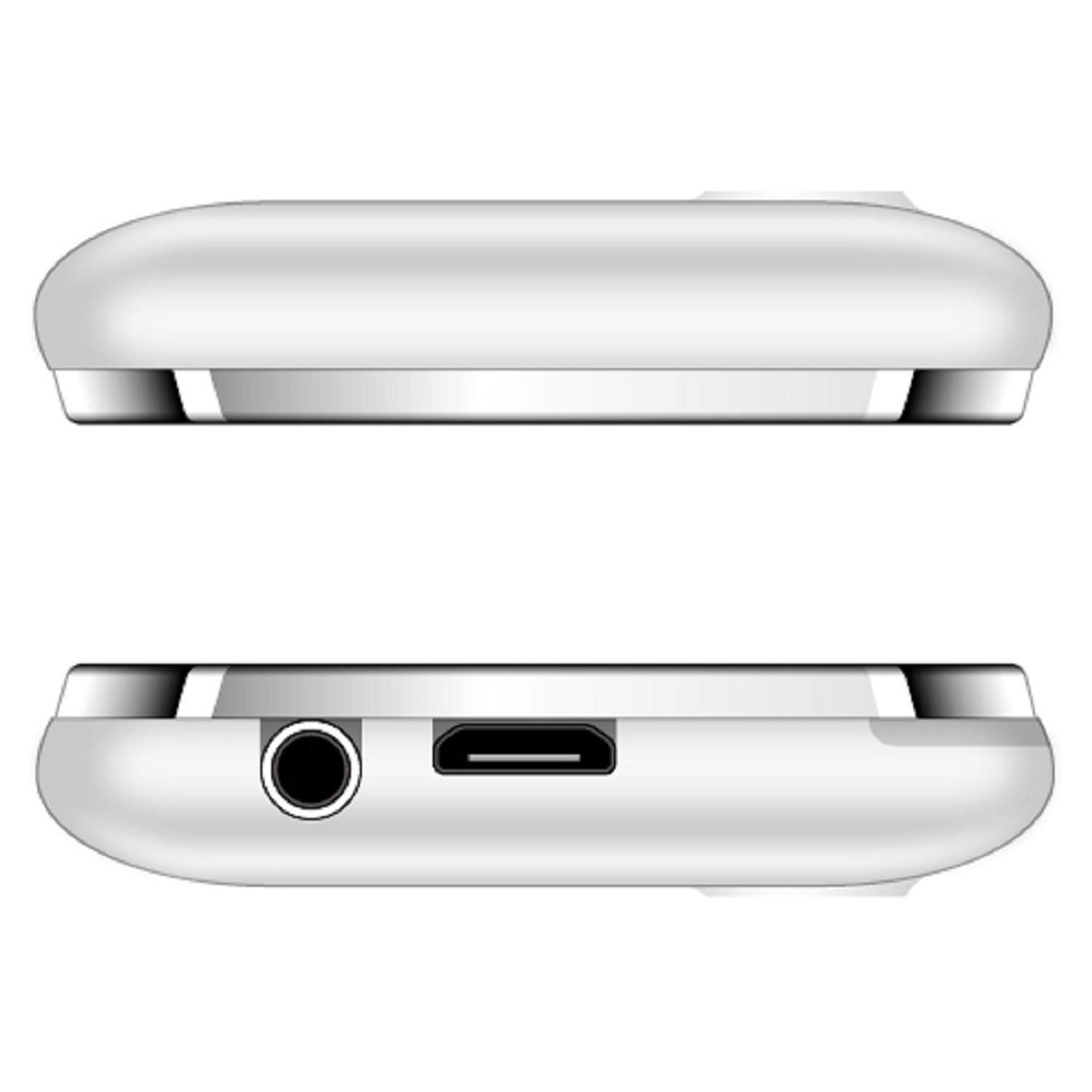
Figure 6: Top and bottom views of the KECHAODA K115, showing the 3.5mm audio jack and micro USB charging port.
4. Operating Instructions
4.1. Power On/Off
- To power on, press and hold the Power/End Call key until the screen lights up.
- To power off, press and hold the Power/End Call key until the power off options appear, then select 'Power off'.
4.2. Basic Phone Functions
- Making Calls: Enter the phone number using the keypad and press the Call key.
- Answering Calls: Press the Call key when the phone rings.
- Sending Messages: Navigate to the 'Messages' menu, select 'Write message', enter your text, and send to the desired recipient.
- Speed Dialing: Configure speed dial numbers in the phone settings for quick access.
4.3. Multimedia Features
- FM Radio: Access the FM Radio application from the main menu. Ensure a 3.5mm audio device is connected to act as an antenna for optimal reception. The phone supports FM recording.
- Audio Player: Play MP3, AMR, and WAV audio files.
- Video Player: Play MP4, 3GP, and AVI video files.
- Image Viewer: View stored image files.
- Sound Recorder: Record audio using the built-in sound recorder.
4.4. Connectivity
- Bluetooth: To pair with other Bluetooth devices (e.g., headsets), navigate to the Bluetooth settings, turn Bluetooth on, and search for available devices. The phone supports Bluetooth v2.1.
4.5. Other Features
- World Clock: View time in different time zones.
- EBook Reader: Read electronic books.
- Alarm: Set multiple alarms.
- File Manager: Organize files stored on the phone or memory card.
- Remote Notifier: Functionality for remote notifications.
- Language Support: The phone supports Hindi, English, Tamil, and Kannada languages.
5. Maintenance
- Keep the device dry. Moisture can damage electronic circuits.
- Do not expose the device to extreme temperatures.
- Clean the phone with a soft, dry cloth. Avoid using harsh chemicals.
- Handle the battery with care. Do not puncture, disassemble, or expose to high temperatures.
- Use only approved accessories.
6. Troubleshooting
| Problem | Possible Solution |
|---|---|
| Phone does not power on. | Ensure the battery is correctly installed and charged. Try charging the phone for at least 30 minutes. |
| Poor audio quality during calls. | Check network signal strength. Ensure the earpiece/speaker is not obstructed. Restart the phone. |
| Battery drains quickly. | Reduce screen brightness. Close unused applications. Limit background processes. Ensure the battery is fully charged before use. |
| Cannot connect to Bluetooth device. | Ensure Bluetooth is enabled on both devices and they are within range. Make sure the other device is in pairing mode. Restart both devices. |
| FM Radio not working. | Ensure a 3.5mm audio device (like headphones) is connected, as it acts as the antenna. |
7. Specifications
| Feature | Detail |
|---|---|
| Model | K115 |
| Display | 1.44 inch QQVGA LCD |
| Operating System | Symbian 9.1 |
| RAM | 32 MB |
| Internal Memory | 64 MB |
| SIM Support | Dual SIM (GSM) |
| Battery | 800 mAh Lithium Ion (Removable) |
| Talk Time | Up to 2.5 Hours |
| Standby Time | Up to 4.5 Days |
| Connectivity | Bluetooth v2.1, Cellular (GSM) |
| Audio Jack | 3.5 mm |
| Special Features | Dual SIM, Light Sensor, MP3, Radio, Rear Camera, Vibration, Speed Dialing |
| Product Dimensions | 9.5 x 4 x 0.9 cm |
| Item Weight | 100 g |
| Manufacturer | DHARAM & COMPANY, Shenzhen Kechaoda Technology Co. Ltd |
8. Warranty and Support
Your KECHAODA K115 mobile phone comes with a warranty card included in the package. Please refer to the warranty card for specific terms and conditions of the warranty.
For technical support or service inquiries, please contact your retailer or the manufacturer directly using the contact information provided on the warranty card or product packaging.


