
Introduction
This manual provides essential instructions for the safe and efficient operation, maintenance, and troubleshooting of the YUCHENGTECH XY-100MW Halogen Moisture Analyzer. Please read this manual thoroughly before using the device to ensure proper functionality and to prevent damage or injury.
Safety Information
Always observe the following safety precautions:
- Ensure the device is connected to a grounded power outlet with the correct voltage (220V 50Hz, or 110V with a transformer).
- Do not operate the analyzer in environments with flammable gases or liquids.
- Avoid touching the heating element during or immediately after operation, as it will be extremely hot.
- Use appropriate personal protective equipment (PPE) when handling samples or cleaning the device.
- Keep the device clean and free from dust and spills.
- Only qualified personnel should perform maintenance or repairs.
Setup
1. Unpacking and Inspection
Carefully remove the moisture analyzer from its packaging. Inspect the device for any signs of damage that may have occurred during transit. Retain all packaging materials for future transport or storage.
2. Placement
Place the analyzer on a stable, level surface, away from direct sunlight, drafts, vibrations, and heat sources. Ensure adequate space around the unit for ventilation and easy access.
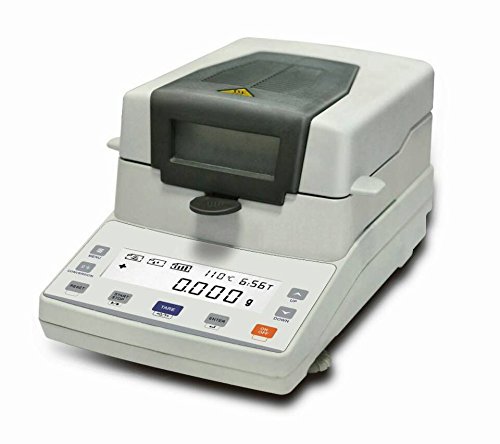
Figure 1: YUCHENGTECH XY-100MW Halogen Moisture Analyzer ready for operation. The lid is open, revealing the sample pan and heating chamber. A blue granular sample is visible in the pan.
3. Power Connection
Connect the power cord to the analyzer and then to a suitable grounded power outlet. If using a 110V power supply, ensure a compatible transformer is used as specified by the manufacturer.
4. Initial Preparation
Before first use, ensure the sample pan support and heating element are correctly installed and clean. Allow the device to warm up for at least 15 minutes after connecting power before performing any measurements.
Operating Instructions
1. Power On/Off
Press the POWER button to turn the analyzer on. The display will illuminate and perform a self-test. To turn off, press and hold the POWER button until the display shuts down.
2. Sample Preparation
Prepare your sample according to standard laboratory procedures. Ensure the sample is evenly spread on a clean, dry sample pan. The recommended sample size is typically between 1-10 grams, depending on the material and desired accuracy.
3. Setting Parameters
Use the control panel buttons to set the desired drying temperature (range: 40-199 degrees Celsius) and drying time. Consult your material's specifications for optimal settings. The temperature adjustment increment is 1 degree Celsius.
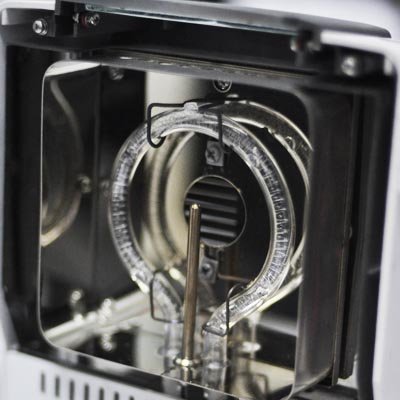
Figure 2: Detailed view of the halogen heating element, responsible for drying the sample. Ensure this area is kept clean and free from obstructions.
4. Starting a Test
- Place the prepared sample pan onto the pan support.
- Close the lid gently.
- Press the START button to begin the drying process. The display will show the current weight, temperature, and elapsed time.
5. Reading Results
Once the test is complete, the analyzer will beep, and the final moisture content (typically displayed as a percentage) will be shown on the screen. Record the results as needed. Open the lid and carefully remove the sample pan using heat-resistant gloves.
Maintenance
1. Cleaning
Regularly clean the sample pan, pan support, and the interior of the heating chamber. Use a soft, damp cloth and mild detergent. Ensure the device is unplugged and cooled down before cleaning. Do not use abrasive cleaners or solvents.
2. Calibration
Periodic calibration with certified reference weights is recommended to maintain measurement accuracy. Refer to the calibration section in the full user manual (if provided separately) for detailed instructions.
3. Storage
When not in use for extended periods, store the analyzer in a clean, dry, and temperature-controlled environment. Cover the device to protect it from dust.
Troubleshooting
| Problem | Possible Cause | Solution |
|---|---|---|
| Device does not power on. | No power supply; loose power cord; faulty outlet. | Check power cord connection; verify outlet functionality; ensure transformer is used for 110V. |
| Inaccurate readings. | Unstable surface; dirty pan/chamber; calibration needed; incorrect sample preparation. | Place on a stable surface; clean components; perform calibration; ensure proper sample spreading. |
| Heating element not working. | Element failure; incorrect temperature setting. | Verify temperature setting; contact support if element appears faulty. |
| Display shows error message. | Specific internal error. | Note the error code and consult the full user manual or contact customer support. |
Specifications
| Feature | Value |
|---|---|
| Model | XY-100MW |
| Capacity | 110g |
| Readability | 1mg |
| Repeatability | 0.01% |
| Pan Size | Ø90mm |
| Heating Temperature Range | 40-199 degrees Celsius |
| Temperature Adjustment | 1 degree Celsius |
| Environment Temperature | 5-35 degrees Celsius |
| Voltage | 220V 50Hz (110V requires transformer) |
Warranty and Support
This YUCHENGTECH product is covered by a standard manufacturer's warranty. For detailed warranty terms and conditions, please refer to the documentation included with your purchase or visit the official YUCHENGTECH website. For technical support, service, or spare parts, please contact your local distributor or the manufacturer directly.
Manufacturer: YUCHENGTECH
Model Number: YUCHENG715