
1. Introduction
This manual provides detailed instructions for the assembly, operation, and maintenance of your Nnewvante Bamboo Laptop Desk. Designed for versatility and comfort, this desk is suitable for use in various settings, including beds, sofas, and floors. Please read this manual thoroughly before use to ensure proper function and longevity of your product.

Figure 1: Nnewvante Bamboo Laptop Desk (Folded)
This image shows the Nnewvante Bamboo Laptop Desk in its folded, compact state, highlighting its portability and ease of storage.
2. Product Features
- Adjustable Tilt Top: The main desktop surface can be tilted to 5 different angles for ergonomic viewing and typing.
- Adjustable Leg Height: Legs can be adjusted from 24.6 cm to 36.6 cm (9.7 to 14.4 inches) to suit various user heights and preferences.
- Secure Leg Locks: Equipped with 4 secure latches to keep the legs firmly in place when extended, preventing accidental folding.
- Side Drawer: A small, convenient pull-out drawer for storing small items like pens, erasers, or clips.
- Removable Stopper: A wooden stopper prevents laptops or books from sliding off the tilted surface.
- Phone Slots: Two integrated slots for holding smartphones or small tablets, updated to be on the right side.
- Durable Material: Constructed from high-quality, solid bamboo for robustness and a smooth finish.

Figure 2: Key Features Diagram
This diagram illustrates the adjustable angles, desktop lock, side drawer, removable stopper, phone slot, leg locks, and adjustable leg height of the Nnewvante Bamboo Laptop Desk.
3. Parts List
Your Nnewvante Bamboo Laptop Desk comes pre-assembled. Please ensure all components are present and undamaged upon unboxing.
- Main Bamboo Desk Unit (with integrated tilt mechanism)
- Foldable Legs (2 pairs, with adjustable height and locking latches)
- Removable Stopper (1 piece)
- Side Storage Drawer (1 piece)
4. Setup Instructions
- Unfolding the Desk: Carefully unfold the legs outwards until they are fully extended.
- Securing the Legs: Engage the 4 orange latches on each leg to lock them into the upright position. Ensure all latches are securely fastened to prevent accidental collapse.
- Adjusting Leg Height: To adjust the height, locate the spring-loaded buttons on the inner side of each leg. Press the button and slide the leg extension to the desired height. Release the button to lock the leg in place. Ensure both legs are adjusted to the same height for stability.
- Inserting the Stopper: If using the tilt function, insert the removable wooden stopper into the designated slot at the bottom edge of the tilting panel to prevent items from sliding off.

Figure 3: Desk in Use with Laptop
This image demonstrates the Nnewvante Bamboo Laptop Desk fully set up and in use with a laptop, showcasing its functional design.
5. Operating Instructions
5.1 Adjusting the Tilt Angle
- Gently lift the tilting desktop panel.
- Select one of the 5 available angle settings by resting the support bar into the desired notch.
- Ensure the panel is securely seated in the chosen notch before placing items on it.
- To flatten, lift the panel slightly and push the support bar back into its lowest position.
5.2 Using the Side Drawer
- The small drawer located on the right side of the desk can be pulled out to store small accessories.
- Push the drawer back in completely when not in use to prevent accidental opening.
5.3 Utilizing Phone Slots
- The two slots on the right side of the desk are designed to hold smartphones or small tablets upright for easy viewing.
- The larger slot (13 x 3.5 cm) is suitable for wider devices, while the smaller slot (13 x 1 cm) is for thinner devices.

Figure 4: Top View of Desk Features
This image provides a top-down view of the Nnewvante Bamboo Laptop Desk, clearly showing the main tilting surface, the integrated side drawer, and the two phone/tablet slots.
6. Maintenance and Care
- Cleaning: Wipe the desk surface with a soft, damp cloth. For stubborn stains, use a mild soap solution and immediately dry with a clean towel. Avoid abrasive cleaners or harsh chemicals.
- Drying: After cleaning, ensure the bamboo is thoroughly dried to prevent water damage or warping.
- Storage: When not in use, fold the desk and store it in a dry place away from direct sunlight or extreme temperatures to preserve the bamboo.
- Avoid Overloading: Do not place excessively heavy items on the desk to prevent damage to the tilting mechanism or legs.
7. Troubleshooting
| Problem | Possible Cause | Solution |
|---|---|---|
| Desk feels unstable/wobbly. | Legs not fully extended or latches not secured. Legs adjusted to different heights. | Ensure legs are fully extended and all 4 latches are securely engaged. Verify both legs are set to the same height. |
| Tilting panel does not stay in place. | Support bar not properly seated in the notch. | Lift the panel and re-seat the support bar firmly into the desired angle notch. |
| Items slide off the tilted panel. | Removable stopper not inserted. | Insert the removable wooden stopper into the slot at the bottom edge of the tilting panel. |
8. Specifications
- Brand: Nnewvante
- Model Number: 71L
- Material: Bamboo
- Color: Bamboo
- Product Dimensions (L x W x H): 70.99 x 35.05 x 24.64 cm (27.95 x 13.8 x 9.7 inches)
- Adjustable Height Range: 24.6 cm to 36.6 cm (9.7 to 14.4 inches)
- Folded Thickness: Approximately 4.5 cm (1.8 inches)
- Net Weight: 3.31 kg (7.3 lbs)
- Tilting Panel Dimensions: 35 x 35 cm (13.8 x 13.8 inches)
- Phone Slot Dimensions: 13 x 1 cm and 13 x 3.5 cm
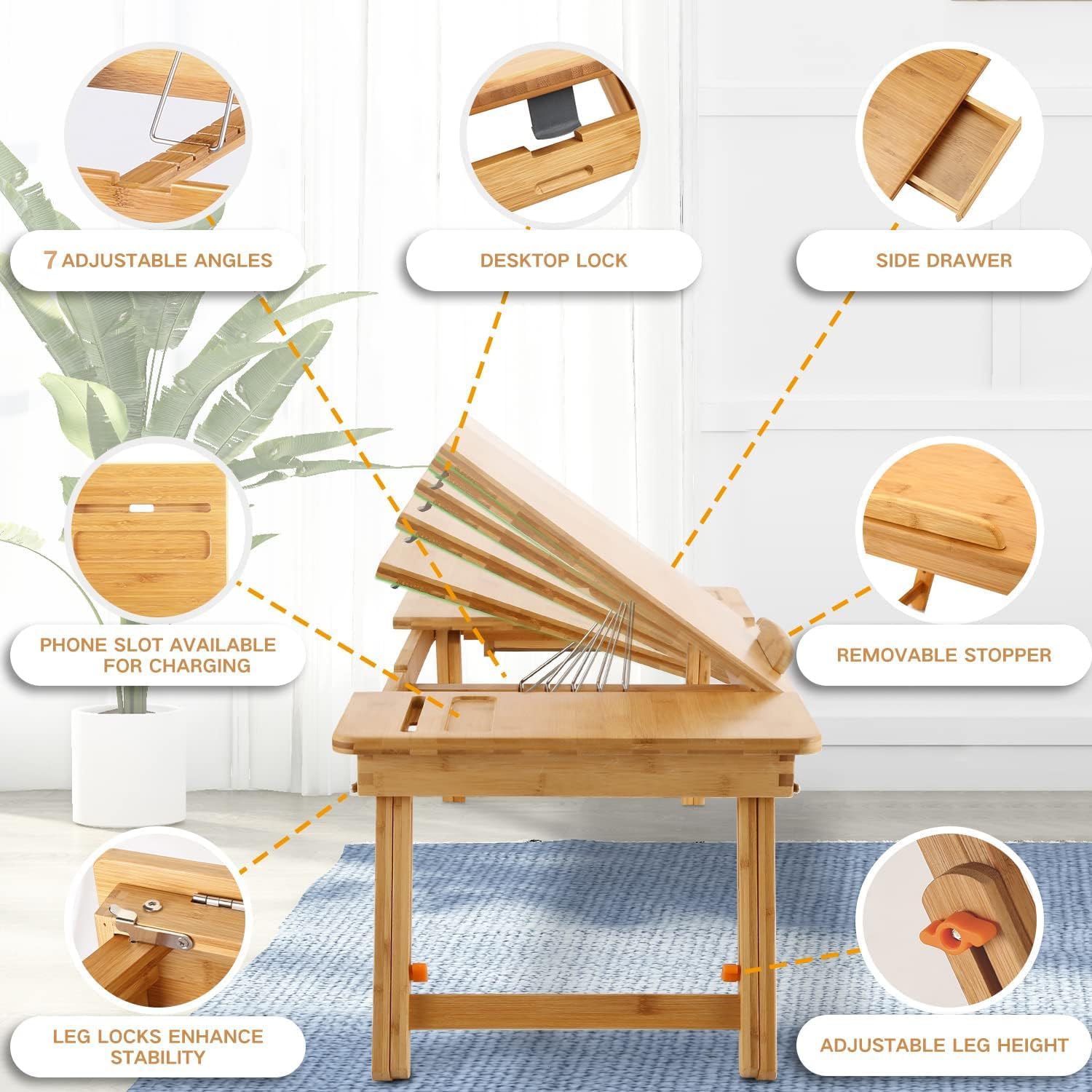
Figure 5: Product Dimensions
This image provides a detailed overview of the Nnewvante Bamboo Laptop Desk's dimensions, including overall length, width, and adjustable height ranges.
9. Warranty and Support
The Nnewvante Bamboo Laptop Desk comes with a 1-year quality guarantee from the date of purchase. This warranty covers manufacturing defects and material flaws under normal use.
For warranty claims, technical support, or any inquiries regarding your product, please contact your retailer or the manufacturer directly. Please retain your proof of purchase for warranty validation.