
Winnes TK905
Winnes TK905 4G GPS Tracker User Manual
Magnetic GPS Tracker for Vehicles, Motorcycles, and Trucks
1. Product Overview
The Winnes TK905 is a versatile 4G GPS tracker designed for real-time location tracking of vehicles, motorcycles, and trucks. It features strong magnetic mounting for easy installation, a durable IP65 waterproof design, and a long-lasting internal battery. This device supports both GPS and LBS dual-mode positioning, providing accurate location data accessible via a free mobile application or web platform.

Figure 1: The Winnes TK905 GPS Tracker main unit, a compact black device with the Winnes logo.
Package Contents:
- Winnes TK905 GPS Tracker Unit
- USB Charging Cable
- User Manual
- SIM Card Adapters (if applicable)

Figure 2: The complete package contents, including the tracker, charging cable, user manual, and SIM card adapters.
2. Setup Guide
2.1 SIM Card Installation
The TK905 GPS tracker requires a 4G/2G cellular SIM card with an active data plan (minimum 30MB monthly data recommended). A Speedtalk SIM card is compatible for use in the USA.
- Locate the SIM card slot on the side of the device. Refer to Figure 3 for port locations.
- Open the rubber cover protecting the SIM card slot and USB port.
- Insert the activated SIM card into the slot with the metal contacts facing down and the notched corner aligned correctly. Ensure it clicks into place.
- Close the rubber cover firmly to maintain the device's IP65 waterproof rating.
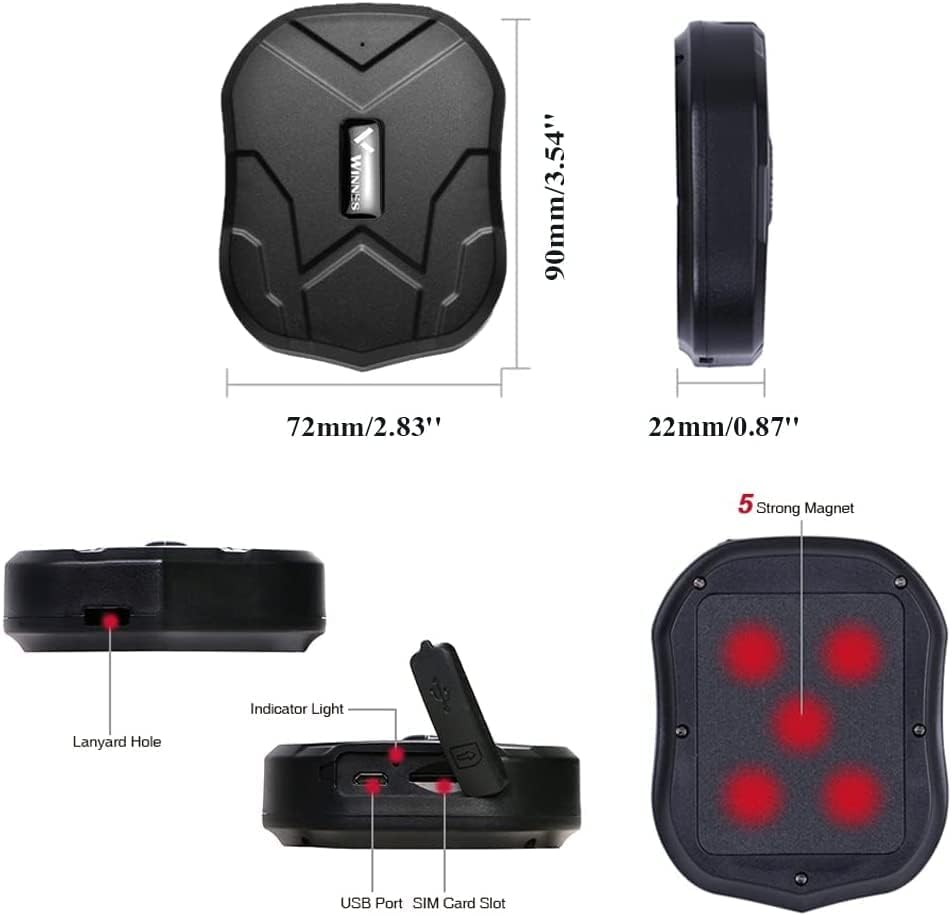
Figure 3: Device dimensions and port locations, including the USB port and SIM card slot.
2.2 Initial Charging
Before first use, fully charge the device using the provided USB cable. Connect the cable to the USB port on the tracker and a standard USB power adapter (not included).
- The indicator light will show charging status.
- A full charge typically takes several hours.
- The built-in 5000mAh lithium battery provides up to 50 days of standby time and approximately 7 days of normal working time.
2.3 Powering On/Off
The device typically powers on automatically once a charged battery is inserted or when connected to power. To power off, specific instructions may be in the detailed manual, or it may enter a low-power sleep mode when inactive.
2.4 Application and Web Tracking Setup
The Winnes TK905 offers lifetime free access to its tracking application and web platform. Download the app from your mobile device's app store or access the web platform via a browser.
- Scan the QR code provided in the manual or on the product packaging to download the official app.
- Alternatively, visit http://www.mytkstar.net/download.htm to download the app or access the web platform.
- Register an account using the device's unique ID number (usually found on the device or packaging).
- Follow the on-screen instructions to add your device to your account.

Figure 4: The mobile application interface, showing tracking features and the QR code for app download.
3. Operating Instructions
3.1 Real-time Tracking
The TK905 provides real-time location tracking with GPS and LBS dual-mode positioning. GPS accuracy is typically 5-10 meters, while LBS (Location Based Service) is used when GPS signals are weak or unavailable, with accuracy ranging from 100-1000 meters.
- Access the real-time tracking feature through the mobile app or web platform.
- The device's current location will be displayed on a map interface (e.g., Google Maps).
- Location updates are continuous, allowing for constant monitoring.

Figure 5: Real-time tracking displayed across mobile, tablet, and computer interfaces, showing a vehicle's current position on a map.

Figure 6: Illustrates the difference in accuracy between LBS (Location Based Service) and GPS positioning.
3.2 Historical Route Playback
Review past movements of the tracker for up to 6 months. This feature is useful for analyzing travel patterns or verifying routes.
- Navigate to the "History Route" or "Playback" section within the app or web platform.
- Select a date and time range to view the historical path.
- The route will be displayed on the map with timestamps.

Figure 7: A mobile phone screen displaying a historical route traced on a map, indicating past movements of the tracker.
3.3 Geo-fence Function
Set up virtual boundaries (geo-fences) on the map. You will receive an alert if the tracker enters or exits these predefined areas.
- In the app/web platform, find the "Geo-fence" or "Safety Zone" setting.
- Draw a circular or polygonal area on the map.
- Configure alerts for entry, exit, or both.
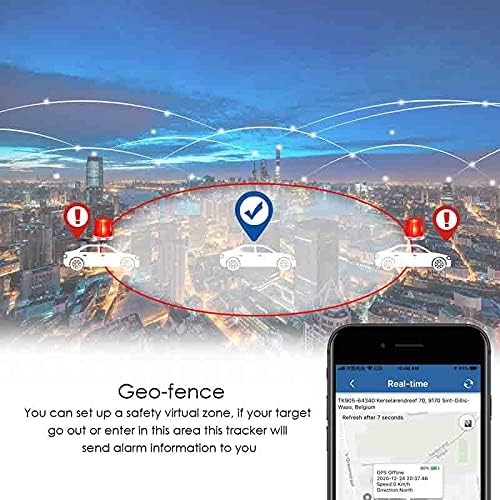
Figure 8: An illustration of the geo-fence feature, where vehicles trigger alarms upon entering or exiting a designated virtual safety zone.
3.4 Alarm Functions
The TK905 is equipped with multiple alarm features to enhance security and monitoring. Alerts are typically sent as text messages to the administrator number configured in the device settings.
- Over-speed Alarm: Receive an alert if the tracker exceeds a preset speed limit.
- Shake Alarm: An alarm is triggered if the device detects significant vibration or movement, indicating potential tampering or unauthorized vehicle movement.
- Low Power Alarm: When the battery level drops below 10%, an alert is sent to remind you to recharge the device.
- Movement Alarm: Alerts for unauthorized movement or towing of the vehicle.

Figure 9: Visual representation of the low battery, overspeed, and vibrate alarm functions of the tracker.
4. Installation and Mounting
The Winnes TK905 features a strong magnetic base, allowing for quick and secure installation without the need for professional tools or permanent fixtures. It can be attached to any iron surface on a vehicle.
- Identify a flat, metallic surface on the vehicle where the tracker can be securely attached. Common locations include under the chassis, inside the trunk, or on metal frames.
- Ensure the surface is clean and free of debris for optimal magnetic adhesion.
- Simply place the tracker onto the chosen metallic surface. The strong built-in magnets will hold it in place.

Figure 10: Illustrates various potential magnetic mounting points on a car, such as the front bumper, under the chassis, and inside the trunk.
5. Maintenance and Battery Life
5.1 Battery Management
The TK905 is equipped with a 5000mAh lithium battery. To maximize battery life and ensure continuous operation:
- Recharge the device promptly when a low power alarm is received.
- Avoid fully discharging the battery frequently.
- For extended periods of inactivity, store the device with a partial charge (around 50%) in a cool, dry place.
- The device features smart sleep modes to conserve battery consumption, extending standby time.

Figure 11: Demonstrates how smart sleep modes help in saving battery consumption compared to continuous operation.
5.2 General Care
- The device is IP65 waterproof, meaning it is protected against dust ingress and low-pressure water jets. However, avoid submerging it in water.
- Clean the device with a soft, dry cloth. Do not use harsh chemicals or abrasive cleaners.
- Ensure the rubber cover for the SIM card slot and USB port is always securely closed to maintain water and dust resistance.
6. Troubleshooting
| Problem | Possible Cause | Solution |
|---|---|---|
| Device not powering on. | Low battery; incorrect SIM card insertion. | Charge the device fully. Re-insert SIM card correctly. |
| No real-time tracking data. | No SIM card signal; no data plan; device in an area with poor signal. | Check SIM card activation and data plan. Move device to an open area with good cellular and GPS signal. |
| Inaccurate location. | Weak GPS signal (e.g., indoors, underground); relying on LBS. | Move the device to an open outdoor area for better GPS reception. |
| Alarms not received. | Incorrect administrator number configured; SIM card issues. | Verify administrator number in settings. Check SIM card balance and functionality. |
For further assistance, please refer to the contact information in the Support section.
7. Specifications
- Model Number: TK905
- Dimensions: 5.16 x 3.94 x 2.32 inches (Package Dimensions)
- Item Weight: 11.3 ounces
- Battery: 1 Lithium Metal battery (5000mAh)
- Standby Time: Up to 50 days
- Normal Working Time: Approximately 7 days
- Connectivity: 4G/2G Cellular
- Positioning: GPS + LBS Dual Mode
- GPS Accuracy: Up to 16ft / 5m
- Special Features: Magnetic mounting, IP65 Waterproof, Dustproof, Impact Resistant
- Supported Application: Alarm, GPS
- Specific Uses: Vehicle management, Location tracking
- Manufacturer: Winnes
8. Warranty and Support
8.1 Warranty Information
Specific warranty details are typically provided with your purchase documentation. Please retain your proof of purchase for any warranty claims. The manufacturer, Winnes, provides support for their products.
8.2 Customer Support
For any issues, questions, or technical support regarding your Winnes TK905 GPS Tracker, please contact the seller directly via Amazon messages. Free 24/7 support is available to assist you.
Related documentsTK905


Ask a question about this manual
Ask about setup, troubleshooting, compatibility, parts, safety, or missing instructions. Manuals+ will review the question and use this page’s manual context to help answer it.