
eYotto 1163
eYotto Multifunction Sport Watch User Manual
Model: 1163
Introduction
Thank you for choosing the eYotto Multifunction Sport Watch. This watch is designed for active individuals, featuring both analog and digital displays, an LED backlight, alarm, and stopwatch functions. It is built with durability and water resistance in mind, making it suitable for various daily activities and outdoor sports. Please read this manual carefully to understand the full capabilities of your watch and ensure proper operation and maintenance.
Safety Information
- Do not press any buttons while the watch is submerged in water.
- Avoid exposing the watch to hot water or steam, as this can compromise its water resistance.
- Keep the watch away from strong magnetic fields, which may affect timekeeping accuracy.
- Do not attempt to open the watch case or replace the battery yourself, as this may void the warranty and damage the watch.
- Clean the watch regularly as described in the Maintenance section to prevent dirt buildup.
Product Overview
Familiarize yourself with the different parts and buttons of your eYotto Sport Watch:
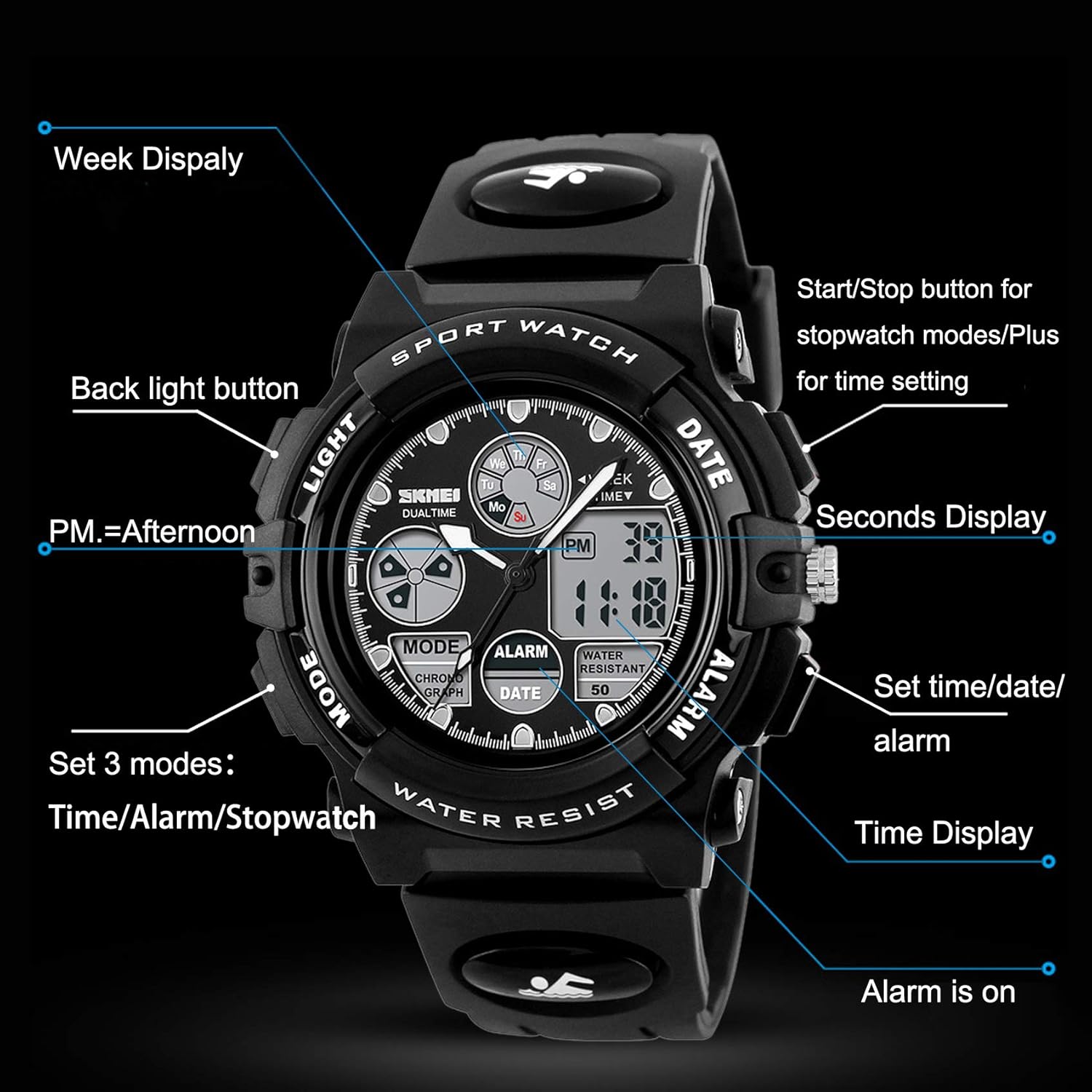
Image Description: This image displays the eYotto Sport Watch with labels pointing to its various components and buttons. Key features highlighted include the "LIGHT" button (top left), "MODE" button (bottom left), "DATE" button (top right), "ALARM" button (bottom right), the analog display, digital time display, seconds display, week display, and indicators for PM and alarm status. This diagram is crucial for understanding how to operate the watch's functions.
- LIGHT Button (Top Left): Activates the EL backlight for visibility in low light conditions.
- MODE Button (Bottom Left): Cycles through different modes: Time, Alarm, and Stopwatch.
- DATE Button (Top Right): Used for starting/stopping the stopwatch and adjusting values during time setting.
- ALARM Button (Bottom Right): Used for setting time/date/alarm and resetting the stopwatch.
- Analog Display: Traditional hour and minute hands.
- Digital Display: Shows digital time, date, and other mode-specific information.
Setup and Operation
1. Setting Time and Date
- In normal time display mode, press the MODE button three times to enter time setting mode. The seconds will start flashing.
- Press the ALARM button to cycle through the setting items: Seconds → Hour → Minute → Month → Date → Day of Week.
- Use the DATE button to adjust the flashing value. Hold the button to increase values quickly.
- Once all settings are complete, press the MODE button to exit setting mode and return to normal time display.
- To switch between 12-hour and 24-hour format, press the DATE button while the hour is flashing in time setting mode.
2. Setting the Alarm
- From normal time display, press the MODE button twice to enter alarm setting mode. The hour digits will flash.
- Press the DATE button to adjust the alarm hour.
- Press the ALARM button to switch to minute setting. The minute digits will flash.
- Press the DATE button to adjust the alarm minute.
- Press the MODE button to exit alarm setting mode.
- To turn the alarm ON/OFF, press and hold the ALARM button, then press the DATE button. An alarm icon will appear/disappear on the display.
3. Using the Stopwatch
- From normal time display, press the MODE button once to enter stopwatch mode. The display will show "00:00:00".
- Press the DATE button to start the stopwatch.
- Press the DATE button again to pause the stopwatch.
- Press the ALARM button to reset the stopwatch to "00:00:00" while it is paused.
- Press the MODE button to exit stopwatch mode and return to normal time display.
4. Using the EL Backlight
The watch features an EL backlight for easy viewing in dark conditions.

Image Description: This image shows two identical eYotto Sport Watches side-by-side. The left watch displays the "NORMAL DISPLAY MODE" with no backlight. The right watch displays the "EL LIGHT DISPLAY MODE" with a bright green backlight illuminating the digital display and parts of the analog face. This illustrates the effect of pressing the LIGHT button.
- Press the LIGHT button (top left) to activate the EL backlight.
- The backlight will illuminate the digital display for a few seconds.
Water Resistance Guidelines
Your eYotto Sport Watch is water resistant up to 50 meters (5 ATM), making it suitable for daily use and various water activities. However, it is important to follow these guidelines:

Image Description: This image shows a young boy swimming underwater, wearing the eYotto Sport Watch on his wrist. Above the water, icons depict various water activities: washing hands, car wash, daily waterproof, and swimming. A note at the bottom states: "NOTE: Long time underwater activities are not recommended". This image visually confirms the watch's suitability for water exposure during activities like swimming, but advises against prolonged submersion.
- Suitable for: Hand washing, car washing, daily splashes, rain, and swimming.
- Not suitable for: Hot water baths, hot showers, saunas, or deep diving.
- Important: Do not press any buttons while the watch is underwater. This can allow water to enter the watch case.
- If the watch is exposed to saltwater, rinse it with fresh water and dry it thoroughly.
Maintenance
- Cleaning: Wipe the watch case and strap with a soft, damp cloth. For stubborn dirt, use a mild soap solution and rinse thoroughly. Ensure the watch is dry before wearing.
- Storage: When not in use for extended periods, store the watch in a cool, dry place away from direct sunlight and extreme temperatures.
- Battery: The watch uses a standard watch battery. When the display dims or functions become erratic, it may be time for a battery replacement. It is recommended to have the battery replaced by a professional watch repair service to maintain water resistance.
- Strap Care: The durable PU rubber strap is designed for comfort and flexibility. Avoid exposing it to harsh chemicals or excessive stretching to prolong its lifespan.
Troubleshooting
| Problem | Possible Cause | Solution |
|---|---|---|
| Digital display is dim or blank. | Low battery. | Replace the battery. |
| Time is inaccurate. | Incorrect time setting; exposure to strong magnetic fields. | Re-set the time according to the instructions. Keep watch away from magnets. |
| Alarm does not sound. | Alarm is not activated; incorrect alarm time set. | Ensure alarm is turned ON (alarm icon visible). Verify alarm time setting. |
| Water inside the watch. | Buttons pressed underwater; exposure to hot water/steam; damaged seal. | Stop using the watch immediately. Seek professional repair. Avoid hot water and pressing buttons underwater. |
Specifications
- Brand: eYotto
- Model Number: 1163
- Movement: Quartz
- Display Type: Analog and Digital (Dual Display)
- Case Material: ABS Plastic
- Strap Material: Soft PU Rubber
- Case Diameter: 44 mm
- Case Thickness: 17 mm
- Band Width: 20 mm
- Water Resistance: 50 meters (5 ATM)
- Functions: Time, Date, Week, Alarm, Stopwatch, EL Backlight (Night Vision), 12/24 Hour System.
- Suitable Wrist Circumference: 160 mm to 230 mm
Warranty and Support
eYotto provides a 180-day warranty for this product. If you encounter any issues or have questions regarding your watch, please contact eYotto customer service through the Amazon platform where you purchased the product. Please provide your order details and a description of the issue for prompt assistance.
For further assistance, please refer to the contact information provided with your purchase or visit the official eYotto support page.
Ask a question about this manual
Ask about setup, troubleshooting, compatibility, parts, safety, or missing instructions. Manuals+ will review the question and use this page’s manual context to help answer it.