
1. Introduction
Thank you for choosing the Mount-It! MI-765 Full-Motion Gas Spring Monitor Wall Mount Arm. This manual provides essential information for safe installation, operation, and maintenance of your new monitor arm. Please read these instructions thoroughly before installation and keep them for future reference.
This monitor arm is designed to securely mount 13-32 inch screens weighing up to 14.3 lbs (6.5 kg) with VESA 75x75mm or 100x100mm mounting patterns. Its full-motion gas spring mechanism allows for effortless adjustment of tilt, swivel, rotation, and height, optimizing your viewing experience and freeing up valuable desk space.
2. Safety Information
WARNING: Failure to read and follow all instructions may result in personal injury, property damage, or voiding of warranty. If you do not understand these instructions or have doubts about the safety of the installation, please contact Mount-It! customer support.
- Do not install this product on drywall alone. It must be mounted to a solid wood stud, concrete, or brick wall.
- Ensure the mounting surface can safely support the combined weight of the equipment and all attached hardware.
- Do not exceed the maximum weight capacity of 14.3 lbs (6.5 kg).
- Use only the provided mounting hardware. Do not use screws that are longer or shorter than those supplied.
- This product contains small items that could be a choking hazard if swallowed. Keep away from children.
- Check that the monitor arm is secure and safe to use at regular intervals (at least every three months).
3. Package Contents
Please verify that all components are present and undamaged before installation. If any parts are missing or defective, contact Mount-It! customer support.
- Monitor Arm Assembly
- Wall Plate
- VESA Plate
- Mounting Hardware (Lag Screws, Washers, Concrete Anchors)
- Monitor Mounting Screws (various sizes)
- Hex Wrenches for adjustment
- Cable Management Covers
4. Specifications
| Feature | Detail |
|---|---|
| Model Number | MI-765 |
| Mounting Type | Wall Mount |
| Movement Type | Articulating, Gas Spring |
| Compatible Screen Sizes | 13 - 32 inches |
| Weight Capacity | Up to 14.3 lbs (6.5 kg) |
| VESA Compatibility | 75x75mm, 100x100mm |
| Tilt Angle | +90° / -45° |
| Swivel Angle | 180° |
| Rotation | 360° (Portrait to Landscape) |
| Extension from Wall | Up to 17.1 inches (43.4 cm) |
| Height Adjustment | Up to 9.85 inches (25 cm) |
| Material | Steel |
5. Installation
Follow these steps carefully to install your Mount-It! MI-765 monitor wall mount arm.
5.1. Wall Mounting Options
This mount is designed for installation on a single wood stud, solid concrete, or brick wall. DO NOT MOUNT ON DRYWALL ALONE.

Image: Secure Wall Installation. This image illustrates the compatible wall types for mounting: brick wall, solid concrete, and single wood stud. It explicitly states, 'Do not mount directly onto drywall.'
Video: Full Motion Monitor Wall Mount | MI-765 (Installation). This video provides a step-by-step guide on how to install the MI-765 monitor wall mount, covering both wood stud and concrete/brick mounting procedures, as well as monitor attachment and gas spring adjustment.
5.1.1. Wood Stud Mounting
- Locate the center of a wood stud using a stud finder.
- Position the wall plate at the desired height and use a level to ensure it is straight. Mark the pilot hole locations.
- Drill pilot holes using a 3/16 inch (4.5mm) drill bit to a depth of 2.2 inches (55mm).
- Attach the wall plate to the stud using the provided lag screws and washers. Tighten until secure, but do not overtighten.
5.1.2. Concrete or Brick Wall Mounting
- Position the wall plate at the desired height and use a level to ensure it is straight. Mark the pilot hole locations.
- Drill pilot holes using a 3/8 inch (10mm) drill bit to a depth of 2.4 inches (60mm).
- Insert the concrete anchors into the drilled holes. Ensure they are flush with the wall surface.
- Attach the wall plate to the wall using the provided lag screws and washers. Tighten until secure, but do not overtighten.
5.2. Attaching the Monitor
- Select the appropriate mounting bolts (M4, M5, M6, M8) and washers for your monitor's VESA mounting holes.
- Install the top two bolts and washers into your monitor's VESA holes, leaving a small gap (approx. 0.11 inches or 3mm) between the screw head and the monitor. This gap allows the monitor to hook onto the VESA plate.
- Carefully hang the monitor onto the top hooks of the VESA plate.
- Install the lower two bolts and washers through the lower holes of the VESA plate and into your monitor.
- Tighten all four bolts until secure. Do not overtighten.
5.3. Gas Spring Adjustment
The gas spring tension needs to be adjusted to match your monitor's weight for optimal performance.

Image: Smooth Gas Spring Adjustment. This image illustrates how to adjust the gas spring tension using a hex wrench. Turning clockwise is for lighter monitors, and turning counter-clockwise is for heavier monitors.
Video: Full Motion Monitor Wall Mount | MI-765 (Installation). This video demonstrates the gas spring adjustment process, showing how to use the hex wrench to increase or decrease tension based on monitor weight.
- Position your monitor horizontally.
- If the monitor drops, the tension is too low. If it rises on its own, the tension is too high.
- Lift the arm slightly to access the tension bolt located on the top of the arm.
- Use the provided hex wrench:
- Turn counter-clockwise (towards '+') for heavier monitors (to increase tension).
- Turn clockwise (towards '-') for lighter monitors (to decrease tension).
- Adjust in small increments and test the monitor's movement until it stays in place at any height.
6. Operating and Adjustments
Your Mount-It! MI-765 monitor arm offers a wide range of adjustments for optimal viewing comfort.
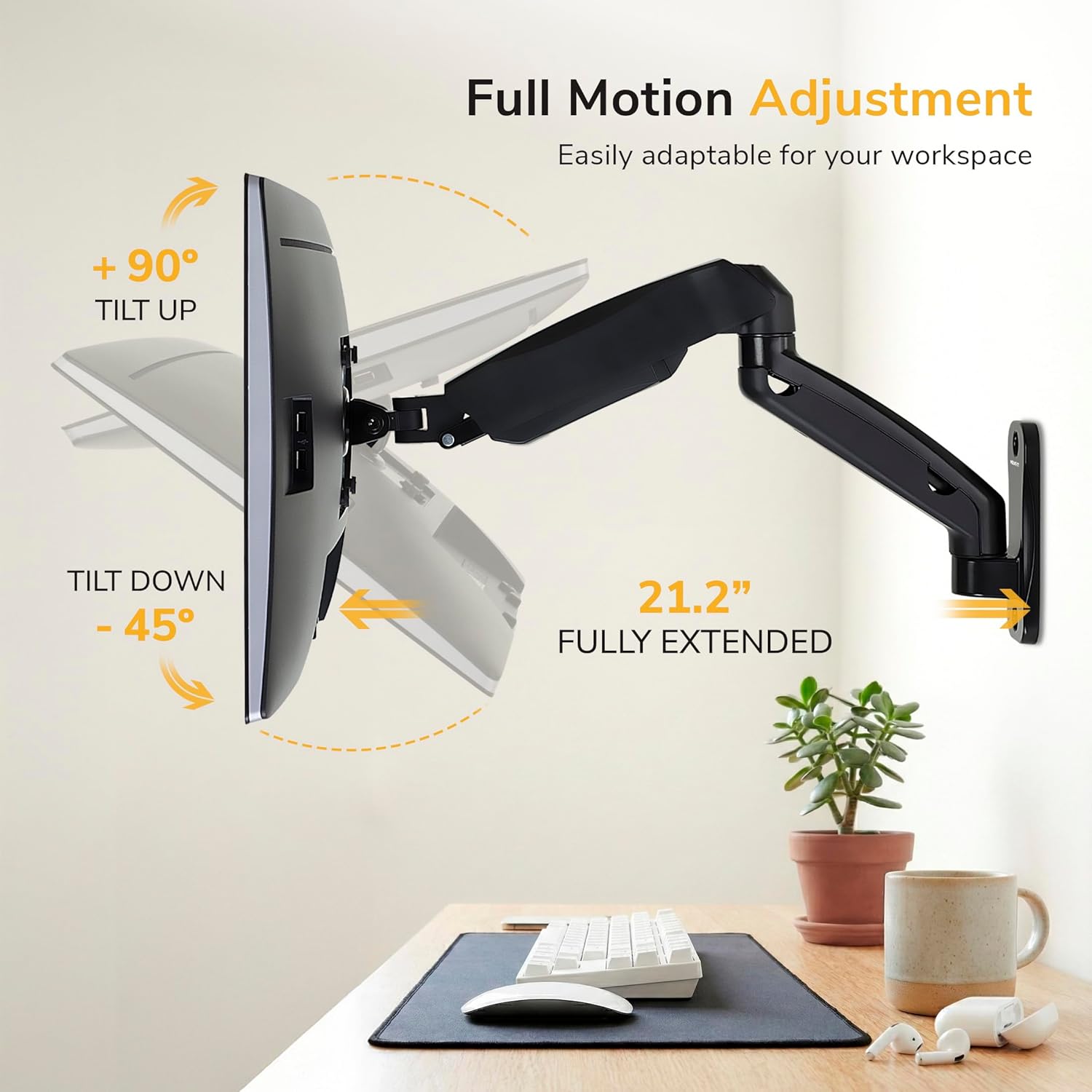
Image: Full Motion Adjustment. This image highlights the extensive tilt range (+90° to -45°) and the maximum extension of 21.2 inches from the wall, demonstrating the arm's adaptability.

Image: Find The Right Height. This image illustrates the vertical height adjustment capability of up to 9.85 inches, enabled by the gas spring mechanism for effortless positioning.
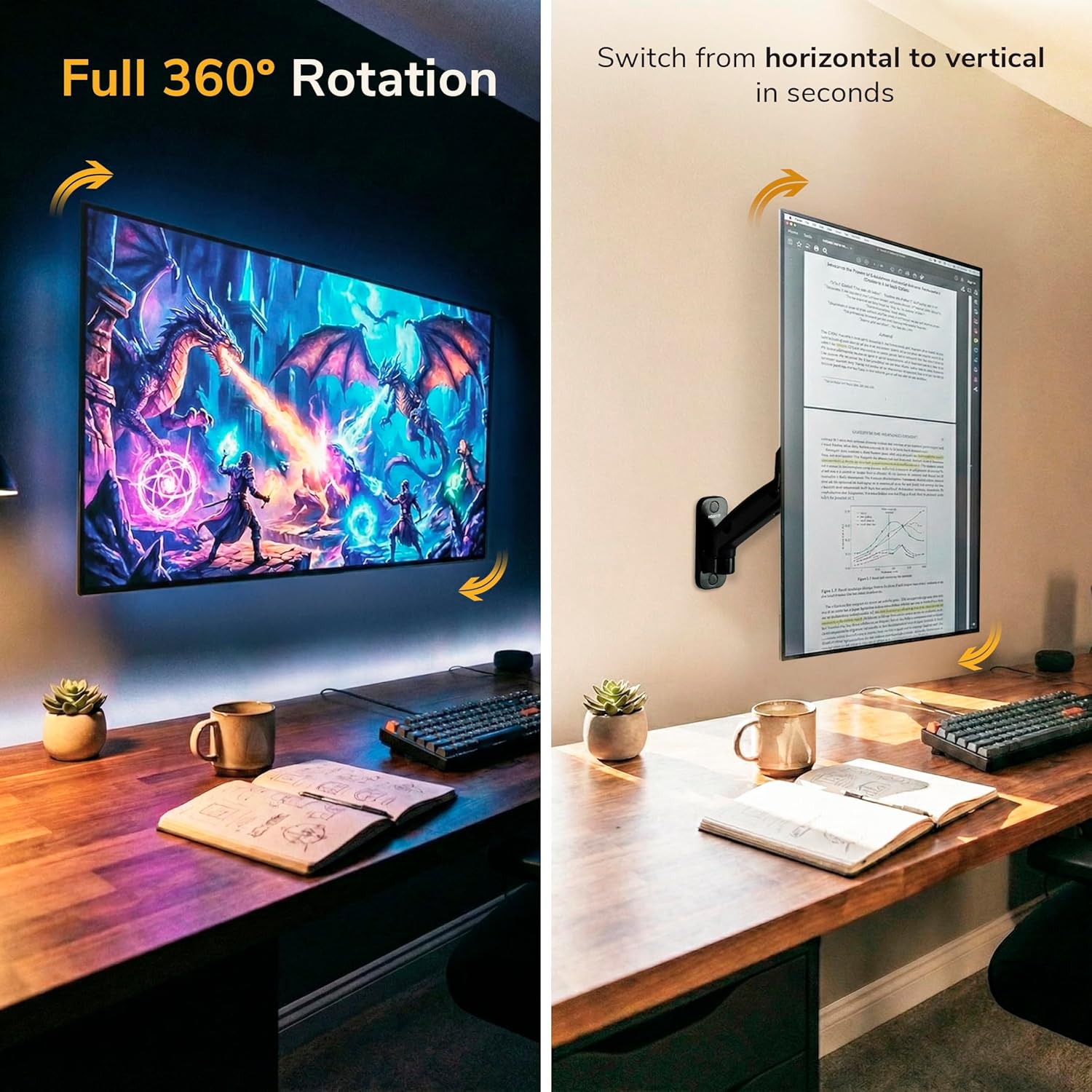
Image: Full 360° Rotation. This image demonstrates the monitor's ability to rotate a full 360 degrees, allowing for quick switching between horizontal (landscape) and vertical (portrait) orientations.
Video: Full Motion Monitor Wall Mount | MI-765 (Features). This video showcases the various full-motion capabilities of the MI-765 monitor arm, including height adjustment, tilt, swivel, and rotation, demonstrating how it can optimize a workspace.
6.1. Height Adjustment
Gently push or pull your monitor up or down to the desired height. The gas spring mechanism will hold it in place once the tension is correctly adjusted.
6.2. Tilt Adjustment
The monitor can be tilted +90° (up) to -45° (down) to reduce glare and improve viewing angles. Simply grasp the top and bottom edges of your monitor and adjust to the desired angle.
6.3. Swivel Adjustment
The arm allows for 180° swivel, enabling you to turn your monitor left or right. Gently push the monitor to the desired horizontal angle.
6.4. Rotation
Rotate your monitor 360° to switch between landscape and portrait orientations. This is useful for different tasks like coding or document viewing.
6.5. Cable Management
Integrated cable management helps keep your workspace tidy and organized.
Video: Full Motion Monitor Wall Mount | MI-765 (Installation). This video demonstrates how to route cables through the integrated cable management channels on the monitor arm for a clean setup.
- Remove the cable management covers by unscrewing the small bolts with the hex wrench and gently pulling them away from the arm.
- Route your monitor cables (power, HDMI, etc.) along the underside of the arm.
- Replace the cable management covers and secure them with the bolts.
7. Maintenance
Regular maintenance ensures the longevity and safe operation of your monitor arm.
- Cleaning: Wipe the surface with a soft, damp cloth. Avoid abrasive cleaners or solvents.
- Inspection: Periodically check all screws and connections to ensure they are tight and secure. Re-tighten if necessary.
- Gas Spring: If the monitor does not hold its position or moves too freely/stiffly, re-adjust the gas spring tension as described in Section 5.3.
8. Troubleshooting
If you encounter any issues, refer to the following common problems and solutions:
| Problem | Possible Cause | Solution |
|---|---|---|
| Monitor drops or rises on its own | Incorrect gas spring tension. | Adjust the gas spring tension (see Section 5.3). Increase tension for heavier monitors, decrease for lighter ones. |
| Monitor does not hold tilt angle | Tilt mechanism bolts are loose. | Tighten the side bolts on the VESA plate that control the tilt. |
| Mount feels unstable on the wall | Mounting screws are loose or incorrect wall type. | Ensure all wall mounting screws are securely tightened. Verify the mount is installed on a solid wood stud, concrete, or brick wall, not drywall. |
| Cables are messy or snagging | Cables not routed through management system. | Utilize the integrated cable management channels (see Section 6.5). |
9. Warranty & Support
The Mount-It! MI-765 Monitor Wall Mount Arm comes with a Limited Warranty. For specific warranty details, please refer to the product packaging or contact Mount-It! customer support.
Mount-It! provides knowledgeable US-based technical specialists available to assist with setup, compatibility, and troubleshooting. If you require further assistance or have any questions, please visit our website or contact our support team:
- Website: www.mount-it.com
- Contact: Refer to our website for contact information (phone, email, chat).


