
Aisuo DY28
Aisuo Night Light-5 in 1 Bedside Lamp with Bluetooth Speaker, 12/24H Digital Calendar Alarm Clock, Touch Control, Support TF and SD Card, Music Player
Instruction Manual
1. Introduction
The Aisuo Night Light is a versatile 5-in-1 device designed to enhance your living space. It combines a touch-controlled night light with 48 color options and 3-level brightness adjustment, a Bluetooth 4.0 HiFi speaker, an MP3 player with TF/SD card support, and a 12/24H digital calendar alarm clock. This manual provides detailed instructions for setup, operation, and maintenance to ensure optimal performance of your device.
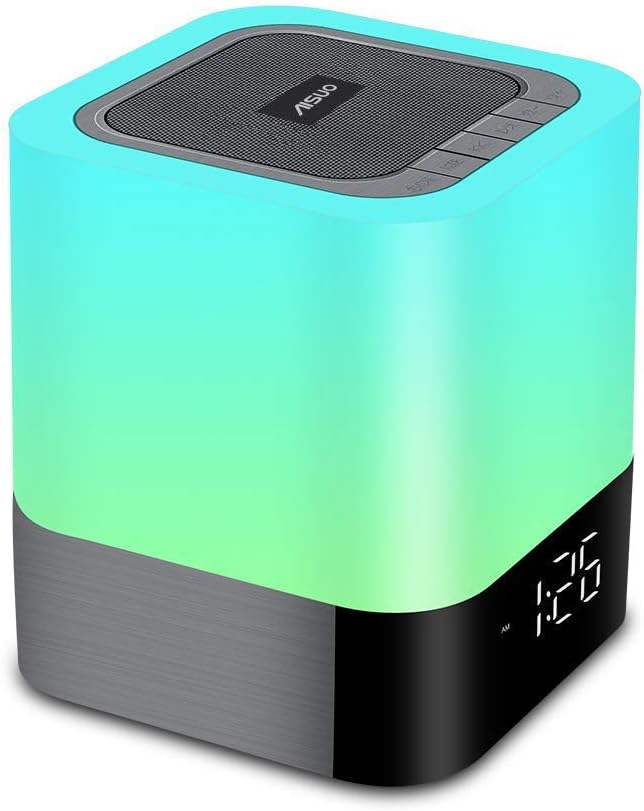
Figure 1: Aisuo Night Light-5 in 1 Bedside Lamp
2. What's in the Box
Upon unboxing your Aisuo Night Light, please verify that all components are present and in good condition. The standard package includes:
- Aisuo Night Light-5 in 1 Bedside Lamp (Model: DY28)
- USB Charging Cable
- 3.5mm Audio Cable (AUX-in)
- User Manual

Figure 2: Package Contents
3. Setup
3.1 Charging the Device
Before initial use, fully charge the Aisuo Night Light. Connect the provided USB charging cable to the 'USB DC' port on the back of the device and plug the other end into a compatible USB power adapter (not included). A full charge typically takes approximately 3 hours. The device features a built-in rechargeable battery for portable use.

Figure 3: Rear Ports for Charging and Connectivity
3.2 Power On/Off
Locate the 'OFF/ON' switch on the back of the device. Slide the switch to 'ON' to power on the unit. To power off, slide the switch to 'OFF'.
3.3 Setting Time and Date
The LED display shows the current time. Refer to the detailed instructions in the included User Manual (PDF) for specific steps on setting the 12/24H digital calendar clock. This typically involves using the mode and navigation buttons on the top panel.
4. Operating Instructions
4.1 Night Light Function
The night light features touch control for easy operation. Tap the top mesh area to adjust brightness or change colors.
- Brightness Adjustment: The night light offers 3 levels of adjustable brightness. Tap the top mesh to cycle through brightness levels.
- Color Options: Choose from 48 optional colors. The light can also change color following the volume and rhythm of music.

Figure 4: Three Daylight Brightness Modes

Figure 5: Multiple Color Options
4.2 Bluetooth Speaker and MP3 Player
The device functions as a Bluetooth 4.0 HiFi speaker, easily connecting with most Bluetooth-enabled devices within a 33ft/10m range. It also supports MP3 playback via TF and SD cards.
- Bluetooth Pairing: Power on the device and select Bluetooth mode. The device will indicate "Bluetooth mode" and be ready for pairing. Search for "DY28" on your device's Bluetooth settings and connect.
- Music Playback: Once paired, you can play music from your connected device. Use the control buttons on the top panel for play/pause, skip tracks, and volume adjustment.
- Hands-free Calls: The built-in speakerphone and microphone allow for easy answering of calls.
- TF/SD Card & AUX Support: Insert a TF or SD card into the designated slot for MP3 playback. Use the 3.5mm audio cable to connect external devices via the AUX-in port.
Video 1: Demonstration of Aisuo Night Light Speaker features, including light changes and Bluetooth functionality.
4.3 Digital Alarm Clock
The integrated 12/24H digital calendar clock features an easy-to-read LED display. It supports a sleep mode, allowing the lamp and speaker to automatically turn off after a set time.

Figure 6: Alarm Clock Display
5. Maintenance
To ensure the longevity and optimal performance of your Aisuo Night Light, follow these simple maintenance guidelines:
- Cleaning: Use a soft, dry cloth to wipe the surface of the device. Avoid using abrasive cleaners or solvents, as they may damage the finish.
- Storage: When not in use for extended periods, store the device in a cool, dry place away from direct sunlight and extreme temperatures.
- Battery Care: Recharge the device regularly, even if not in frequent use, to maintain battery health. Avoid fully depleting the battery for prolonged periods.
6. Troubleshooting
If you encounter any issues with your Aisuo Night Light, please refer to the following common troubleshooting steps:
| Problem | Possible Cause | Solution |
|---|---|---|
| Device does not power on | Low battery; Power switch is off | Charge the device; Ensure power switch is in 'ON' position |
| No sound from speaker | Volume too low; Device not paired; Incorrect mode | Increase volume; Re-pair Bluetooth; Switch to correct mode (Bluetooth/TF/SD/AUX) |
| Bluetooth connection unstable | Device too far; Interference | Move device closer (within 10m); Avoid obstacles or other strong signal sources |
| Alarm not sounding | Alarm not set correctly; Volume too low | Verify alarm settings; Increase alarm volume |
If the problem persists after attempting these solutions, please contact Aisuo Customer Service for further assistance.
7. Specifications
| Feature | Detail |
|---|---|
| Model Name | DY28 |
| Material | Plastic, Metal |
| Product Dimensions | 3.9"D x 3.9"W x 4.4"H |
| Item Weight | 1.21 pounds |
| Color | Warm White |
| Speaker Type | HiFi Bluetooth Speaker |
| Bluetooth Version | 4.0 |
| Bluetooth Range | 10 Meters (33 Feet) |
| Speaker Maximum Output Power | 10 Watts |
| Power Source | Built-in Rechargeable Battery |
| Charging Time | 3 Hours |
| Control Method | Touch, Button |
| Includes MP3 player? | Yes |
| Water Resistance Level | Not Water Resistant |
8. Warranty and Support
Aisuo is committed to providing high-quality products. This product comes with a quality guarantee. If you have any questions or require support regarding your Aisuo Night Light, please contact Aisuo Customer Service. They aim to respond within 12 hours.
For additional information and detailed instructions, you may refer to the official User Manual (PDF) available online: User Manual (PDF)
Ask a question about this manual
Ask about setup, troubleshooting, compatibility, parts, safety, or missing instructions. Manuals+ will review the question and use this page’s manual context to help answer it.