
1. Introduction
The Midiplus USB MIDI Host Controller is a compact and efficient device that allows you to connect a USB MIDI keyboard or controller directly to traditional 5-pin MIDI In/Out jacks. This eliminates the need for a computer in your MIDI setup, providing a streamlined and portable solution for musicians and producers. It is powered by a 5V power supply, which is included with the unit.
2. Product Overview
The Midiplus USB MIDI Host is designed for simplicity and functionality. Key features include:
- Provides dedicated MIDI In and MIDI Out jacks for standard 5-pin MIDI connections.
- Equipped with a USB MIDI Host port for connecting USB MIDI devices.
- Powered by a 5V power supply (power adapter included).
- Compact design for easy integration into any setup.
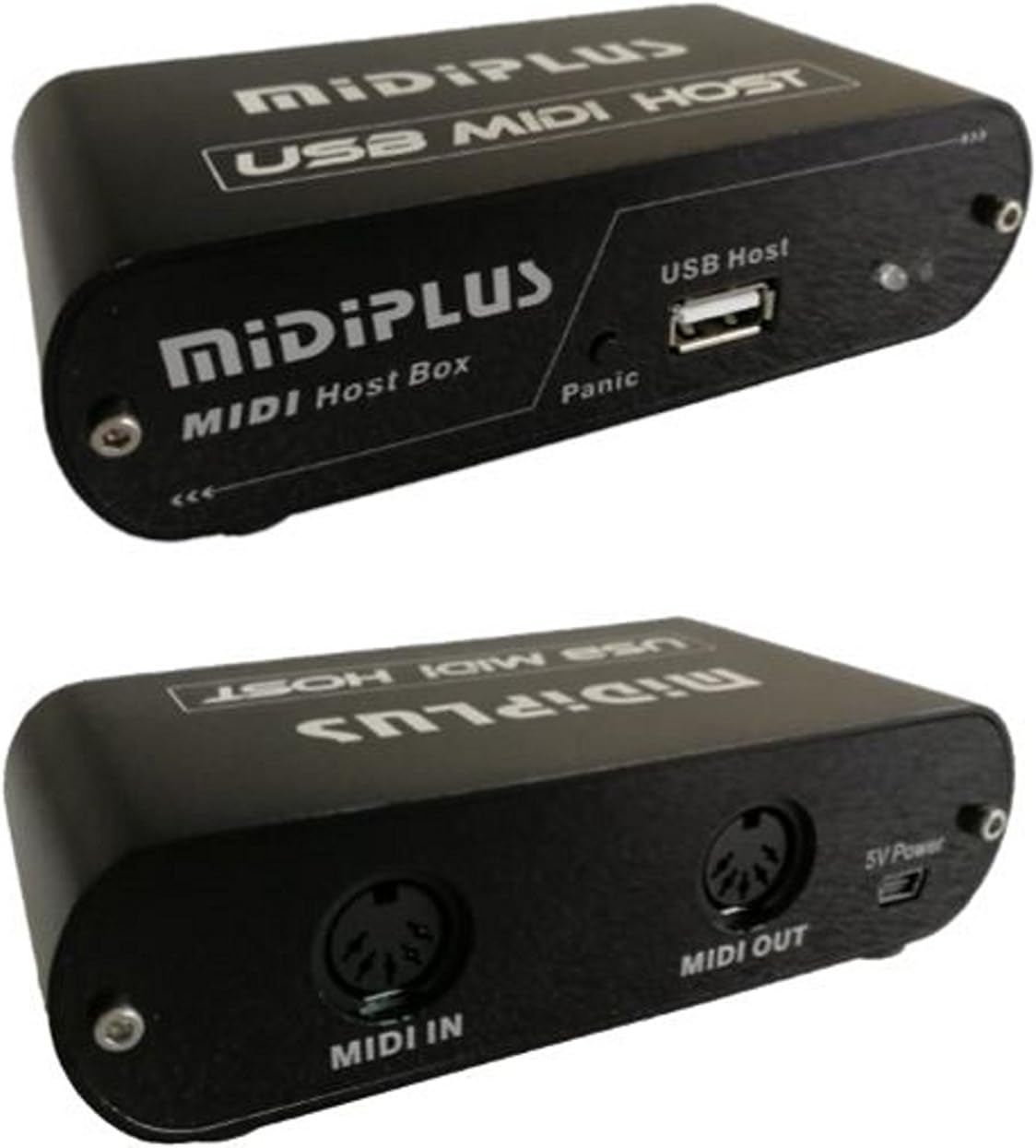
Figure 2.1: Angled view of the Midiplus USB MIDI Host Controller, highlighting the USB Host port, MIDI In, and MIDI Out connections.

Figure 2.2: Front panel of the Midiplus USB MIDI Host, featuring the USB Host port and a Panic button for resetting MIDI signals.

Figure 2.3: Rear panel of the Midiplus USB MIDI Host, showing the MIDI In, MIDI Out, and 5V Power input.
3. Setup Instructions
Follow these steps to set up your Midiplus USB MIDI Host Controller:
- Power Connection: Connect the included 5V power adapter to the "5V Power" port on the rear of the USB MIDI Host. Plug the adapter into a standard electrical outlet. The unit will power on automatically.
- Connect USB MIDI Device: Plug your USB MIDI keyboard or controller into the "USB Host" port located on the front of the Midiplus unit. Ensure the USB device is compatible with standard USB MIDI protocols.
- Connect 5-pin MIDI Device:
- To send MIDI data from your USB device to a 5-pin MIDI device, connect a standard 5-pin MIDI cable from the "MIDI OUT" port of the Midiplus unit to the "MIDI IN" port of your target MIDI device.
- To receive MIDI data from a 5-pin MIDI device and route it to your USB device, connect a standard 5-pin MIDI cable from the "MIDI OUT" port of your 5-pin MIDI device to the "MIDI IN" port of the Midiplus unit.
- Verify Connection: Once all connections are made, your USB MIDI device should be able to communicate with your 5-pin MIDI device. Refer to your specific MIDI devices' manuals for further configuration if needed.
4. Operating Instructions
The Midiplus USB MIDI Host Controller operates as a bridge between USB MIDI and traditional 5-pin MIDI. It is designed for plug-and-play functionality without requiring complex software configuration for basic use.
- MIDI Data Flow: MIDI messages from the connected USB device are automatically converted and sent to the 5-pin MIDI OUT. Conversely, MIDI messages received at the 5-pin MIDI IN are routed to the connected USB device.
- Panic Button: If you experience stuck notes or unexpected MIDI behavior, press the "Panic" button on the front panel. This sends an "All Notes Off" message across all MIDI channels, clearing any hanging notes.
- Supported Software: While primarily a hardware host, the device is compatible with various DAW software that support input/output, such as Ableton Live, Logic Pro, FL Studio, etc., on Windows, macOS, or Linux operating systems when connected to a computer. For drivers and advanced software tools, visit the manufacturer's website: https://www.midiplus.com/support/drivers/.
5. Specifications
| Feature | Detail |
|---|---|
| Item Weight | 5.3 ounces |
| Product Dimensions | 4.7 x 2.6 x 1.4 inches |
| Item Model Number | USB MIDI Host |
| Compatible Devices | Personal Computer (for advanced software use), USB MIDI Keyboards/Controllers |
| Connector Type | USB, 5-pin MIDI DIN |
| Hardware Interface | USB |
| Operating System Compatibility | Windows, macOS, or Linux (when connected to a computer) |
| Power Source | Corded Electric (5V power supply included) |
| Connectivity Technology | USB |
| Number of Channels | 16 (standard MIDI channels) |
6. Troubleshooting
- No MIDI Signal:
- Ensure the 5V power adapter is securely connected and the unit is powered on.
- Verify that your USB MIDI device is properly connected to the "USB Host" port.
- Check all 5-pin MIDI cable connections between the Midiplus unit and your external MIDI devices. Ensure "MIDI OUT" connects to "MIDI IN" and vice-versa as intended.
- Confirm that your USB MIDI device is functioning correctly when connected directly to a computer (if applicable).
- Press the "Panic" button to clear any stuck MIDI messages.
- Intermittent Connection:
- Ensure all cables are securely seated and not damaged.
- Avoid placing the unit near strong electromagnetic interference.
- USB Device Not Recognized:
- Some USB MIDI devices may require specific drivers or may not be compatible with a generic USB MIDI host. Check the manufacturer's website for your USB device for compatibility information.
- Ensure the USB device is a class-compliant MIDI device.
7. Maintenance
To ensure the longevity and optimal performance of your Midiplus USB MIDI Host Controller, follow these maintenance guidelines:
- Keep the unit clean by wiping it with a soft, dry cloth. Avoid using liquid cleaners or solvents.
- Store the unit in a cool, dry place away from direct sunlight, extreme temperatures, and humidity.
- Avoid dropping the unit or subjecting it to strong impacts.
- Ensure proper ventilation and do not block any openings.
8. Warranty and Support
For warranty information, technical support, or service inquiries, please refer to the documentation provided with your purchase or visit the official Midiplus website. Keep your proof of purchase for warranty claims.
9. Official Product Videos
There are no official product videos specifically for the Midiplus USB MIDI Host Controller provided by the seller in the available data. For general MIDI setup guides or related product information, please refer to the manufacturer's website or other resources.


