Introduction
This manual provides detailed instructions for the operation and maintenance of your SKMEI 1233 Digital Watch. Please read this manual thoroughly to ensure proper use and to maximize the lifespan of your watch.
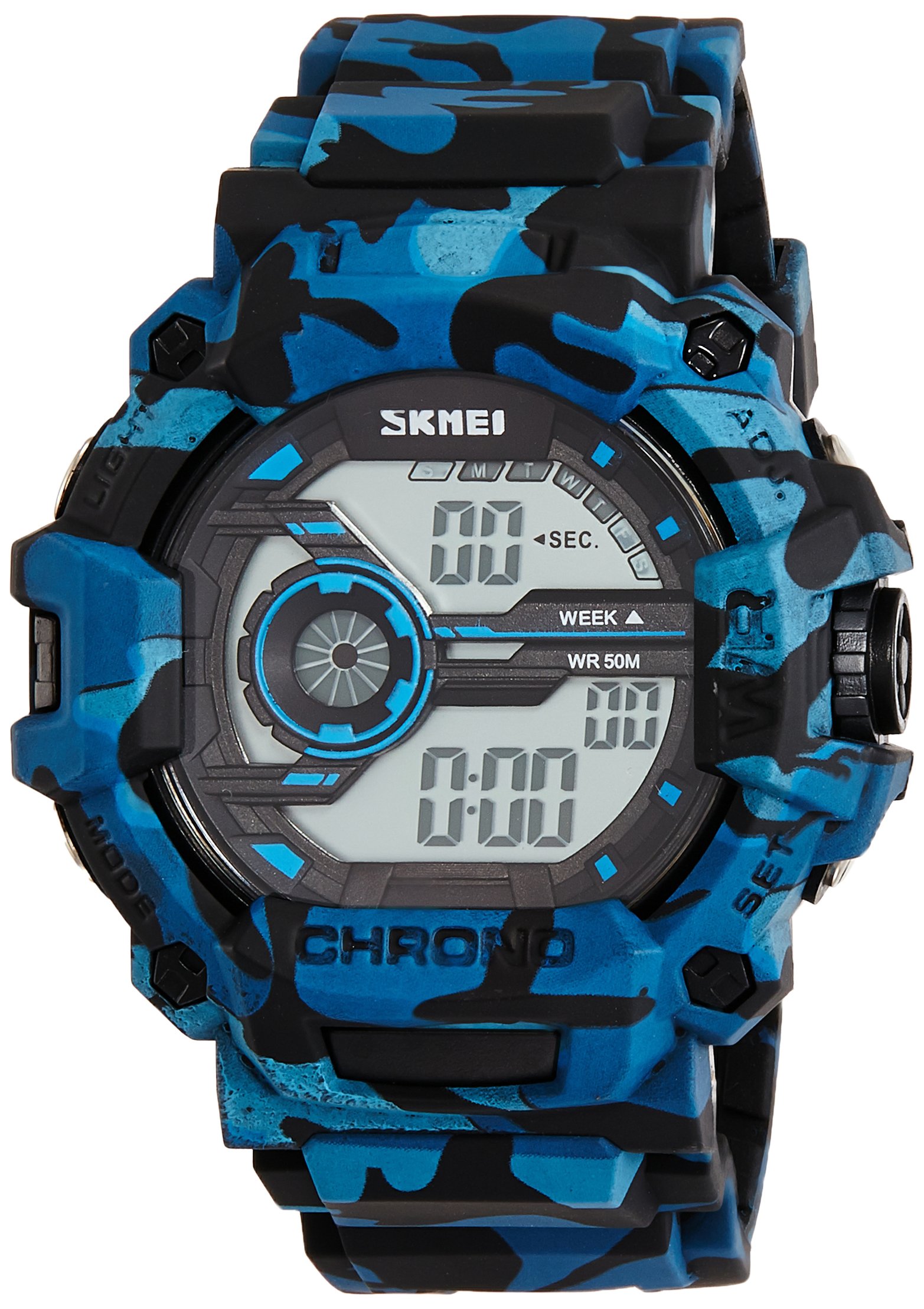
Figure 1: Front view of the SKMEI 1233 Digital Watch, showcasing the digital display and overall design.
Watch Components
Familiarize yourself with the buttons and display of your SKMEI 1233 watch. The watch features four primary buttons for various functions.

Figure 2: Side view of the watch, highlighting the 'SET' and 'ADJ' buttons. Additional buttons are located on the opposite side for 'MODE' and 'LIGHT' functions.
- SET Button: Used to enter and confirm settings.
- MODE Button: Cycles through different modes (Time, Alarm, Stopwatch).
- ADJ Button: Adjusts values during setting or changes display format.
- LIGHT Button: Activates the backlight for visibility in low light conditions.
Setup and Time Setting
Your watch comes with a pre-installed LR44 battery. Follow these steps to set the time and date:
- In normal time display mode, press the MODE button repeatedly until the time setting mode is activated. Typically, the seconds will begin to flash.
- Press the SET button to select the value you wish to adjust (seconds, hour, minute, month, date, day). The selected value will flash.
- Use the ADJ button to increase the flashing value. Hold the ADJ button to rapidly advance the value.
- Continue pressing SET to cycle through all adjustable parameters (seconds, hour, minute, month, date, day).
- Once all settings are complete, press the MODE button to exit the setting mode and return to the normal time display.
- To switch between 12-hour and 24-hour format, press the ADJ button while the hour is flashing during time setting.
Operating Functions
Alarm Function
- From normal time display, press the MODE button once to enter Alarm mode. The alarm time will be displayed.
- Press the SET button to select the hour or minute to adjust. The selected value will flash.
- Use the ADJ button to set the desired alarm hour and minute.
- Press MODE to exit Alarm setting mode.
- To turn the alarm ON/OFF, press the ADJ button while in Alarm mode (without pressing SET). An alarm icon will appear/disappear on the display.
Stopwatch Function
- From normal time display, press the MODE button twice to enter Stopwatch mode. The display will show '00:00:00'.
- Press the ADJ button to start the stopwatch.
- Press the ADJ button again to pause the stopwatch.
- Press the SET button to reset the stopwatch to '00:00:00' while it is paused.
- Press MODE to exit Stopwatch mode.
Backlight
Press the LIGHT button (typically located on the top left) to illuminate the display for a few seconds.
Maintenance
Cleaning
Wipe the watch case and band regularly with a soft, dry cloth. For stubborn dirt, a slightly damp cloth can be used, followed by immediate drying. Avoid using chemical cleaners or solvents, as these can damage the watch materials.
Water Resistance

Figure 3: Back view of the watch, showing the stainless steel case back and 'WATER RESISTANT 5ATM' marking.
This watch is rated 5 ATM (50 meters) water resistant. This means it is suitable for everyday use, showering, and swimming in shallow water. It is not suitable for diving, snorkeling, or high-pressure water activities. Do not operate buttons while the watch is wet or submerged, as this can compromise the water resistance.
Battery Replacement
The watch uses one LR44 battery. When the display becomes dim or functions become erratic, it may be time to replace the battery. Battery replacement should ideally be performed by a qualified watch technician to ensure proper sealing and maintain water resistance. If replacing yourself, ensure the gasket is correctly seated before securing the case back.
Troubleshooting
- Watch not displaying time or display is dim: Check battery. Replace if necessary.
- Buttons not responding: Ensure the watch is not in a locked mode (if applicable, though not a feature on this model) or that the battery is not critically low.
- Time is incorrect after setting: Re-check the setting procedure. Ensure you have pressed the MODE button to exit setting mode after adjustments.
- Condensation inside the watch: This indicates a breach in water resistance. Avoid further contact with water and seek professional repair immediately.
Specifications
| Model Number | 1233 |
| Display Type | Digital |
| Movement Type | Quartz |
| Case Material | Resin |
| Band Material | Resin |
| Case Diameter | 50 mm |
| Band Width | 22 mm |
| Water Resistance | 5 ATM (50 meters) |
| Battery Type | 1 x LR44 (included) |
| Item Weight | 140 g |
Warranty and Support
Warranty Information
The SKMEI 1233 Digital Watch comes with a 1-year manufacturer warranty on manufacturing defects from the date of purchase. This warranty does not cover damage caused by misuse, accidents, unauthorized repairs, or normal wear and tear. Please retain your proof of purchase for warranty claims.
Customer Support
For further assistance, technical support, or warranty inquiries, please contact your retailer or the official SKMEI customer service. Refer to the packaging or the SKMEI official website for contact details.


