Introduction
Thank you for choosing the Nobleza Nano Fish Tank. This compact 4-liter aquarium is designed for ease of use and features an integrated filtration system and LED lighting. Please read this manual thoroughly before setting up and operating your new fish tank to ensure proper function and the well-being of your aquatic inhabitants.

Image: The Nobleza Nano Fish Tank in white, showcasing its spherical design with a clear front viewing window. Inside, two small goldfish swim around artificial green plants and blue gravel.
Safety Information
- Always unplug the aquarium from the power source before performing any maintenance, cleaning, or handling the internal components.
- Ensure your hands are dry when plugging or unplugging the power adapter.
- Do not immerse the power adapter or LED light switch in water.
- Place the aquarium on a stable, level surface away from direct sunlight, heat sources, or areas with extreme temperature fluctuations.
- Keep out of reach of children and pets to prevent accidental damage or injury.
- This product is intended for indoor use only.
- Do not overfill the tank. Ensure water levels do not reach the electrical components of the LED light.
Package Contents
Your Nobleza Nano Fish Tank package includes the following items:
- Nobleza Nano Fish Tank (4-liter capacity, white)
- Integrated 3W LED Light
- Integrated Water Pump / Filter System
- Replaceable Filter Sponges
- USB Power Adapter (VDE plug)
- Artificial Plant Decoration
- Decorative Gravel (blue)

Image: A collage showing the key components: a yellow filter sponge, a white USB charging plug and cable, a white water pump, and a diagram illustrating the internal water circulation within the aquarium.
Setup Instructions
Follow these steps for the initial setup of your aquarium:
- Unpack and Inspect: Carefully remove all components from the packaging. Inspect the tank and all parts for any damage.
- Rinse Components: Rinse the tank, artificial plant, and decorative gravel thoroughly with clean water. Do not use soap or detergents, as these can be harmful to fish.
- Place Gravel: Distribute the decorative gravel evenly on the bottom of the tank.
- Position Decoration: Place the artificial plant decoration as desired.
- Install Filter Sponge: Ensure the filter sponge is correctly seated within the filtration compartment located at the top of the tank.
- Fill with Water: Slowly fill the tank with dechlorinated water up to the recommended maximum fill line. Avoid overfilling to prevent water from contacting the LED light's electrical contacts.
- Connect Power: Connect the USB power cable to the aquarium's pump and then plug the USB adapter into a suitable power outlet. The pump and filtration system will begin operating automatically.
- Acclimatize Fish: If adding fish, follow proper acclimatization procedures to introduce them to their new environment gradually.

Image: A diagram illustrating the water flow within the aquarium, showing water being drawn from the bottom, filtered, and then released from the top, creating internal circulation.
Operating Instructions
LED Light Operation
The aquarium features a 3W LED light integrated into the lid. To operate the light:
- Locate the power button on the top of the aquarium lid.
- Press the button once to turn the LED light ON.
- Press the button again to turn the LED light OFF.

Image: The Nobleza Nano Fish Tank illuminated by its internal LED light in a dimly lit room, creating a soft glow. Two small fish are visible inside.
Feeding
The aquarium lid includes a convenient feeding hole:
- Locate the small opening on the top of the lid.
- Dispense a small amount of fish food through this hole. This allows for feeding without removing the entire lid.

Image: A detailed view of the small, circular feeding hole located on the top surface of the aquarium lid.
Maintenance
Regular maintenance is crucial for a healthy aquatic environment.
Water Changes
Perform partial water changes regularly (e.g., 25% weekly) to maintain water quality.
- Prepare Water: Prepare fresh, dechlorinated water at a similar temperature to the aquarium water.
- Drain Water: The aquarium features a convenient drainage hose. Pull out the hidden hose located at the bottom side of the tank, then open the plug to allow water to drain into a bucket.
- Refill: Once the desired amount of water is drained, close the plug, retract the hose, and slowly refill the tank with the prepared fresh water.
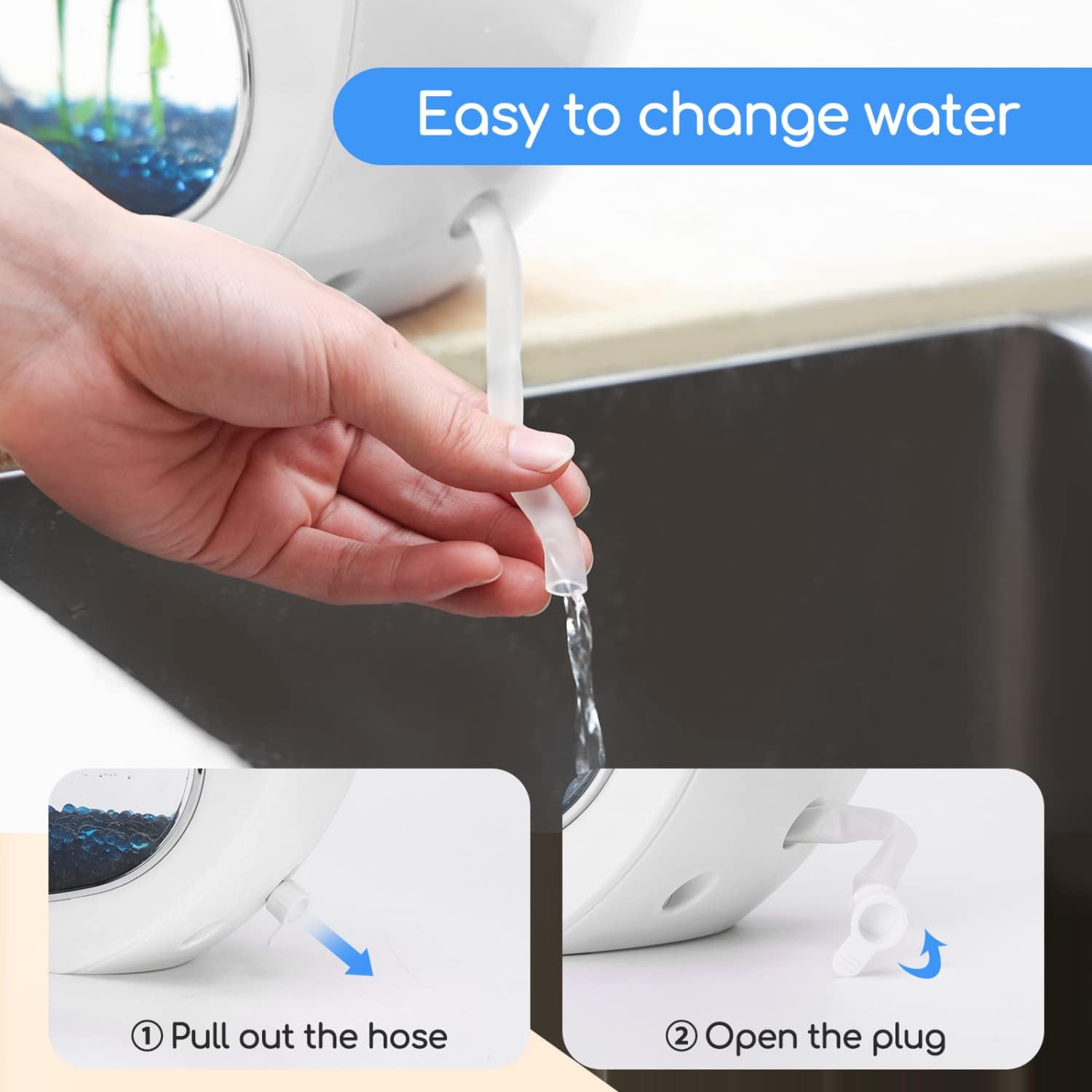
Image: A two-part image demonstrating the water change process. The top image shows a hand pulling out a clear drainage hose from the side of the aquarium, directing water into a sink. The bottom image shows a close-up of the hose being pulled out and its plug being opened.
Filter Maintenance
The integrated filtration system uses replaceable filter sponges to keep the water clean and oxygenated.
- Cleaning: Periodically rinse the filter sponge in old aquarium water (never tap water, as chlorine can kill beneficial bacteria) to remove accumulated debris.
- Replacement: Replace the filter sponge every 2-4 weeks, or as needed, to maintain optimal filtration performance.

Image: A close-up view of the yellow high-efficiency filter cotton, with an arrow indicating its upward removal from the filter compartment.
Troubleshooting
| Problem | Possible Cause | Solution |
|---|---|---|
| Pump not working | Power disconnected, pump clogged, or pump malfunction. | Check power connection. Unplug and clean pump impeller. If still not working, contact support. |
| Water is cloudy | New tank syndrome, overfeeding, insufficient filtration, or dirty filter. | Perform a partial water change. Reduce feeding. Clean or replace filter sponge. Ensure proper water circulation. |
| LED light not turning on | Power disconnected, switch malfunction, or LED failure. | Check power connection. Ensure water level is not too high. Press the switch firmly. If issue persists, contact support. |
| Water temperature too high | Aquarium placed near heat source, or pump/LED generating excessive heat. | Relocate aquarium away from direct sunlight or heat. Ensure adequate room ventilation. This tank does not include a heater, so external factors are usually the cause. |
| Fish appear stressed or hyperactive | Water quality issues, tank too small, or pump flow too strong. | Check water parameters (ammonia, nitrite, nitrate). Ensure tank is not overstocked. The pump flow is fixed; if fish are struggling, consider species more suited to smaller, lower-flow environments. |
Specifications
| Feature | Detail |
|---|---|
| Model Number | NOB-8719138030026 |
| Dimensions (L x W x H) | 26.5 x 15 x 29 cm |
| Weight | 2 kg |
| Tank Volume | 4 Liters |
| Material | Glass |
| LED Light Power | 3W |
| Pump Power | 2W |
| Pump Flow Rate | 250 L/H |
| Color | White |

Image: A table summarizing the product parameters, including Capacity (4L), LED Power (3W), Pump Flow (250L/H), Pump Power (2W), Color (White/Pink/Green), and Size (29*26.5*15CM).

Image: A diagram illustrating the physical dimensions of the Nobleza Nano Fish Tank, showing a height of 29.0 cm, a width of 26.5 cm, and a depth of 15.0 cm.
Warranty and Support
For information regarding warranty and returns, please refer to the retailer's policy where the product was purchased. If you received a defective or damaged product, consult the retailer's help page for specific instructions. For general inquiries or support, please contact Nobleza customer service through their official channels.
Note: Warranty terms may vary based on region and retailer. Please retain your proof of purchase for any warranty claims.