
1. Introduction and Overview
The Banglijian Ziv-201A is a compact, rechargeable digital hearing aid designed to provide clear sound with noise-cancelling features. It is suitable for individuals with mild to moderate hearing loss.
Key Features:
- Digital Noise Cancelling: Helps reduce background noise for clearer hearing.
- Rechargeable Battery: Offers approximately 20-24 hours of continuous use on a full charge.
- Adjustable Volume Control: Five volume levels to suit different listening environments.
- Two Program Modes: Select between quiet and noisy environment settings.
- Lightweight and Comfortable: Designed for ease of use and discreet wear.
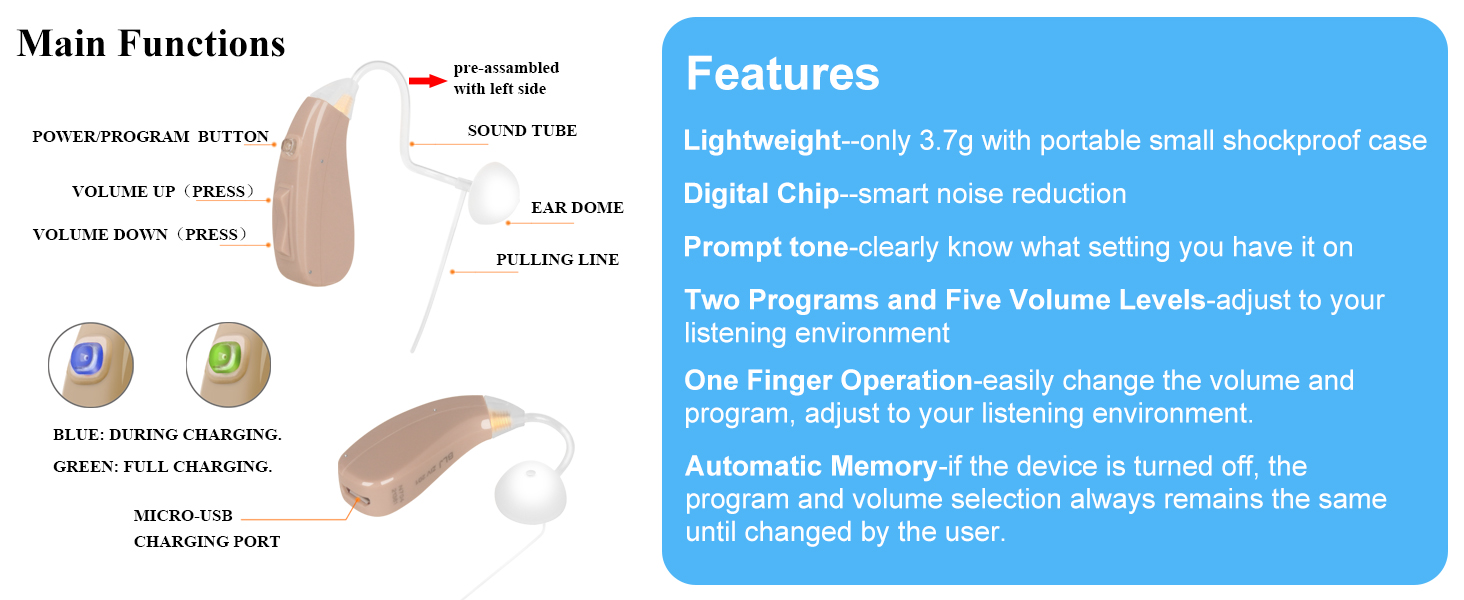
Image: Ziv-201A Hearing Loss Compatibility Guide. This chart illustrates the degree of hearing loss (dB) and daily listening challenges, indicating that the Ziv-201A is suitable for mild and moderate hearing loss ranges.
Video: An overview of the Banglijian Ziv-201A hearing aid, highlighting its portable design and clear sound for users experiencing hearing difficulties.
2. Product Components
Your Banglijian Ziv-201A package includes the following items:
- 1 x Hearing aid (pre-assembled with left slim tube)
- 1 x Right slim tube with red mark
- 10 x Ear domes for slim tube (various sizes)
- Thick tube accessories (1 ear hook, 3 thick tubes, 5 ear plugs)
- 1 x Cleaning brush
- 1 x Power adapter
- 1 x Micro-USB cable
- 1 x Shockproof case
- 1 x User manual

Image: A visual representation of all items included in the Banglijian Ziv-201A hearing aid package, such as the hearing aid unit, various ear domes, sound tubes, charging accessories, and cleaning tools.
3. Setup Instructions
3.1 Initial Charging
Before first use, fully charge the hearing aid. Connect the micro-USB cable to the charging port on the device and the power adapter. The indicator light will be blue during charging and turn green when fully charged.

Image: Close-up of the Banglijian Ziv-201A hearing aid showing the micro-USB charging port and the indicator light, which glows blue during charging and green when fully charged.
3.2 Attaching Sound Tubes and Ear Domes
The hearing aid comes pre-assembled with a left slim tube. A right slim tube is also included. You can choose between slim and thick tubes, and various ear dome sizes, to ensure a comfortable and effective fit.
- Selecting the Right Tube: The slim tube is generally suitable for glasses wearers, those needing lower gain, or smaller ear domes. The thick tube is for adjusting length or requiring higher gain.
- Selecting the Right Ear Dome: Try different sizes of ear domes to find one that fits snugly inside your ear canal without causing discomfort or feedback.
- Assembly: Ensure tight connections between the sound tube, the ear dome, and the device to prevent sound leakage and whistling.

Image: Diagram illustrating how to attach and adjust the sound tubes (left and right) and ear domes to the Banglijian Ziv-201A hearing aid, emphasizing clockwise rotation to tighten and counter-clockwise to loosen.

Image: A selection of open and closed ear domes in various sizes (9mm, 12mm, 15mm) for the Banglijian Ziv-201A, demonstrating options for comfort and better sealing.
Video: Demonstrates the pre-assembled left slim sound tube on the 201A unit and how to prepare it for use.
Video: A comprehensive guide on how to use and wear the Banglijian 201A hearing aid, including power on/off, program switching, and proper placement.
Video: Instructions on how to replace the slim tube with a thick tube on the 201A hearing aid, demonstrating the process of detaching and reattaching components.
3.3 Wearing the Hearing Aid
Carefully place the hearing aid behind your ear, ensuring the sound tube and ear dome are comfortably and securely positioned in your ear canal. If you wear glasses, guide the sound tube below the glasses temple, keeping it parallel and not pinched.

Image: A person demonstrating the correct way to wear the Banglijian Ziv-201A hearing aid behind the ear, with the sound tube and ear dome properly inserted.
Video: Detailed instructions on how to properly wear the 201A hearing aid with glasses, ensuring comfort and optimal sound delivery.
4. Operating Instructions
4.1 Power On/Off
Press and hold the 'Power/Program' button for 3+ seconds until the indicator light turns green (for power on) or blue (for power off).
4.2 Volume Control
Use the 'Volume Up' and 'Volume Down' buttons to adjust the sound level. There are five volume levels. You will hear a single beep with each press. Three beeps indicate maximum or minimum volume.
4.3 Program Selection
Short press the 'Power/Program' button to switch between the two sound environment programs:
- Quiet Mode (One Beep): Ideal for low-frequency, relatively quiet everyday environments.
- Noisy Mode (Two Beeps): Suitable for very noisy environments with fewer low-frequency sounds.

Image: Detailed view of the Banglijian Ziv-201A showing the Power/Program button, Volume Up/Down buttons, and the Micro-USB charging port. Indicator light colors for charging status are also shown.
5. Maintenance
Proper maintenance ensures the longevity and optimal performance of your hearing aid.
5.1 Cleaning
- Regularly clean the surface of the device, sound tube, and ear domes using the provided cleaning brush.
- Ensure no wax or debris accumulates in the ear dome or sound tube.
5.2 Storage
- When not in use, store the device in the provided shockproof case or a hearing aid dry box to prevent moisture damage.
- Keep the device away from high temperatures, high humidity, and direct sunlight.
- Never expose the hearing aid to fire.
5.3 Battery Care
- Use only the original provided charger and micro-USB cable.
- Charge the device in a timely manner. Prolonged low power states can damage the battery.
6. Troubleshooting
6.1 Feedback or Whistling
- Check if the ear dome fits snugly inside the ear canal. Replace it with a different size if necessary.
- Ensure tight connections among the sound tube, the ear dome, and the device.
6.2 Hearing Noise
- Allow time for adaptation. It may take 2-4 weeks to get used to the sound.
- Try switching between the program modes (Quiet/Noisy) to find the optimal setting for your environment.
- Start with the lowest possible volume and gradually increase it.
6.3 General Adaptation
It may take 20-30 days to fully adapt to using the hearing aid. Be patient and consistent with its use.
7. Specifications
| Feature | Detail |
|---|---|
| Model Name | Ziv-201A |
| Power Source | Rechargeable (Lithium Polymer battery) |
| Battery Life | Approx. 20-24 hours continuous use |
| Control Type | Button Control |
| Noise Control | Environmental Noise Cancellation |
| Fit Type | Behind-the-Ear |
| Item Weight | 3.7 Grams |
| Product Dimensions | 1.45"L x 0.4"W |
| Material | Acrylonitrile Butadiene Styrene (ABS), Silicone |
8. Warranty and Support
8.1 Warranty Information
The Banglijian Ziv-201A comes with an 18-month warranty from the date of purchase. During this period, maintenance or replacement will be provided for all quality problems under normal conditions of use. The warranty does not cover losses or damages caused by dropping, exposure to water, or damage by animals or humans.
8.2 Customer Support
For any problems or inquiries, please contact the Banglijian support team. You can find contact information on the first page of your user manual or by following these steps:
- Go to the product listing page on Amazon.
- Look for the 'Banglijian' icon (usually near the 'Sold by' information) and click it.
- On the seller's page, look for an 'Ask a question' button and click it.
- Select 'An item for sale' and then write your message, including your 17-digit Amazon order ID and a clear description of your problem.
Video: A short video explaining how to contact the seller for support if you have issues with your product.