
Alstar SKU_AM_FW2M5A
Alstar 2" Multiple 5-Position Filter Wheel User Manual
Model: SKU_AM_FW2M5A
Introduction
The Alstar 2" Multiple 5-Position Filter Wheel is designed to allow astronomers and astrophotographers to quickly switch between up to five different 2-inch filters without disassembling their optical setup. This device is essential for efficient observation and imaging, providing a light-tight interior to prevent reflections and stray light, ensuring optimal performance for both visual observing and astrophotography.
Product Overview
The filter wheel features a robust aluminum housing and clearly marked filter positions. It is designed for seamless integration with various telescope and camera setups.

Figure 1: Exploded view showing the main components of the filter wheel, including the filter wheel body, camera adapter, rotation lock ring, 2" conversion interface, 2" nosepiece, 2" eyepiece adapter, filter position indicator, dust caps, and hexagon wrench.

Figure 2: Detailed view illustrating the various thread types and adapters for the filter wheel, including M48x0.75 male/female threads, M54x0.75 male/female threads, and threads for eliminating light.
Setup
1. Installing Filters
To install your 2-inch filters into the wheel, follow these steps:
- Unscrew the four screws located on the back of the filter wheel using the provided hexagon wrench.
- Carefully open the back housing of the filter wheel.
- Screw up to five 2-inch filters into the designated filter positions inside the wheel. Ensure they are securely seated.
- Replace the back housing and secure it by screwing in the four screws.
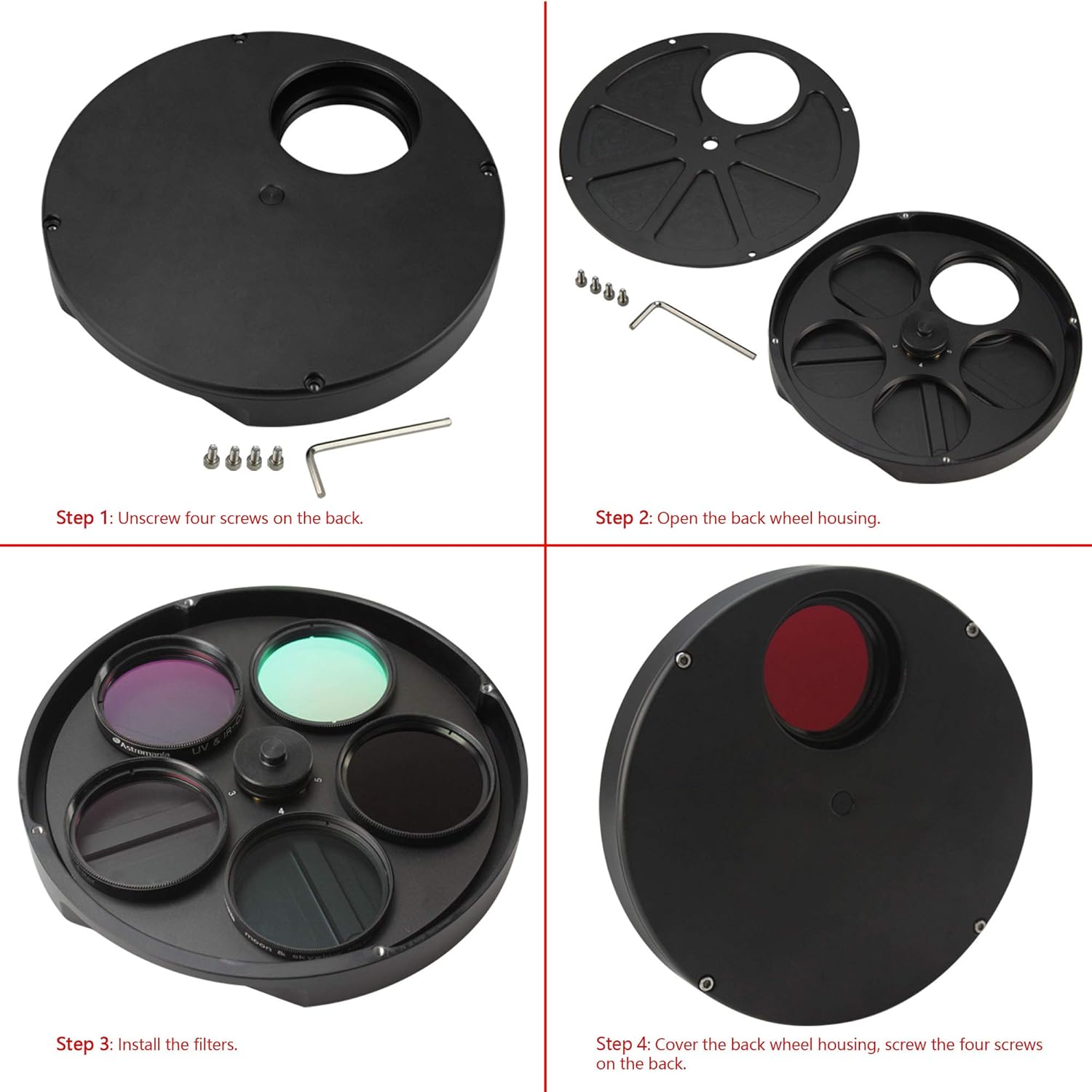
Figure 3: Step-by-step guide for installing filters: 1) Unscrew back, 2) Open housing, 3) Install filters, 4) Cover and screw back.
2. Attaching to Telescope and Camera/Eyepiece
The filter wheel offers versatile connection options for your telescope and accessories.
- Telescope Side: The filter wheel comes with a 2-inch adapter for quick attachment to your focuser. It also features a T-2 thread for other adapters.
- Accessory Side: You will find T-2 and M48 threads to connect your camera or eyepiece connector.
Note: Your focuser may require 20 mm of inward focusing distance from the normal focus position to compensate for the thickness of the filter wheel.

Figure 4: Assembly diagrams showing the filter wheel connected to a telescope (top) and a camera (bottom) using various adapters.
Operating
Once the filters are installed and the filter wheel is attached to your optical setup, operating it is straightforward:
- To change filters, simply rotate the wheel manually.
- Each filter position is clearly designated by a number (1 to 5), allowing you to easily identify which filter is currently in the beam path.
- The smooth rotation mechanism ensures quick and precise filter changes, minimizing interruptions during observation or imaging sessions.
Maintenance
Proper maintenance will ensure the longevity and optimal performance of your Alstar Filter Wheel.
- Cleaning: Use a soft, lint-free cloth to wipe the exterior of the filter wheel. Avoid using abrasive cleaners or solvents.
- Filter Care: When filters are not in use, it is recommended to keep them installed within the filter wheel, as it provides optimal protection from dust and damage. If removing filters, store them in their original cases or a clean, dry environment.
- Storage: Store the filter wheel in a dry, dust-free environment when not in use. Keep it away from extreme temperatures and humidity.
Troubleshooting
If you encounter any issues with your filter wheel, refer to the following common problems and solutions:
| Problem | Possible Cause | Solution |
|---|---|---|
| Filters not seating properly | Incorrect filter size; debris in thread; cross-threaded. | Ensure filters are 2-inch standard. Clean threads. Carefully re-thread filters. |
| Stray light or reflections | Filter wheel not fully closed; external light source. | Ensure the back housing is securely fastened. Operate in a dark environment. |
| Difficulty rotating wheel | Debris in mechanism; overtightened screws. | Check for any obstructions. Ensure screws are tightened appropriately, not excessively. |
| Cannot achieve focus with filter wheel | Insufficient inward focusing distance. | Verify your focuser can provide the necessary 20mm inward travel. Adjust focuser or consider a low-profile adapter if available. |
Specifications
| Feature | Detail |
|---|---|
| Model Number | SKU_AM_FW2M5A |
| Filter Capacity | 5 x 2-inch filters |
| Material | Aluminum |
| Telescope Side Connection | 2-inch adapter, T-2 thread |
| Accessory Side Connection | T-2 thread, M48 thread |
| Product Dimensions | 19.3 x 10.41 x 18.8 cm |
| Product Weight | 589.67 g |
| Required Inward Focusing Distance | 20 mm (approx.) |
Warranty and Support
For warranty information and technical support, please refer to the documentation provided with your purchase or contact Alstar customer service through their official website or the retailer from whom the product was purchased. Please have your model number (SKU_AM_FW2M5A) and purchase details ready when contacting support.
Ask a question about this manual
Ask about setup, troubleshooting, compatibility, parts, safety, or missing instructions. Manuals+ will review the question and use this page’s manual context to help answer it.