
Introduction
This manual provides essential information for the safe and effective use of your Digipartspower 2-Prong AC DC Adapter. This adapter is designed to provide a stable 24V 50W power supply for compatible devices, such as the Okin Refined-R Mod JLDQ-11 motor lift. Please read these instructions thoroughly before installation and operation, and retain them for future reference.
Important Safety Information
To ensure safe operation and prevent damage, observe the following precautions:
- This adapter is equipped with Over Voltage Protection (OVP), Over Current Protection (OCP), and Short Circuit Protection (SCP) to safeguard your devices.
- Ensure the adapter's output voltage and connector tip size match your device's requirements before connecting. Refer to your device's manual for specifications.
- Do not expose the adapter to water, moisture, or extreme temperatures.
- Avoid dropping or subjecting the adapter to strong impacts.
- Do not attempt to open or modify the adapter. Servicing should only be performed by qualified personnel.
- Keep the adapter away from children.
- Unplug the adapter from the power outlet when not in use for extended periods.
Product Overview
The Digipartspower 2-Prong AC DC Adapter is a compact and reliable power supply unit. It features a standard 2-prong AC input cable and a DC output cable with a compatible connector for devices like the Okin Refined-R Mod JLDQ-11 motor.
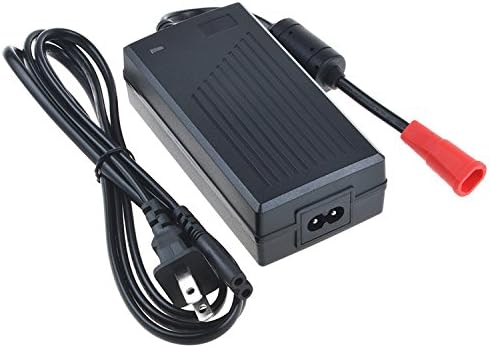
Image 1: Top view of the Digipartspower 2-Prong AC DC Adapter, showing the main unit, AC input cable, and DC output cable with its connector.
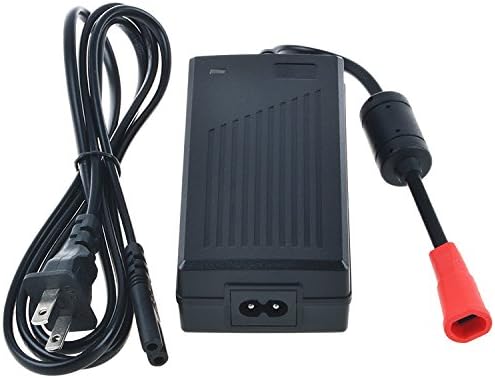
Image 2: Another view of the Digipartspower 2-Prong AC DC Adapter, highlighting the textured surface of the main unit and the connection points.
Setup Instructions
Follow these steps to properly set up your AC DC adapter:
- Verify Compatibility: Before connecting, confirm that your device (e.g., Okin Refined-R Mod JLDQ-11) requires a 24V DC input and that the adapter's output connector matches your device's input port.
- Connect to Device: Plug the DC output connector of the adapter firmly into the corresponding power input port on your device.
- Connect to Power Outlet: Insert the 2-prong AC input plug of the adapter into a standard wall power outlet (100-240V AC).
- Power On: Once connected, your device should receive power. Observe your device's indicators to confirm it is powered on correctly.
Operating Instructions
Once properly set up, the Digipartspower AC DC Adapter operates automatically to provide continuous power to your connected device. There are no user-adjustable settings on the adapter itself. Ensure the adapter is placed in a well-ventilated area to prevent overheating during prolonged use.
Care and Maintenance
Proper care extends the life of your adapter:
- Cleaning: Disconnect the adapter from both the power outlet and your device before cleaning. Use a soft, dry cloth to wipe the exterior. Do not use liquid cleaners or solvents.
- Storage: When not in use, store the adapter in a cool, dry place, away from direct sunlight and extreme temperatures. Avoid tightly coiling the cables to prevent damage.
- Inspection: Periodically inspect the adapter and cables for any signs of damage, such as frayed wires, cracked casing, or bent pins. If damage is found, discontinue use immediately and replace the adapter.
Troubleshooting
If you encounter issues with your adapter, refer to the following common problems and solutions:
- No Power to Device:
- Ensure both the AC input plug and DC output connector are securely plugged in.
- Check if the wall outlet is functional by plugging in another device.
- Verify that the adapter's specifications (voltage, wattage, connector type) match your device's requirements.
- Inspect cables for any visible damage.
- Adapter Overheating:
- Ensure the adapter is in a well-ventilated area and not covered.
- Confirm that the connected device's power requirements do not exceed the adapter's 50W capacity.
- Intermittent Power:
- Check for loose connections at both the wall outlet and the device.
- Inspect the cables and connectors for any signs of wear or damage.
If these steps do not resolve the issue, please contact customer support.
Technical Specifications
| Feature | Specification |
|---|---|
| Brand | Digipartspower |
| Model | JLDQ-11 (Compatible) |
| Input Voltage | 100-240V AC |
| Output Voltage | 24 Volts DC |
| Wattage | 50 watts |
| Main Power Connector Type | 2 Pin (AC Input) |
| Special Feature | Short Circuit Protection (SCP), Over Current Protection (OCP), Over Voltage Protection (OVP) |
| Certification | CE, FCC, RoHS |
| UPC | 753038364254 |
Warranty and Support
Money Back Guarantee: We offer a 30-day money-back guarantee if you are not satisfied with our products.
Customer Service: Digipartspower is committed to providing quality power products and excellent customer service. If you have any concerns, questions, or require assistance, please feel free to contact us. We aim to ship orders within 24 hours, Monday through Friday.