
Introduction
Thank you for choosing the SKMEI Model 1235 Analog-Digital Watch. This manual provides detailed instructions for setting up, operating, and maintaining your watch to ensure optimal performance and longevity. Please read this manual carefully before using your watch.
Product Overview
The SKMEI Model 1235 is a robust analog-digital wristwatch designed for daily wear and sports activities. It features a dual time display, stopwatch, alarm, and backlight functions, all housed in a durable plastic case with 50-meter water resistance.
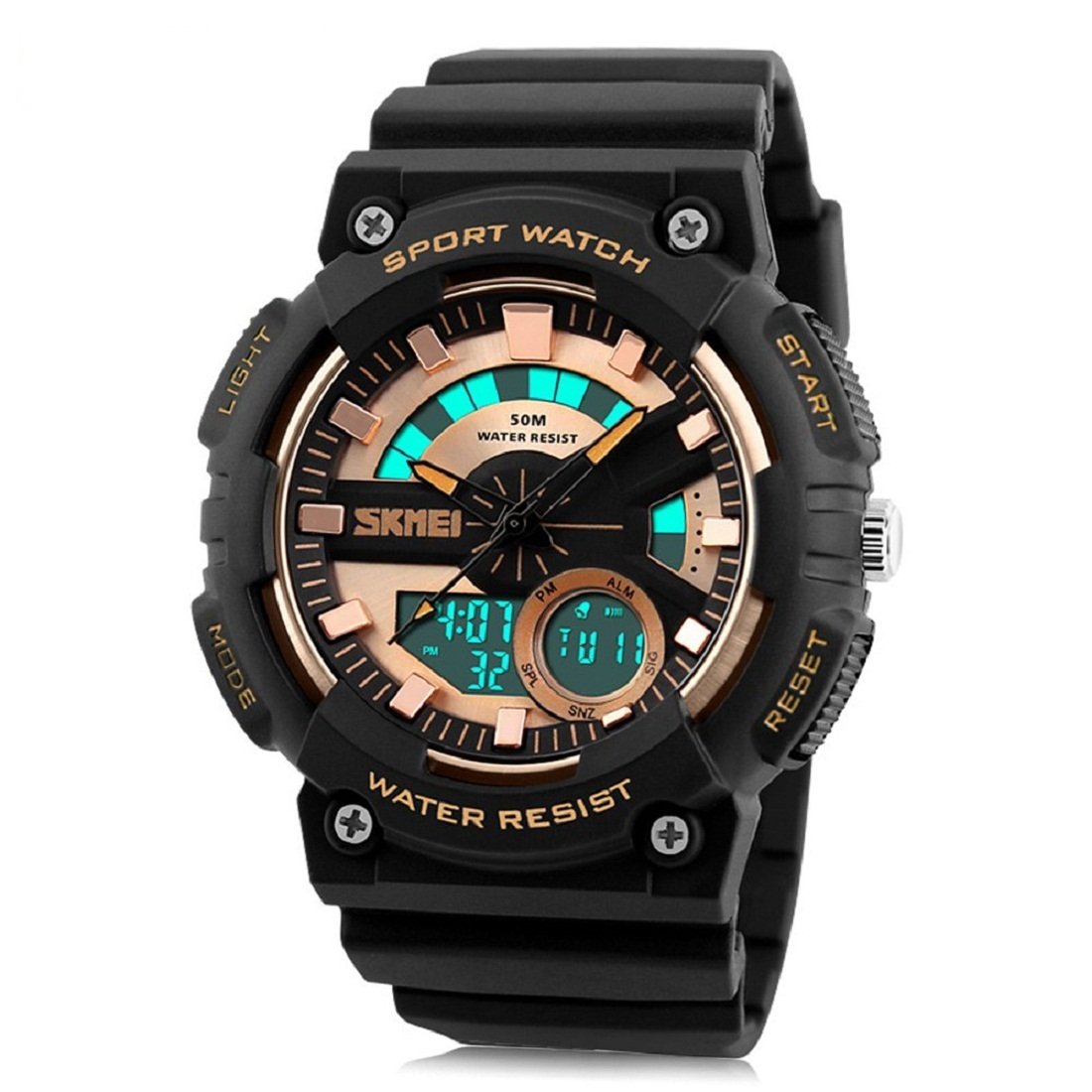
Figure 1: Front view of the SKMEI Model 1235 Analog-Digital Watch. This image displays the watch's black case, gold accents, and the dual analog-digital display. The 'LIGHT', 'MODE', 'START', and 'RESET' buttons are clearly visible.
Button Functions:
- LIGHT Button: Activates the backlight for the digital display.
- MODE Button: Cycles through different operating modes (Time, Chronograph, Alarm).
- START Button: Used to start/stop functions in Chronograph mode, and adjust values during setting.
- RESET Button: Used to reset functions in Chronograph mode, and select items during setting.
Setup
1. Setting Analog Time:
The analog hands are set independently from the digital display. Pull out the crown located on the right side of the watch case. Rotate the crown to adjust the hour and minute hands to the desired time. Once set, push the crown back in to secure the time.
2. Setting Digital Time and Date:
- From the normal time display, press the MODE button three times to enter the time setting mode. The seconds digits will flash.
- Press the RESET button to cycle through the setting items: Seconds → Hour → Minute → Month → Date → Day of Week.
- Use the START button to adjust the flashing value. Hold the START button to increase values rapidly.
- To switch between 12-hour and 24-hour format, press the RESET button until the hour digits are flashing, then press the START button to toggle.
- Once all settings are adjusted, press the MODE button to exit the setting mode and return to the normal time display.
Operating Modes
1. Chronograph (Stopwatch) Mode:
- From the normal time display, press the MODE button once to enter Chronograph mode. The display will show "00:00:00".
- Press the START button to begin timing.
- Press the START button again to pause timing.
- Press the RESET button while paused to reset the stopwatch to "00:00:00".
- To return to normal time display, press the MODE button.
2. Alarm Mode:
- From the normal time display, press the MODE button twice to enter Alarm mode. The alarm time will be displayed.
- Press the RESET button to select the hour or minute digits for setting.
- Use the START button to adjust the flashing value.
- To activate or deactivate the alarm, press the START and RESET buttons simultaneously in Alarm mode. An alarm icon will appear/disappear.
- To return to normal time display, press the MODE button.
3. Backlight Function:
Press the LIGHT button (top-left) at any time to illuminate the digital display for a few seconds, allowing visibility in low-light conditions.

Figure 2: The SKMEI Model 1235 watch with its backlight activated, illuminating the digital display for improved visibility in dark environments.
Maintenance
- Cleaning: Wipe the watch regularly with a soft, dry cloth to remove dust and dirt. For stubborn grime, use a slightly damp cloth and then dry thoroughly. Avoid harsh chemicals or abrasive cleaners.
- Water Resistance: This watch is water resistant up to 50 meters (5 ATM). This means it is suitable for short periods of recreational swimming or showering. Do not press any buttons while the watch is submerged in water, as this can compromise the water seal. Avoid hot water, as temperature changes can affect the seals.
- Temperature: Avoid exposing the watch to extreme temperatures (hot or cold) for extended periods, as this can affect battery life and accuracy.
- Impact: While durable, avoid strong impacts or dropping the watch, which can damage internal components or the case.
- Battery Replacement: When the display becomes dim or the watch stops functioning, the battery may need replacement. This should ideally be performed by a qualified watch technician to ensure proper sealing and functionality.
Troubleshooting
| Problem | Possible Cause | Solution |
|---|---|---|
| Digital display is blank or dim. | Low battery. | Replace the battery. |
| Digital time is incorrect. | Time not set correctly or accidental adjustment. | Refer to "Setting Digital Time and Date" section to reset the time. |
| Analog hands are incorrect. | Analog time not set correctly or accidental adjustment of the crown. | Refer to "Setting Analog Time" section to reset the hands. Ensure the crown is pushed in fully. |
| Alarm does not sound. | Alarm is deactivated or set incorrectly. | Refer to "Alarm Mode" section to activate and set the alarm correctly. |
| Water inside the watch. | Buttons pressed underwater or seals compromised. | Immediately take the watch to a qualified technician for inspection and repair. Avoid further water exposure. |
Specifications
| Brand | SKMEI |
| Model Number | 1235 |
| Display Type | Analog-Digital |
| Movement Type | Quartz |
| Case Material | Plastic |
| Dial Window Material | Resin |
| Band Material | Plastic (PU) |
| Clasp Type | Buckle |
| Case Diameter | 48 mm |
| Case Thickness | 17 mm |
| Band Width | 24 mm |
| Band Length | 26.5 cm |
| Water Resistance Depth | 50 Meters (5 ATM) |
| Special Features | Alarm, Light, Chronograph |
| Item Weight | 70 g |
Warranty and Support
This SKMEI Model 1235 watch comes with a manufacturer's warranty. Please refer to the warranty card included with your purchase for specific terms and conditions, including coverage duration and what is covered. For technical support or warranty claims, please contact the authorized SKMEI dealer or service center from whom you purchased the product. Keep your proof of purchase for warranty validation.


