
ZdalaMit AKB72915239-ZDLMT
ZdalaMit AKB72915239 Replacement Remote Control User Manual
Model: AKB72915239-ZDLMT
Introduction
This user manual provides instructions for the ZdalaMit AKB72915239 Replacement Remote Control, designed for various LG TV models. This remote is a direct replacement and requires no programming or pairing. Simply insert batteries to begin operation.
Product Overview

Figure 1: Front view of the ZdalaMit AKB72915239 remote control, displaying its ergonomic design and button layout.
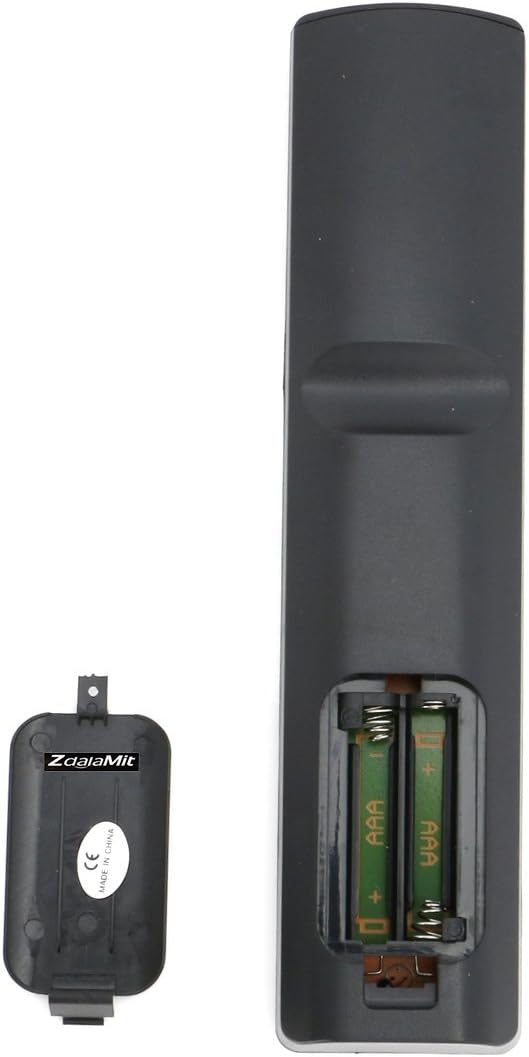
Figure 2: Back view of the remote control with the battery cover removed, illustrating the battery insertion area.
Setup
Battery Installation
The remote control requires two (2) 1.5V AAA alkaline batteries (not included).
- Locate the battery compartment on the back of the remote control.
- Press down on the tab and slide the battery cover downwards to open it.
- Insert two AAA batteries, ensuring the positive (+) and negative (-) terminals align correctly with the markings inside the compartment.
- Slide the battery cover back into place until it clicks securely.
Note: Ensure batteries are inserted correctly to prevent damage to the remote control. Remove batteries if the remote will not be used for an extended period.
Operating Instructions
This replacement remote control is designed to function immediately with compatible LG TV models without any programming or pairing. Simply point the remote at your television and press the desired button.
Key Functions
- Power Button (●): Turns the TV on or off.
- Number Pad (0-9): Directly enters channel numbers.
- Volume Up/Down (VOL +/-): Adjusts the sound volume.
- Channel Up/Down (CH +/-): Changes the TV channel.
- Mute (🔇): Mutes or unmutes the TV sound.
- Input/Source: Selects video input sources (e.g., HDMI, AV).
- Navigation Buttons (Up, Down, Left, Right, Enter): Used to navigate menus and confirm selections.
- Home: Accesses the TV's main menu or smart features.
- Back/Exit: Returns to the previous screen or exits a menu.
- Color Buttons (Red, Green, Yellow, Blue): Used for specific functions within certain TV applications or menus.
For specific functions related to your LG TV model, refer to your television's original user manual.
Maintenance
Cleaning the Remote
- Wipe the remote control with a soft, dry cloth.
- Do not use liquid cleaners, sprays, or abrasive materials, as these may damage the remote's surface or internal components.
Battery Replacement
Replace batteries when the remote's response becomes sluggish or stops working. Follow the battery installation steps outlined in the "Setup" section.
Important: Dispose of used batteries responsibly according to local regulations. Do not mix old and new batteries, or different types of batteries.
Troubleshooting
| Problem | Possible Cause | Solution |
|---|---|---|
| Remote not working. | Batteries are dead or inserted incorrectly. | Replace batteries with new AAA alkaline batteries, ensuring correct polarity (+/-). |
| Remote works intermittently. | Low battery power; obstruction between remote and TV; remote sensor on TV is blocked. | Replace batteries. Ensure there is a clear line of sight between the remote and the TV's infrared sensor. Clear any obstructions. |
| Certain buttons do not respond. | Button malfunction; TV model incompatibility for specific advanced functions. | Ensure the remote is pointed directly at the TV. If the issue persists for basic functions, the remote may be faulty. Note that some advanced functions might be TV model specific. |
Specifications
- Model Number: AKB72915239-ZDLMT
- Brand: ZdalaMit
- Compatible Devices: LG Televisions (various models as listed in product description)
- Power Supply: 2 x 1.5V AAA Alkaline Batteries (not included)
- Product Dimensions: 7 x 2 x 1 inches (approximately)
- Item Weight: 3 ounces (approximately)
- Color: Black
- Special Feature: Ergonomic design
Contact and Support
For any queries or assistance regarding your ZdalaMit AKB72915239 Replacement Remote Control, please contact the seller or manufacturer directly through your purchase platform.
This product is designed for ease of use and typically requires no programming. If you encounter issues not covered in this manual, please reach out for support.
Related Documents - AKB72915239-ZDLMT
 |
ZDALAMIT INC MIC-VOICE-RC Remote Control User Manual User manual for the ZDALAMIT INC MIC-VOICE-RC remote control, detailing button functions, pairing instructions, and FCC compliance information. |
 |
FCC U.S. Agent Designation for Shenzhenshichengxingwangdianzishangwuyouxiangongsi (FCC ID: 2BLKOBT800) Official U.S. Agent Designation letter for Shenzhenshichengxingwangdianzishangwuyouxiangongsi, appointing ZDALAMIT INC as the agent for service of process for equipment authorized under FCC ID 2BLKOBT800. Includes agent contact details and regulatory compliance information. |
 |
FCC ID 2A4YN-MIC-VOICE-RC - ZDALAMIT INC Remote Control FCC filing details and visual description for the ZDALAMIT INC MIC-VOICE-RC remote control, FCC ID 2A4YN-MIC-VOICE-RC. |
Ask a question about this manual
Ask about setup, troubleshooting, compatibility, parts, safety, or missing instructions. Manuals+ will review the question and use this page’s manual context to help answer it.