Important Safety Information
WARNING: Installation of brake components requires specialized knowledge and tools. Improper installation can lead to brake system failure, resulting in serious injury or death. It is strongly recommended that installation be performed by a qualified automotive professional. Always refer to your vehicle's service manual for specific procedures and torque specifications.
Before beginning any work, ensure the vehicle is securely supported and the ignition is off. Wear appropriate personal protective equipment, including safety glasses and gloves.
Product Overview
The Wilwood Forged Billet Dynalite-M Caliper (Model 120-13551-RD) is an advanced brake caliper designed for high-performance applications. This caliper is an enhancement of the Forged Dynalite series, specifically engineered to improve outboard clearance. It serves as a foundational component for Wilwood's Classic Style brake kits, incorporating the latest developments in caliper design and manufacturing to deliver superior strength and performance.
- Bore Size: 1.75 inches
- Rotor Width Compatibility: 1 inch
- Finish: Red Powder Coat

Figure 1: The Wilwood Forged Billet Dynalite-M Caliper, featuring a vibrant red powder coat finish. This image displays the overall design and aesthetic of the caliper.
Installation and Setup
This section provides general guidelines for the installation of the Wilwood Forged Billet Dynalite-M Caliper. Always consult the specific installation instructions provided with your complete brake kit and your vehicle's service manual for detailed, vehicle-specific procedures, torque specifications, and safety precautions.
- Preparation: Ensure the vehicle is safely lifted and supported. Remove the wheel and existing brake components as per your vehicle's service manual. Clean the mounting surface on the spindle or caliper bracket.
- Mounting: Position the caliper onto the mounting bracket or spindle. Ensure proper alignment with the rotor. Secure the caliper using the appropriate bolts and washers, torquing them to the manufacturer's specifications. Refer to Figure 2 for critical dimensions and mounting points.
- Brake Line Connection: Connect the brake line to the caliper's inlet fitting (1/8-27 NPT). Use appropriate thread sealant and ensure a leak-free connection. Do not overtighten.
- Pad Installation: Install the correct brake pads into the caliper. Ensure they are seated properly and the retaining pins/clips are secured.
- Bleeding the System: After installation, the brake system must be thoroughly bled to remove all air. Follow standard brake bleeding procedures, starting with the caliper furthest from the master cylinder. Use only new, clean brake fluid of the recommended type.
- Final Checks: Before driving, pump the brake pedal several times to ensure a firm pedal. Check for any fluid leaks around the caliper and brake lines. Reinstall the wheels and lower the vehicle.

Figure 2: Technical drawing illustrating the dimensions and mounting points of the Wilwood Dynalite Caliper. This diagram provides critical measurements such as mount center, mount height, and bolt circle radius, essential for proper fitment and installation.
Operating Considerations
Once installed, proper operation of your new brake system is crucial for safety and performance.
- Brake Pad Bed-in: New brake pads and rotors require a proper bed-in procedure to achieve optimal performance and longevity. Follow the bed-in instructions provided by the brake pad manufacturer. This typically involves a series of moderate to firm stops from varying speeds, allowing the brakes to cool between cycles.
- Initial Performance: Expect reduced braking performance immediately after installation and before the bed-in process is complete. Drive cautiously.
- Fluid Level: Regularly check the brake fluid level in the master cylinder reservoir. A drop in fluid level may indicate pad wear or a leak.
Maintenance
Regular inspection and maintenance are vital for the safe and effective operation of your brake system.
- Routine Inspection: Periodically inspect the calipers, brake pads, rotors, and brake lines for signs of wear, damage, or leaks. Check for even pad wear and rotor condition.
- Brake Pad Replacement: Replace brake pads when they reach their minimum thickness specification. Refer to Figure 3 for brake pad dimensions and ordering information. Always replace pads on both sides of an axle simultaneously.
- Brake Fluid: Brake fluid should be flushed and replaced according to your vehicle manufacturer's recommendations, typically every 1-2 years, to maintain optimal braking performance and prevent corrosion.
- Caliper Cleaning: Keep calipers clean from excessive brake dust and road grime. Use appropriate brake cleaner.
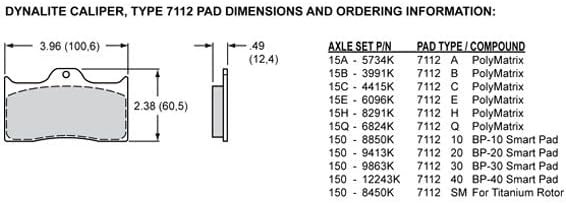
Figure 3: Diagram detailing the dimensions of the Dynalite Caliper Type 7112 brake pads and a table with ordering information for various pad types and compounds. This information is crucial for selecting the correct replacement pads.
Troubleshooting
If you experience issues with your brake system, consult a qualified mechanic immediately. Do not attempt to drive a vehicle with compromised brakes.
| Symptom | Possible Cause | Action |
|---|---|---|
| Spongy Brake Pedal | Air in the brake lines, low brake fluid, worn master cylinder. | Bleed the brake system, check fluid level, inspect master cylinder. |
| Brake Noise (Squealing/Grinding) | Worn brake pads, improper pad bed-in, foreign material, rotor issues. | Inspect pads and rotors, re-bed pads, clean components. |
| Uneven Brake Pad Wear | Sticking caliper piston, seized caliper slide pins, improper installation. | Inspect caliper for proper function, lubricate slide pins, verify installation. |
| Brake Fluid Leak | Loose fittings, damaged brake line, faulty caliper seal. | Locate and repair leak, replace damaged components. |
For any persistent or severe issues, seek professional automotive service.
Specifications
| Brand | Wilwood |
| Model Number | 120-13551-RD |
| Bore Size | 1.75 inches |
| Rotor Width Compatibility | 1.00 inch |
| Color/Finish | Red Powder Coat |
| Item Weight | 3.5 pounds |
| Product Dimensions | 9 x 5.75 x 4 inches |
| Manufacturer Part Number | 120-13551-RD |
Warranty and Support
For information regarding the warranty of your Wilwood product, please refer to the official Wilwood website or contact their customer support directly. Warranty terms and conditions may vary.
For technical assistance, product inquiries, or support, please contact Wilwood customer service.
Manufacturer: Wilwood Engineering, Inc.