
1. Product Overview
The KeyGuard SL-591 Portable Car Lock Box is designed for secure key storage near your vehicle. It features a durable metal body, a combination keypad, and a protective cover for weather resistance and discretion. This lock box is suitable for storing car keys, key fobs, and other small valuables.

Figure 1: KeyGuard SL-591 Portable Car Lock Box. This image displays the lock box in two states: closed with the protective cover, and open revealing the keypad and interior storage compartment with keys.
Key features include:
- Durable Construction: Full metal body with a protective rubber cover.
- Keypad Entry: User-friendly punch button keypad for number or letter combinations.
- Weather Protection: Non-ferrous metal construction and a thick rubber cover protect against rust and debris.
- Scratch Prevention: The rubber cover also prevents scratching vehicle surfaces.
- Ample Storage: Internal dimensions of approximately 4" (H) x 2-3/8" (W) x 1-1/8" (D) provide space for keys, fobs, and small items.

Figure 2: KeyGuard SL-591 Features. This image details the robust construction, the protective door that conceals the keypad, and the large, easy-to-use buttons.

Figure 3: Ample Storage Space. This image demonstrates the interior capacity of the lock box, capable of holding multiple keys, fobs, credit cards, and identification.
2. Setup
2.1 Setting or Changing the Combination
The KeyGuard SL-591 uses a push-button combination system. The combination is set or changed by activating specific buttons on the back of the faceplate using the provided tool.
- Open the lock box. If it's currently locked, enter the existing combination and pull down the open tab.
- Access the back of the faceplate. This area has 11 yellow buttons, each with an arrow. Below each arrow is a number corresponding to the front keypad.
- Set your desired combination:
- Using the provided clear plastic tool (or a small screwdriver), turn the arrow of each desired combination number/letter downwards towards the base of the KeyGuard to activate it.
- For numbers/letters you do NOT want in your combination, ensure their arrows are pointing upwards.
- Important: The combination does not require a specific order for entry. Any sequence of the activated buttons will open the lock. For example, if 1, 2, and 3 are activated, pressing 1-2-3, 3-2-1, or 2-1-3 will all open the lock.
- Test the new combination:
- After setting the pins, press the "Clear Key" button on the front keypad.
- Enter your newly set combination (press all activated buttons).
- Pull down the "OPEN" tab. If the tab pulls down and the lock opens, your combination is set correctly.
- If the tab does not pull down, DO NOT CLOSE THE COVER. Re-check the pin settings on the back of the faceplate and try again.
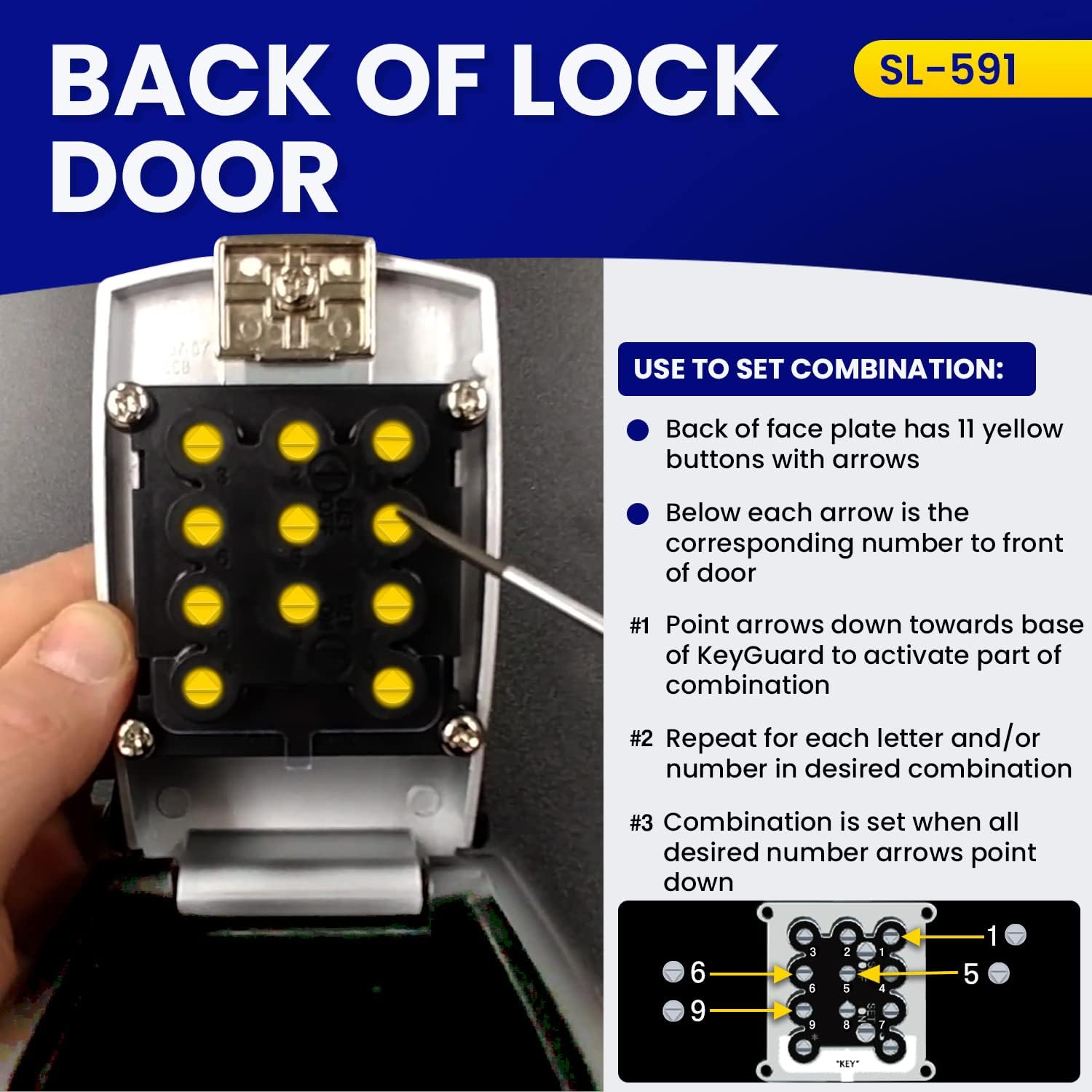
Figure 4: Setting the Combination Pins. This image illustrates the back of the lock box faceplate, detailing how to use the yellow buttons and arrows to set the desired combination.

Figure 5: Testing the Combination. This image provides visual steps for opening the lock box and includes the process for testing a newly set combination using the clear key and open tab.
2.2 Mounting the Lock Box
The SL-591 is designed for easy mounting on a car window.
- Roll down your car window approximately 1-2 inches.
- Place the metal hook of the lock box over the top edge of the window glass.
- Ensure the lock box is securely seated on the window.
- Roll the window back up completely. The window will secure the lock box in place.
- The protective rubber cover helps prevent scratches to your vehicle's paint or window.

Figure 6: Window Mounting. This image shows the KeyGuard SL-591 attached to a car window, highlighting its sturdy metal construction and how it securely hangs.
3. Operation
3.1 Opening the Lock Box
- Slide down the protective cover to reveal the keypad.
- Enter your combination by pressing the activated buttons. Remember, the order of pressing does not matter, but all activated buttons must be engaged.
- Once the combination is entered, pull down the "OPEN" tab located below the keypad. The front door of the lock box will open.
3.2 Closing the Lock Box
- Ensure the contents are placed securely inside the compartment.
- Close the front door of the lock box.
- Press the "OPEN" tab upwards to secure the door. The lock box is automatically secured when closed.
- Slide the protective cover back up to conceal the keypad and protect it from elements.

Figure 7: Keyless Access. This image shows a hand interacting with the keypad, demonstrating the ease of use for secure keyless entry.
4. Maintenance
The KeyGuard SL-591 is designed for durability and minimal maintenance.
- Cleaning: Wipe the exterior with a damp cloth as needed. Avoid abrasive cleaners that could damage the finish or rubber cover.
- Weather Protection: The thick rubber cover is integral to protecting the lock box from rust and debris. Ensure it is properly positioned over the keypad when not in use.
- Inspection: Periodically check the lock box for any signs of wear or damage, especially to the rubber cover and the mounting mechanism.
5. Troubleshooting
- Lock Box Not Opening:
- Ensure all numbers/letters in your set combination are pressed. The order of pressing does not matter, but all activated buttons must be engaged.
- Verify that the "OPEN" tab is pulled down firmly after entering the combination.
- If the combination was recently changed, double-check that the new combination was set correctly by ensuring the arrows on the back of the faceplate are pointing down for the desired numbers.
- Keyless Entry Fob Security:
- The lock box itself does not shield the remote signal of a keyless entry fob. If your vehicle unlocks by proximity, the fob inside the lock box may still activate the vehicle.
- To prevent this, it is recommended to place your keyless entry fob inside a Faraday bag before storing it in the lock box. Ensure the Faraday bag fits within the lock box's internal dimensions.
- Difficulty Mounting on Window:
- Ensure the car window is rolled down sufficiently to allow the lock box hook to clear the window frame.
- Roll the window up slowly and ensure the lock box is not obstructed. Some window visors may interfere with proper mounting.
6. Specifications
| Brand | KeyGuard |
| Model Name | SL-591-CVR |
| Lock Type | Combination Lock, Keypad |
| Material | Metal (Zinc Alloy) with ABS Plastic Coating and Rubber Cover |
| External Dimensions (L x W x H) | 3.25 x 3 x 5 inches |
| Internal Dimensions (H x W x D) | 4" x 2-3/8" x 1-1/8" |
| Item Weight | 1.5 Pounds |
| Special Features | Portable, All-Weather Protection, Push Button Keypad |
| Included Components | Car Window Lock Box, Combination Setting Tool |
7. Warranty and Support
The KeyGuard SL-591 Portable Car Lock Box comes with a 1-year warranty from the date of purchase, covering manufacturing defects.
For technical support, warranty claims, or further assistance, please contact KeyGuard customer service. Refer to the product packaging or the official KeyGuard website for current contact information.