
1. Introduction and Overview
The Sachtler Video 25 Plus FB Fluid Head is engineered for professional camera operators, offering exceptional performance for studio and outside broadcast (OB) applications. Despite its robust capabilities, it remains unusually light. This fluid head features a sophisticated seven-step, temperature-independent damping system, ensuring smooth and precise camera movements without jerks or vibrations. Its 18-step counterbalance system, easily adjustable in 9 stages with fine-tuning via a half-step function, provides optimal balance for various camera configurations. The Video 25 Plus FB supports tilt angles up to 90° even under maximum load, and includes Sachtler's renowned Touch & Go quick release system, a self-illuminating Touch Bubble, and conveniently located horizontal and vertical brakes for maximum safety and efficiency in fast-paced environments. This model is equipped with a 4-hole flat base, allowing versatile mounting on all 150mm or flat base tripods.
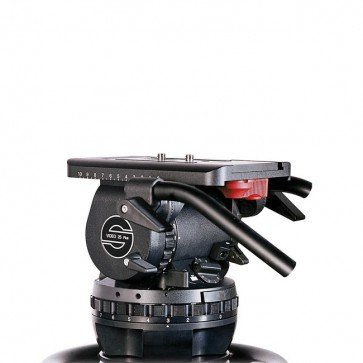
Figure 1: The Sachtler Video 25 Plus FB Fluid Head, showcasing its robust design and control knobs.
2. Key Features
- Frictionless Leak-Proof Fluid Damping: Features a seven-level damping system for smooth, jerk-free panning and tilting, essential for professional video capture.
- Touch & Go Quick Release / Automatic Locking System: Enables rapid camera attachment and detachment, saving time during setup and breakdown.
- Sliding Balance Plate: Offers a 3.9-inch (Flatbase) sliding range, allowing precise compensation for varying camera configurations and weights to achieve perfect balance.
- 18-Step Dynamic Counterbalancing System: Utilizes torsion springs to compensate for torque during camera tilts, preventing accidental tipping and ensuring secure positioning at any tilt angle, freeing the operator to focus on camerawork.
- Safe at Any Temperature: The damping system operates reliably without friction across a wide temperature range from -40°F to +140°F, making it suitable for diverse environmental conditions.
3. Setup Guide
3.1 Mounting the Fluid Head
- Ensure your tripod is stable and securely set up on a level surface.
- The Video 25 Plus FB features a 4-hole flat base. Align the mounting holes on the fluid head with the mounting plate of your tripod or support system.
- Secure the fluid head to the tripod using the appropriate screws or locking mechanism provided with your tripod. Ensure it is tightened firmly to prevent any movement.
3.2 Attaching the Camera
- Locate the Touch & Go quick release plate on the fluid head.
- Press the release lever to unlock the plate and slide it out.
- Attach the quick release plate to the bottom of your camera using the camera screw. Ensure it is securely fastened.
- Slide the camera with the attached plate back into the fluid head until it clicks into place, indicating it is locked. Verify the secure attachment by gently attempting to lift the camera.
3.3 Balancing the Camera
- With the camera mounted, release the tilt lock.
- Adjust the sliding balance plate by loosening its lock and moving the camera forward or backward until the camera remains stationary at any tilt angle without assistance.
- Once balanced, tighten the sliding balance plate lock.
- Adjust the 18-step dynamic counterbalance system to match the weight and center of gravity of your camera setup. Start with a lower setting and increase until the camera feels weightless and stable when tilted.
4. Operating Instructions
4.1 Damping System Adjustment
The Video 25 Plus FB features a seven-step damping system for both pan and tilt movements. Rotate the damping control knobs (typically located on the side of the head) to select the desired level of drag. A higher number indicates more resistance, providing smoother, more controlled movements, while a lower number allows for faster, freer motion.
4.2 Counterbalance Adjustment
The 18-step counterbalance system is crucial for preventing the camera from tipping and ensuring it stays at any tilt angle. Use the counterbalance dial to adjust the spring tension. For heavier camera setups or specific tilt requirements, increase the counterbalance setting. Fine-tuning can be achieved using the half-step function.
4.3 Pan and Tilt Locks
The fluid head is equipped with independent pan and tilt locks. Engage these levers to secure the camera in a fixed position. Always ensure these locks are disengaged before attempting to pan or tilt the camera to avoid damage to the head or camera.
4.4 Self-Illuminating Touch Bubble
The integrated self-illuminating touch bubble allows for quick and accurate leveling of the fluid head, even in low-light conditions. Ensure the bubble is centered to achieve a perfectly level horizon for your shots.
5. Maintenance
5.1 Cleaning
- Regularly wipe down the fluid head with a soft, dry cloth to remove dust and dirt.
- For stubborn grime, use a slightly damp cloth with mild soap, then wipe dry immediately.
- Avoid using abrasive cleaners, solvents, or harsh chemicals, as these can damage the finish and internal components.
- Keep the quick release plate and its slot clean to ensure smooth operation.
5.2 Storage
- Store the fluid head in a clean, dry environment, away from extreme temperatures and humidity.
- When not in use, it is recommended to engage the pan and tilt locks to prevent accidental movement.
- If storing for extended periods, consider placing it in a protective case.
5.3 Temperature Considerations
The Sachtler Video 25 Plus FB is designed to operate reliably from -40°F to +140°F. No special adjustments are typically needed for temperature variations within this range, as the damping system is temperature-independent. However, rapid temperature changes can sometimes cause condensation; allow the unit to acclimate before use if moving between extreme temperature environments.
6. Troubleshooting
| Problem | Possible Cause | Solution |
|---|---|---|
| Camera not balancing correctly. | Incorrect sliding plate position or counterbalance setting. | Adjust the sliding balance plate until the camera is stable. Fine-tune the 18-step counterbalance system to match the camera's weight. |
| Pan or tilt movement feels stiff or jerky. | Damping setting too high, or pan/tilt locks are partially engaged. | Reduce the damping setting. Ensure pan and tilt locks are fully disengaged. Check for any obstructions. |
| Quick release plate not locking securely. | Plate not fully inserted, or debris in the slot. | Ensure the plate is fully seated until it clicks. Clean the quick release slot and plate. |
| Bubble level not accurate. | Head not level, or bubble level needs calibration (rare). | Adjust tripod legs to level the head. If persistent, consult Sachtler support. |
7. Specifications
| Feature | Detail |
|---|---|
| Model | Video 25 Plus FB |
| Brand | Sachtler |
| ASIN | B0743GFC3C |
| UPC | 663647918970 |
| Manufacturer | Sachtler |
| Color | Black |
| Compatible Devices | Camera |
| Maximum Weight Recommendation | 77 Pounds |
| Damping System | 7-step, temperature-independent fluid damping |
| Counterbalance System | 18-step dynamic counterbalance with half-step function |
| Base Type | 4-hole Flat Base |
| Operating Temperature Range | -40°F to +140°F (-40°C to +60°C) |
8. Warranty and Support
8.1 Product Warranty
Sachtler products are manufactured to high-quality standards and typically come with a manufacturer's warranty. The specific terms and duration of the warranty for your Video 25 Plus FB Fluid Head may vary by region and purchase date. Please refer to the warranty card included with your product or visit the official Sachtler website for detailed warranty information and registration procedures.
8.2 Customer Support
For technical assistance, spare parts, or service inquiries, please contact Sachtler customer support. You can find contact information, including phone numbers and email addresses, on the official Sachtler website. When contacting support, please have your product model (Video 25 Plus FB) and serial number ready to expedite the process.
Official Sachtler Website: www.sachtler.com


