
1. Introduction
This manual provides detailed instructions for the operation and maintenance of your Astell&Kern A&Ultima SP1000 High Resolution Music Player. Please read this manual thoroughly before using the device to ensure proper functionality and to maximize your listening experience.
The Astell&Kern A&Ultima SP1000 is designed for high-fidelity audio playback, supporting various high-resolution audio formats. It features an octo-core CPU for efficient performance and a responsive user interface.
2. Key Features
- Powerful Octo-Core CPU: Ensures smooth operation and responsive performance.
- Accurate Playback: Supports native 32bit/384kHz audio playback.
- Intuitive User Interface: Designed for a music-centric experience.
- Internal Storage: 256GB built-in memory.
- Expandable Storage: Micro SD card slot for additional memory up to 512GB.
- USB Type-C: Supports data transfer speeds up to 10Gbps.
- High-Quality 5-inch Touchscreen Display: For clear visuals and easy navigation.
- Watch-Grade Stainless Steel Casing: Durable construction with a carbon fiber back.
- Multi-Function Control and Volume Wheel: For precise audio adjustments.
Video Description: This video provides an overview of the Astell&Kern A&Ultima SP1000, showcasing its design, key features like the multi-function control wheel, high-quality touchscreen, octa-core processor, and battery life. It also demonstrates the device in use, highlighting its premium build and user experience.
3. Device Layout and Controls
Familiarize yourself with the physical components and controls of your SP1000 player.

Image Description: Front view of the Astell&Kern A&Ultima SP1000 High Resolution Music Player in copper finish, displaying its 5-inch touchscreen with a music playback interface. The screen shows album art, track progress, and playback controls. The device has a sleek, angular design.
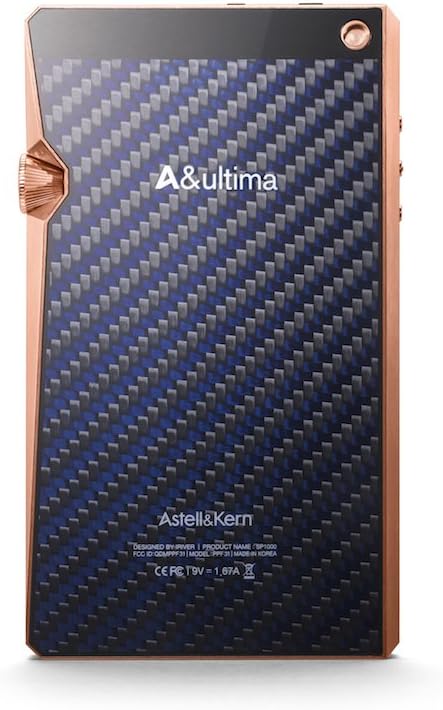
Image Description: Back view of the Astell&Kern A&Ultima SP1000 High Resolution Music Player, showcasing its carbon fiber pattern back panel and the 'A&Ultima' branding. The copper frame and volume wheel are visible from this angle.
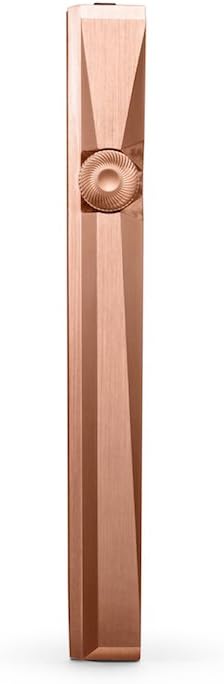
Image Description: Side view of the Astell&Kern A&Ultima SP1000, highlighting the distinctive multi-function control and volume wheel with its intricate gear-like texture. The angular design of the copper chassis is also prominent.
4. Setup
4.1. Initial Charging
Before first use, fully charge the device. Connect the provided USB Type-C cable to the player and a power source (e.g., computer USB port or a compatible USB wall adapter). The device supports 2-hour fast-charge capability.
4.2. Powering On/Off
- To power on: Press and hold the power button (usually located on the side) until the screen illuminates.
- To power off: Press and hold the power button, then select "Power Off" from the on-screen options.
- To put in standby: Briefly press the power button.
4.3. Inserting a Micro SD Card
The SP1000 supports Micro SD cards up to 512GB for expanded storage. Locate the Micro SD card slot on the device, insert the card gently until it clicks into place. Ensure the card is inserted correctly to avoid damage.
5. Operating Instructions
5.1. User Interface Navigation
The SP1000 features a 5-inch touchscreen display. Navigate through menus, select tracks, and adjust settings by tapping and swiping on the screen. The interface is designed to be intuitive and music-centric.
5.2. Music Playback
- Connect your headphones to the appropriate audio output jack (3.5mm or 2.5mm balanced).
- Browse your music library using the touchscreen.
- Tap on a track or album to begin playback.
- Use the on-screen controls for play/pause, skip track, and repeat/shuffle functions.
5.3. Volume Control
Adjust the volume using the multi-function control and volume wheel located on the side of the device. Rotate the wheel to increase or decrease the volume level. The current volume level will be displayed on the screen.
6. Connectivity
6.1. Wi-Fi Connection
To connect to a Wi-Fi network:
- Go to Settings > Wi-Fi.
- Turn Wi-Fi on.
- Select your desired network from the list and enter the password if required.
6.2. Bluetooth Connection
To pair with a Bluetooth device:
- Go to Settings > Bluetooth.
- Turn Bluetooth on.
- Ensure your Bluetooth headphones or speaker are in pairing mode.
- Select the device from the list to pair.
6.3. USB Type-C
The USB Type-C port is used for charging, data transfer, and connecting to a computer as a USB DAC. Connect the device to your PC or MAC using the supplied USB Type-C cable.
7. Memory Management
7.1. Internal Memory
The device comes with 256GB of internal storage. You can transfer music files directly to this storage by connecting the SP1000 to a computer via USB and accessing it as a mass storage device.
7.2. Micro SD Card
For additional storage, insert a Micro SD card (up to 512GB) into the dedicated slot. The device will automatically recognize the card, and its contents will be integrated into your music library.
8. Specifications
| Feature | Detail |
|---|---|
| Model Name | A&ultima SP1000 |
| Brand | Astell&Kern |
| Item Model Number | 3PPF319C-CMCGN1 |
| Product Dimensions | 31.89 x 51.18 x 72.44 inches |
| Item Weight | 2.2 pounds |
| Batteries | 1 Lithium Polymer battery required |
| Special Feature | Touch Screen |
| Connectivity Technology | Wi-Fi, Bluetooth, USB Cable |
| Memory Storage Capacity | 256 GB (expandable via Micro SD) |
| Color | Copper |
| Screen Size | 5 Inches |
| Compatible Devices | PC, MAC |
| Media Type | Micro SD |
| Display Technology | High-Definition HD5 Grade/Touchscreen |
9. Troubleshooting
This section addresses common issues you might encounter with your SP1000 player.
9.1. Device Not Powering On
- Ensure the device is sufficiently charged. Connect it to a power source and allow it to charge for at least 30 minutes before attempting to power on again.
- Perform a soft reset by pressing and holding the power button for approximately 10-15 seconds.
9.2. No Sound Output
- Check that your headphones are properly connected to the correct audio jack.
- Verify the volume level is not set to minimum or muted.
- If using Bluetooth, ensure the device is correctly paired and connected to your audio output device.
9.3. Wi-Fi Connectivity Issues
- Ensure the Wi-Fi function is enabled in the device settings.
- Verify that the Wi-Fi network is active and within range.
- Try forgetting the network and reconnecting.
- Restart both the SP1000 and your Wi-Fi router.
9.4. System Performance Issues
- Close any unnecessary background applications.
- Ensure the device firmware is up to date. Check for updates in the settings menu.
- If issues persist, consider performing a factory reset (note: this will erase all data on the device).
10. Maintenance
- Cleaning: Use a soft, dry cloth to clean the device. Avoid using harsh chemicals or abrasive materials.
- Storage: Store the device in a cool, dry place away from direct sunlight and extreme temperatures.
- Battery Care: To prolong battery life, avoid fully discharging the battery frequently. If storing for an extended period, charge the battery to approximately 50-70%.
- Software Updates: Regularly check for and install firmware updates to ensure optimal performance and access to new features.

Image Description: The Astell&Kern A&Ultima SP1000 music player enclosed in a dark red leather protective case, viewed from an angle. The case covers the back and sides, leaving the screen and control wheel exposed, offering protection while maintaining accessibility.
11. Warranty and Support
For warranty information, please refer to the warranty card included with your product or visit the official Astell&Kern website. Keep your proof of purchase for warranty claims.
For technical support, product inquiries, or service requests, please contact Astell&Kern customer service through their official channels. Contact information can typically be found on the manufacturer's website.
Note: Unauthorized repairs or modifications may void your warranty.


