
1. Product Overview
The BIC America Acoustech PL-200 II offers improved bass performance and more placement flexibility than the original top-rated BIC PL-200. Like the PL-200, the PL-200 II is powered by an audiophile state-of-the-art BASH amplifier capable of delivering up to 1,000-watts dynamic peak output. Its specially designed heavy-duty long-throw 12 in. woofer can move an impressive volume of air with exquisite control while delivering prodigious amounts of bass for both music and theater applications. The dual flared front ports enable a more even transition of sound into the room and dramatically boost deeper bass frequencies providing a smoother frequency response, virtually flat down to 20 Hz. Wide port flares eliminate port noise while increased cabinet bracing eliminates unwanted cabinet vibrations for even cleaner sound. The front porting also enables extra placement flexibility, including the option of being placed or built into a cabinet. The PL-200 II has an elegant enclosure with hand-rubbed black lacquer on the top and bottom. Hand-rubbed lacquer ensures each cabinet has a deep gloss shine and is more scratch-resistant than most lacquer finishes on the market.
Key Features
- Built-in BASH amplifier for powerful audio delivery.
- Output: 1,000 watts peak / 250 watts RMS.
- 12-inch front-firing, long-throw, heavy-duty poly-injected woofer with high-power magnet and long excursion surround.
- Dual flared front ports provide versatile positioning options.
- Frequency response: 21 Hz to 200 Hz (±3 dB).
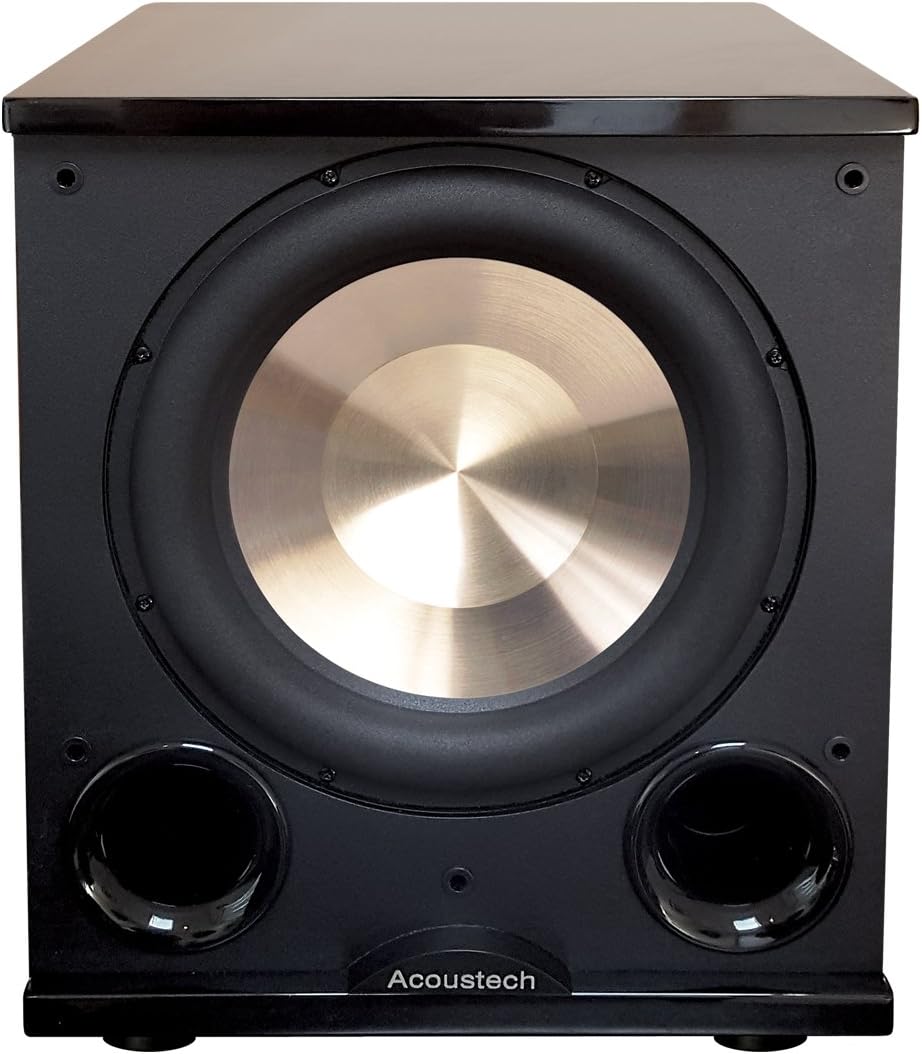
Figure 1: Front view of the PL-200II subwoofer.

Figure 2: Angled front view of the PL-200II subwoofer.
2. Setup and Placement
2.1 Unpacking
Carefully remove the subwoofer from its packaging. Inspect the unit for any signs of damage. Retain all packaging materials for future transport or service needs.
2.2 Placement Considerations
The PL-200II features dual front ports, allowing for flexible placement options. Experiment with different locations in your room to achieve optimal bass response. Placing the subwoofer in a corner or near a wall can enhance bass output. Due to its front-firing design, it can also be placed within a cabinet or built-in unit without compromising performance.
2.3 Connections
Connect the subwoofer to your audio receiver or amplifier using the appropriate inputs on the rear panel. For receivers with a dedicated subwoofer output (LFE), use the 'SUB IN' RCA input. If your receiver does not have an LFE output, you can use the 'HIGH LEVEL INPUTS FROM AMPLIFIER' terminals by connecting them to your amplifier's speaker outputs.

Figure 3: Rear panel connections and controls.

Figure 4: Detailed view of input terminals.

Figure 5: Example 7.2 speaker configuration with PL-200II subwoofers.
3. Operation
The PL-200II subwoofer features several controls on its rear panel to fine-tune its performance to your listening environment and preferences.

Figure 6: Detailed view of control knobs.
3.1 Power Control
- OFF: Turns the subwoofer off.
- AUTO: The subwoofer will automatically turn on when an audio signal is detected and enter standby mode after a period of inactivity.
- ON: The subwoofer remains on continuously.
3.2 Volume Adjustment
Use the VOLUME knob to adjust the output level of the subwoofer. Start with a low setting and gradually increase it until the bass blends seamlessly with your main speakers without overpowering them.
3.3 Crossover Frequency
The CROSSOVER FREQUENCY knob (30Hz-90Hz) controls the upper frequency limit of the subwoofer. Set this to match the low-frequency capabilities of your main speakers. If your receiver has a built-in crossover, set the subwoofer's crossover to 'CROSSOVER FROM RECEIVER (DIGITAL)' or its highest setting.
3.4 Phase Control
The PHASE switch (0°/180°) helps to integrate the subwoofer's output with your main speakers. Experiment with both settings to find the one that produces the most impactful and coherent bass in your listening position.
4. Maintenance
To ensure the longevity and optimal performance of your BIC America Acoustech PL-200II subwoofer, follow these maintenance guidelines:
- Cleaning: Use a soft, dry cloth to wipe down the cabinet. Avoid using abrasive cleaners, solvents, or chemical sprays, as these can damage the finish.
- Dusting: Regularly dust the subwoofer, especially the woofer cone and ports, to prevent dust buildup that could affect sound quality.
- Placement: Ensure the subwoofer is placed on a stable, level surface to prevent vibrations and potential damage. Keep it away from direct sunlight, heat sources, and excessive moisture.
- Ventilation: Do not block the ventilation openings on the subwoofer, especially on the rear panel, to prevent overheating.
- Handling: When moving the subwoofer, lift it carefully from the base. Avoid dropping or subjecting it to strong impacts.
5. Troubleshooting
If you experience issues with your BIC America Acoustech PL-200II subwoofer, refer to the following common troubleshooting steps:
- No Sound:
- Ensure the subwoofer is plugged into a working power outlet and the power switch is set to ON or AUTO.
- Check all audio connections between the subwoofer and your receiver/amplifier.
- Verify that the volume control on the subwoofer and your receiver is turned up.
- Confirm that your receiver's subwoofer output is enabled in its settings.
- Distorted Sound:
- Reduce the volume level on the subwoofer or your receiver.
- Check for loose connections or damaged cables.
- Ensure the subwoofer is not placed too close to other electronic devices that might cause interference.
- Weak or Boomy Bass:
- Adjust the PHASE switch (0°/180°) to see which setting provides better integration with your main speakers.
- Experiment with the CROSSOVER FREQUENCY setting. If it's set too high, the bass might sound boomy; if too low, it might be weak.
- Try repositioning the subwoofer in the room. Small changes in placement can significantly impact bass quality.
- Subwoofer Not Turning On/Off Automatically:
- Ensure the power switch is set to AUTO.
- The auto-on feature requires a sufficient audio signal to activate. Increase the subwoofer's volume or the receiver's subwoofer output level.
6. Technical Specifications
| Feature | Specification |
|---|---|
| Model Name | PL-200II |
| Brand | BIC AMERICA |
| Speaker Type | Subwoofer |
| Speaker Size | 12 Inches |
| Woofer Diameter | 12 Inches |
| Audio Driver Type | Dynamic Driver |
| Speaker Maximum Output Power | 1000 Watts (Peak) / 250 Watts (RMS) |
| Frequency Response | 21 Hz to 200 Hz (±3 dB) |
| Connectivity Technology | Wired |
| Subwoofer Connectivity Technology | Wired |
| Input Voltage | 240 Volts |
| Power Source | Corded Electric |
| Mounting Type | Floor Standing |
| Product Dimensions | 19.5"D x 17.25"W x 14.85"H |
| Item Weight | 0.01 Ounces |
| Color | Black |
| Material | Plastic |
| Manufacturer | bic acoustech |
| UPC | 729305004529 |
| Included Components | product, manual |
7. Warranty and Support
The BIC America Acoustech PL-200II subwoofer comes with a Limited Warranty. For specific details regarding warranty coverage, terms, and conditions, please refer to the warranty card included with your product or visit the official BIC America website.
For technical support, service, or inquiries about your product, please contact BIC America customer service directly. Contact information can typically be found on the manufacturer's website or in the product packaging.


