
1. Important Safety Information
Please read this entire manual before operating the ISDT D2 Mark 2 charger. Failure to follow these instructions can result in property damage, personal injury, or death. Always operate the charger in a safe environment and under supervision.
- Battery Compatibility: Only use this charger with compatible battery types as specified in the 'Specifications' section. Attempting to charge incompatible batteries may cause damage or fire.
- Supervision: Never leave the charger unattended while it is connected to a power source or charging/discharging batteries.
- Ventilation: Ensure adequate ventilation around the charger and batteries during operation to prevent overheating.
- Fire Safety: Keep a fire extinguisher or sand readily available when charging LiPo batteries. Charge LiPo batteries in a fire-resistant container or area.
- Connection Polarity: Always ensure correct polarity when connecting batteries to the charger. Incorrect connections can cause short circuits and damage.
- Power Source: Use only the specified AC input voltage range (100-240V).
- Damage Inspection: Do not operate the charger if it or any connected components appear damaged.
2. Product Overview
The ISDT D2 Mark 2 is a dual-channel AC input smart balance charger and discharger designed for various battery types. It features an optimized internal structure with a dual-fan cooling system and a 2.4-inch IPS LCD display for clear operation.
Key Features:
- Wide range AC input (100-240V) with industrial-level power management.
- Dual-channel output (200W total) allowing independent operation.
- Support for various battery types: LiFe, Lilon, LiPo, LiHv (1-6S), NiMH, Cd (1-16S), Pb (1-12S).
- Integrated safety protections: Short Current Protection (SCP), Over Load Protection (OLP), Over Voltage Protection (OVP), Over Temperature Protection (OTP).
- 5V/2A USB output for charging external devices.
- Upgraded hardware and optimized scOs operating system for enhanced stability.

Figure 2.1: Front view of the ISDT D2 Mark 2 charger, showing the dual charging ports, balance ports, USB output, and display screen.

Figure 2.2: Various angles of the ISDT D2 Mark 2 charger, highlighting its compact design and port locations.
3. Product Components
The ISDT D2 Mark 2 package includes the following items:
- 1x ISDT D2 Mark 2 Charger Unit
- 1x AC Input Cable
Familiarize yourself with the charger's physical layout:
- Front Panel: Features the 2.4-inch IPS LCD display, control dial/button, two main output ports (e.g., XT60), and two balance ports.
- Side Panel: Includes a 5V/2A USB output port.
- Rear Panel: Contains the AC power input socket and dual cooling fans.

Figure 3.1: Rear and side view of the ISDT D2 Mark 2, illustrating the dual cooling fans and AC input port.
4. Setup Instructions
4.1 Power Connection
- Connect the provided AC input cable to the AC input port on the rear of the ISDT D2 Mark 2 charger.
- Plug the other end of the AC input cable into a suitable wall outlet (AC 100-240V).
- The charger will power on, and the display screen will illuminate.

Figure 4.1: Rear panel of the charger, showing the AC input port for power connection.
4.2 Battery Connection
Before connecting any battery, ensure it is compatible with the charger and in good physical condition.
- Identify the main discharge lead and the balance lead of your battery.
- Connect the main discharge lead of the battery to one of the main output ports (CH1 or CH2) on the front of the charger. Ensure correct polarity.
- Connect the balance lead of the battery to the corresponding balance port next to the main output port. The balance plug should fit securely.
- Repeat for the second channel if charging two batteries simultaneously.

Figure 4.2: The charger with batteries connected to both main and balance ports for dual-channel operation.
5. Operating Instructions
5.1 User Interface Navigation
The ISDT D2 Mark 2 features a 2.4-inch IPS LCD display and a control dial/button for navigation. Rotate the dial to scroll through options and press it to select.
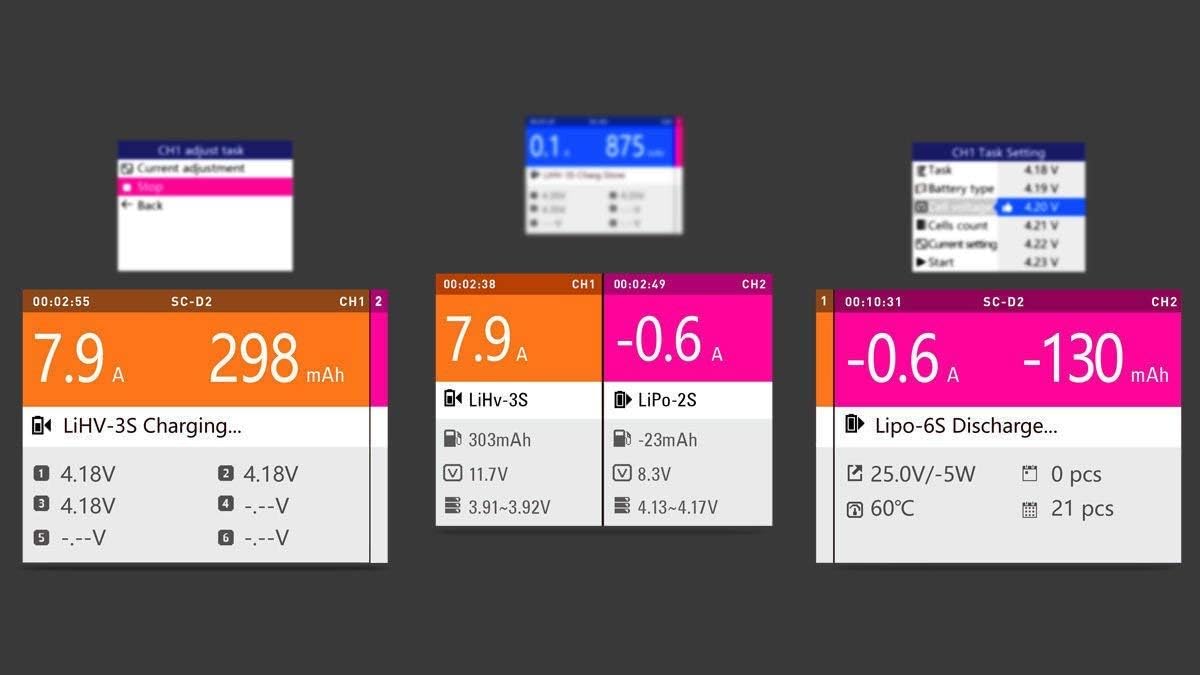
Figure 5.1: Examples of the charger's display interface, showing various charging parameters and menu options.
5.2 Charging/Discharging Modes
After connecting a battery, the charger will automatically detect some battery parameters. You will then need to select the desired operation mode:
- Charge: Standard charging mode.
- Balance Charge: Charges and balances individual cell voltages for multi-cell batteries. Recommended for LiPo/Li-ion/LiFe/LiHv batteries.
- Discharge: Discharges the battery to a set voltage.
- Storage: Charges or discharges the battery to a specific voltage level suitable for long-term storage, preserving battery health.
5.3 Battery Type Selection
It is crucial to correctly select the battery type and cell count (for multi-cell batteries) in the charger's menu to prevent damage. The charger supports:
- LiFe/Lilon/LiPo/LiHv (1-6S)
- NiMH/Cd (1-16S)
- Pb (1-12S)
5.4 Dual Task and Parallel Task Functions
- Dual Task: Allows the charger to perform independent charge/discharge/storage tasks on two separate batteries simultaneously, each with its own parameters.
- Parallel Task: This function enables the charger to combine the power of both channels to output maximum power to a single battery. This requires a parallel charging board (not included) and careful attention to battery compatibility and safety.
5.5 DC Power Output (CH1)
Channel 1 (CH1) can function as a DC power supply. Refer to the on-screen menu for specific settings and output voltage/current adjustments when utilizing this feature.
5.6 USB Output
The 5V/2A USB output port on the side of the unit can be used to charge mobile phones or other compatible electronic devices.
6. Maintenance
Proper maintenance ensures the longevity and safe operation of your ISDT D2 Mark 2 charger.
- Cleaning: Disconnect the charger from all power sources and batteries before cleaning. Use a soft, dry cloth to wipe the exterior. Do not use solvents or abrasive cleaners.
- Cooling System: The charger features a dual-fan cooling system. Ensure the fan vents on the rear panel are not obstructed during operation. Regularly check for dust accumulation and gently clean if necessary to maintain optimal airflow.
- Storage: Store the charger in a dry environment, away from direct sunlight and extreme temperatures. The recommended storage temperature is -20°C to 60°C (-4°F to 140°F).

Figure 6.1: An internal diagram illustrating the dual fan cooling system designed to dissipate heat during operation.
7. Troubleshooting
This section addresses common issues you might encounter with your ISDT D2 Mark 2 charger.
- Charger Not Powering On:
- Ensure the AC input cable is securely connected to both the charger and the wall outlet.
- Verify that the wall outlet is supplying power.
- Check the AC input cable for any visible damage.
- Charging Error/Warning Message:
- Incorrect Battery Type/Cell Count: Double-check that the selected battery type and cell count in the charger's menu match the connected battery.
- Poor Connection: Ensure all battery leads (main and balance) are securely connected to the charger with correct polarity.
- Battery Fault: If the charger indicates a battery fault, the battery may be damaged or over-discharged. Discontinue use of the battery and consult a battery specialist.
- Over Temperature Protection (OTP): If the charger becomes too hot, it may temporarily stop operation. Allow it to cool down in a well-ventilated area. Ensure fan vents are clear.
- Over Voltage Protection (OVP) / Over Load Protection (OLP) / Short Current Protection (SCP): These are built-in safety features. If triggered, disconnect the battery and power cycle the charger. Re-evaluate your charging parameters and battery condition before attempting to charge again.
- Unusual Fan Noise: While some fan noise is normal during operation, excessive or unusual noise may indicate an issue. Ensure the fan vents are clear of obstructions. If the noise persists or is accompanied by other issues, contact support.
- Display Not Responding: Try power cycling the charger by disconnecting and reconnecting the AC power.
8. Specifications
| Feature | Specification |
|---|---|
| Input Voltage | AC 100-240V |
| Charge Current | 0.1-12.0A * 2 |
| Discharge Current | 0.1-1.5A * 2 |
| Max Charge Capacity | 200W |
| Max Discharge Capacity | 15W * 2 |
| Balancing Current | 1.5A/cell * 2 |
| Balance Cells | 2-6S * 2 |
| Supported Battery Types | LiFe/Lilon/LiPo/LiHv (1-6S), NiMH/Cd (1-16S), Pb (1-12S) |
| Display | 2.4 inch 320x240 IPS LCD |
| Operating Temperature | 0-40°C (32-104°F) |
| Storage Temperature | -20-60°C (-4-140°F) |
| Dimensions | 120x108x70 mm (4.72 x 4.25 x 2.76 inches) |
| Weight | 510g (1.32 pounds) |
| Item Model Number | 5582713130 |
9. Warranty and Support
For specific warranty information regarding your ISDT D2 Mark 2 charger, please refer to the documentation included with your purchase or contact the retailer/manufacturer directly. Warranty terms may vary by region and seller.
For technical support, product inquiries, or to access additional resources, please visit the official ISDT website or their brand store:
ISDT Brand Store: https://www.amazon.com/stores/ISDTOfficial/page/CD66BDD7-E050-477A-B081-1CA75B65F070