
Introduction and Overview
The Yamaha PSR-EW300 is a 76-key portable keyboard designed for beginners and aspiring musicians. It offers a comprehensive set of features to support learning and musical expression. Key functionalities include a 76-note touch-sensitive keyboard, a wide selection of instrument voices and accompaniment styles, and advanced connectivity options.
- 76-Key Portable Keyboard with 574 Voices, 165 Styles, and 154 preset songs.
- Yamaha Education Suite (Y.E.S.) for structured learning.
- Touch Tutor lesson mode to develop dynamic playing.
- USB to HOST connectivity for MIDI and audio transfer to computers or iOS devices.
- Built-in speakers and various effects for enhanced sound.
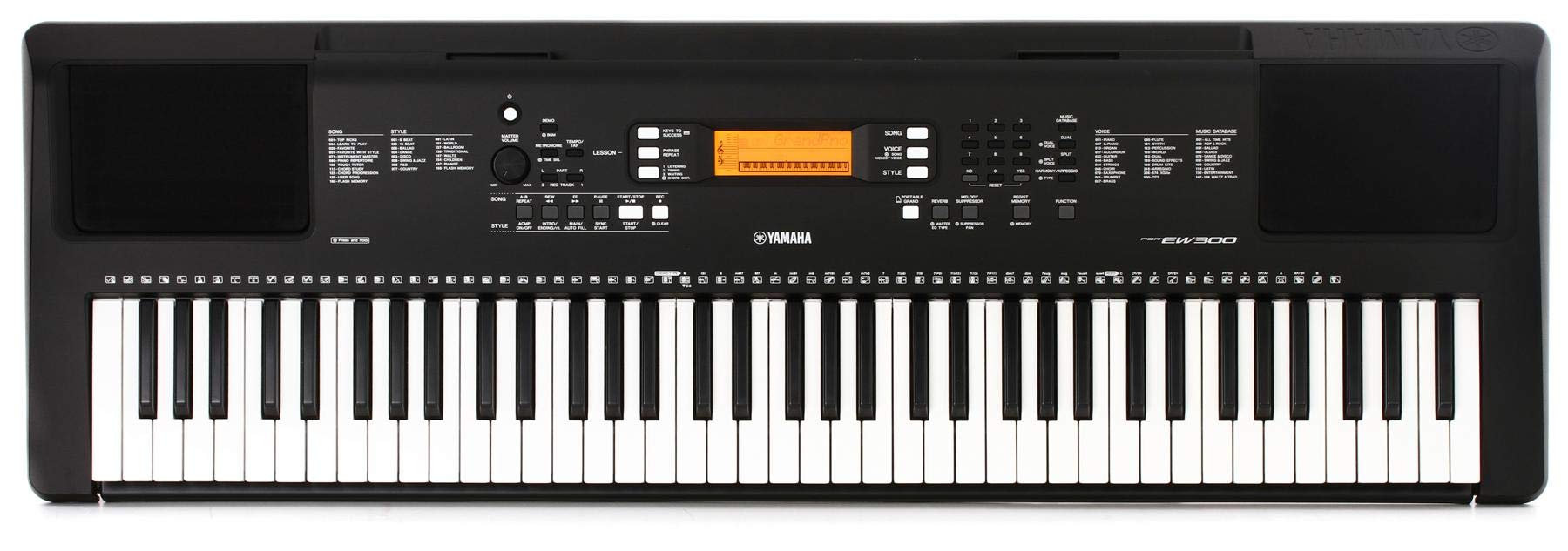
Figure 1: Front view of the Yamaha PSR-EW300 76-Key Portable Keyboard.
Setup
Power Supply
The PSR-EW300 can be powered using either AA batteries or a PA150 power adapter. The power adapter is sold separately. Ensure the correct power source is connected before operation.
Connecting Headphones
To practice privately, connect standard 3.5mm headphones to the dedicated headphones jack located on the rear panel of the keyboard.
Connecting a Sustain Pedal
A sustain pedal (sold separately) can be connected to the sustain pedal input on the rear panel for enhanced expressive control over your playing.
Operating the Keyboard
Basic Functions
The keyboard features a clear LCD display and intuitive controls for easy navigation. Adjust the master volume using the dedicated knob. Use the tempo/tap button to set the desired tempo for rhythms and songs.
Voices and Styles
The PSR-EW300 offers 574 high-quality instrument voices and 165 accompaniment styles. Select voices and styles using the numeric keypad and category buttons. The keyboard also includes 87 different effects to enhance your sound.
Built-in Speakers
The keyboard is equipped with a pair of powerful 5-watt amplifiers and speakers, providing clear and rich sound for practice and performance.
Touch Sensitive Keys
The 76 touch-sensitive keys respond to the force with which they are played, allowing for dynamic and expressive musical performances, similar to an acoustic piano.
Learning Features
The Yamaha PSR-EW300 is equipped with a comprehensive suite of educational tools to assist learners of all levels.
Yamaha Education Suite (Y.E.S.)
Y.E.S. provides built-in lesson functions that allow you to practice preset songs or MIDI files at your own pace. You can practice one hand at a time or both together, making it an effective tool for self-study.
Keys to Success
This feature guides you through learning songs step-by-step. It breaks down songs into phrases, allowing you to master each section before combining them. The keyboard provides feedback on your playing, helping you improve accuracy and timing.
Touch Tutor
The Touch Tutor mode tracks the velocity or strength with which you play the keys. This helps in developing finger strength, dexterity, and the ability to control musical dynamics, making learning more engaging.
Song Book
The PSR-EW300 comes with an accompanying songbook containing 202 lessons, songs, and exercises. These materials are designed to take advantage of the keyboard's features, including the key lighting system, to facilitate learning music theory and practical playing skills.
Chord Study and Chord Dictionary
The Chord Study feature teaches you to play chords rhythmically in various popular music genres. For chords you are unfamiliar with, the onboard Chord Dictionary can be used. Simply select the root note and chord quality, and the keyboard will illuminate the notes that make up the chord, guiding you to play them correctly.
Connectivity
USB to HOST
The USB to HOST port allows for MIDI and audio transfer, enabling you to connect the keyboard to a computer or iOS device with a single cable. This expands the instrument's capabilities for use with creative or educational music software and apps.
Aux Input
Plug in your portable music player to the Aux Input to play along with your favorite tunes. The melody suppressor function can be used to soften the lead vocal, allowing you to sing and play along.
Video 1: Official product video demonstrating the Yamaha PSR-EW300 Portable Piano Keyboard features.
Maintenance
General Care
Keep the keyboard clean by wiping it with a soft, dry cloth. Avoid using abrasive cleaners or solvents. Protect the instrument from extreme temperatures, humidity, and direct sunlight. Do not place heavy objects on the keyboard.
Storage
When not in use, store the keyboard in a safe place, preferably covered, to protect it from dust and spills.
Troubleshooting
No Sound
- Check if the power adapter is securely connected or if batteries are correctly inserted and charged.
- Ensure the master volume is turned up.
- If headphones are connected, ensure they are fully plugged in and functioning correctly.
Keys Not Responding
- Verify the keyboard is powered on.
- Check if any specific mode (e.g., lesson mode waiting for a correct note) is active that might temporarily disable key response.
Specifications
| Feature | Detail |
|---|---|
| Number of Keys | 76 |
| Key Type | Touch-sensitive |
| Voices | 574 |
| Styles | 165 |
| Preset Songs | 154 |
| Effects | 87 |
| Amplifiers | 2.5W + 2.5W (5W total) |
| Speakers | 12 cm x 2 |
| Connectivity | USB to HOST (MIDI/Audio), Aux In, Headphones (3.5mm), Sustain Pedal |
| Power Source | PA150 Adapter or AA Batteries (6x) |
| Dimensions (W x D x H) | 45.35 x 14.53 x 4.65 inches |
| Weight | 13.7 pounds |
Warranty and Support
For warranty information and customer support, please refer to the official Yamaha website or contact your local Yamaha dealer. Keep your proof of purchase for warranty claims.


