
Introduction
Thank you for purchasing the beFree Sound 8 Inch Bluetooth Portable Party Speaker. This manual provides important information regarding the setup, operation, and maintenance of your new speaker. Please read it thoroughly before use and retain it for future reference.
This multipurpose portable party speaker is designed to deliver powerful sound with 400 Watts PMPO, making it suitable for various events and gatherings. It features versatile connectivity options including Bluetooth, USB, and MicroSD card reader, along with a microphone input for karaoke functions and illuminating reactive lights to enhance your audio experience.
Product Features
- Powerful Audio Output: 400 Watts PMPO for robust sound.
- Wireless Connectivity: Bluetooth for streaming audio from compatible devices.
- Multiple Playback Options: USB and MicroSD card reader for direct media playback.
- Karaoke Functionality: Microphone input for vocal performances.
- Dynamic Lighting: Illuminating reactive lights with an option to turn them on or off.
- Portability: Equipped with a convenient handle and wheels for easy transport.
- Rechargeable Battery: Built-in 12V rechargeable battery providing approximately 6-8 hours of playback at half volume.
- Full Function Remote Control: For convenient operation from a distance.
- Durable Design: Metal grill covered speakers for protection.
Package Contents
Please check the package contents carefully. If any items are missing or damaged, contact your retailer.
- beFree Sound 8 Inch Bluetooth Portable Party Speaker
- AC UL Adapter (100-240V)
- Full Function Remote Control
- User Manual (this document)
Controls and Connections
Familiarize yourself with the various controls and connection ports on your speaker.

This image displays the front of the beFree Sound portable party speaker, highlighting the 8-inch woofer with its vibrant, multi-colored reactive lights active. The speaker features a durable metal grill covering the woofer and tweeter, and the beFree Sound logo is visible below the woofer. A retractable handle is visible at the top.

This image shows the front of the beFree Sound portable party speaker with the reactive lights turned off, revealing the standard appearance of the 8-inch woofer behind the protective metal grill. The beFree Sound branding is centered below the woofer.

This image presents a side view of the speaker, with the included full-function remote control placed in front. Icons indicating Bluetooth, MicroSD, FM Radio, and USB connectivity are displayed next to the speaker, illustrating its versatile input options.

This image provides an angled view of the speaker's rear, showcasing the control panel with various knobs and ports, as well as the integrated wheels and retractable handle for easy mobility.
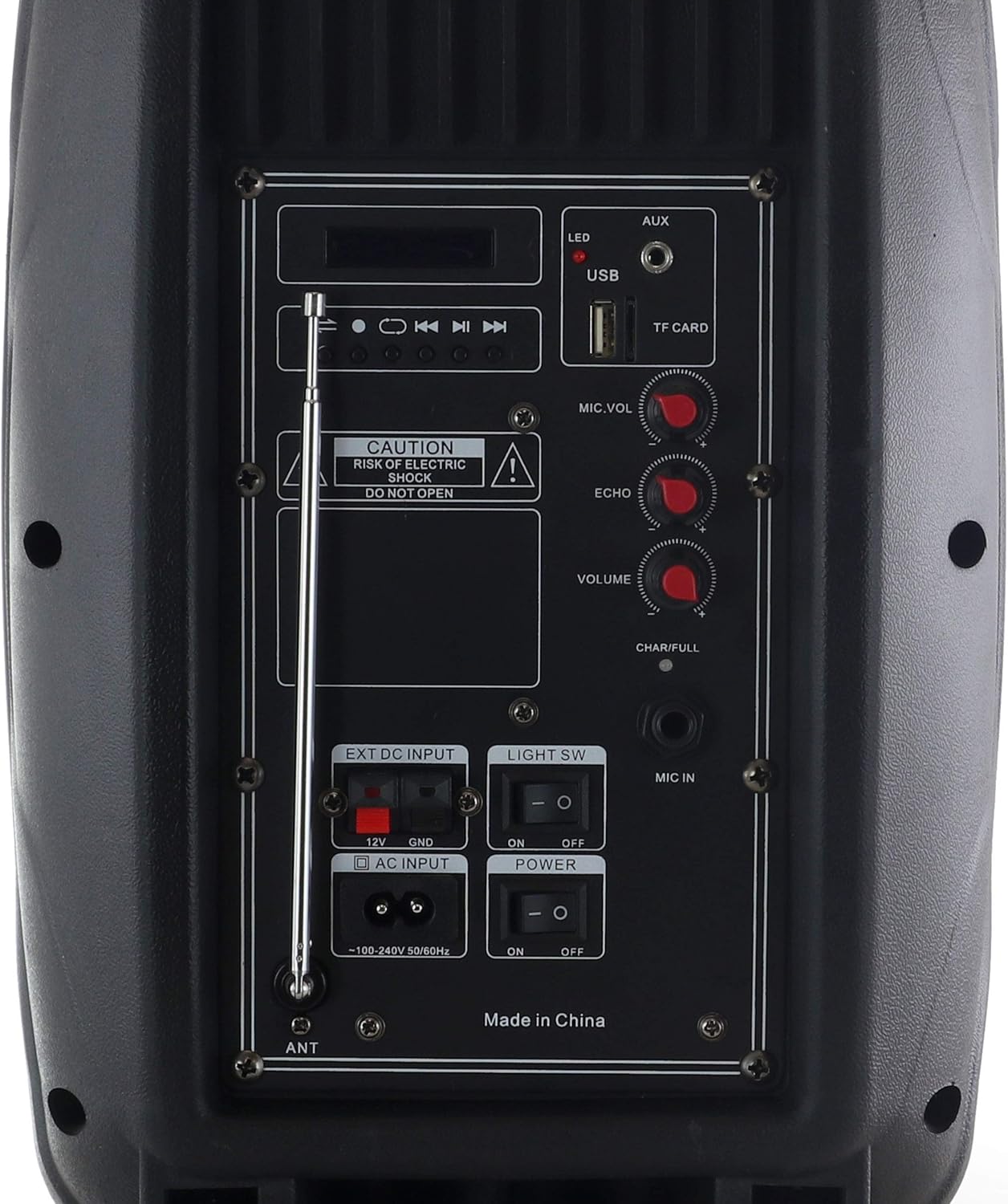
A detailed close-up of the speaker's rear control panel.
Control Panel Overview (Refer to Figure 5)
- LED Display: Shows current mode, track number, or FM frequency.
- Media Controls: Play/Pause, Previous Track, Next Track, Mode.
- USB Port: For USB flash drives.
- TF CARD Slot: For MicroSD cards.
- AUX Input: 3.5mm jack for external audio devices.
- MIC.VOL: Microphone volume control knob.
- ECHO: Microphone echo effect control knob.
- VOLUME: Master volume control knob.
- CHAR/FULL Indicator: Light indicating charging status (CHAR) or full battery (FULL).
- MIC IN: 6.35mm jack for microphone connection.
- EXT DC INPUT (12V): For external 12V DC power source.
- AC INPUT (100-240V): For connecting the AC power adapter.
- LIGHT SW: Switch to turn the illuminating reactive lights ON/OFF.
- POWER SW: Main power ON/OFF switch.
- ANT: Extendable antenna for FM radio reception.
Setup
- Charging the Battery:
Before first use, fully charge the speaker's internal 12V rechargeable battery. Connect the supplied AC UL adapter to the AC INPUT (100-240V) port on the rear panel and plug the adapter into a standard wall outlet. The CHAR/FULL indicator will illuminate during charging and change when fully charged.
Note: The speaker can be used while charging, but it is recommended to fully charge it for optimal battery life.
- Powering On/Off:
Locate the POWER SW on the rear panel. Flip the switch to the "ON" position to power on the speaker. Flip it to "OFF" to power off.
- Positioning:
Place the speaker on a stable, flat surface. For optimal sound dispersion, position it in an open area, away from obstructions. The integrated wheels and handle allow for easy relocation.

Figure 6: Speaker in Use Environment
This image shows the beFree Sound speaker positioned on a rug in a home environment, demonstrating its compact size and how it can fit into various settings.
Operating Instructions
1. Bluetooth Mode
- Power on the speaker. The speaker will automatically enter Bluetooth pairing mode, indicated by a flashing Bluetooth icon on the LED display.
- On your Bluetooth-enabled device (e.g., smartphone, tablet), enable Bluetooth and search for available devices.
- Select "beFree Sound" (or similar name) from the list of devices. Once paired, the speaker will emit a confirmation tone, and the Bluetooth icon on the display will stop flashing.
- You can now play audio from your device through the speaker. Use your device's volume controls and the speaker's master VOLUME knob to adjust the sound level.
2. USB/MicroSD Card Playback
- Insert a USB flash drive into the USB port or a MicroSD card into the TF CARD slot on the rear panel.
- The speaker will automatically detect the media and switch to USB or TF CARD mode, beginning playback of audio files. If it does not switch automatically, press the "MODE" button on the control panel or remote until the correct mode is selected.
- Use the media control buttons (Play/Pause, Previous Track, Next Track) on the speaker or remote to navigate your music.
3. AUX Input Mode
- Connect one end of a 3.5mm audio cable (not included) to the AUX Input port on the speaker and the other end to the audio output of your external device (e.g., MP3 player, laptop).
- Press the "MODE" button on the control panel or remote until "AUX" is displayed on the LED screen.
- Play audio from your external device. Adjust volume using both the external device and the speaker's master VOLUME knob.
4. FM Radio Mode
- Extend the ANT (antenna) on the rear panel for better reception.
- Press the "MODE" button on the control panel or remote until "FM" is displayed.
- To auto-scan and save available stations, press and hold the Play/Pause button. The speaker will scan and store stations automatically.
- Use the Previous Track and Next Track buttons to navigate between saved FM stations.
5. Microphone and Karaoke Function
- Connect a microphone (not included) to the MIC IN jack on the rear panel.
- Adjust the microphone volume using the MIC.VOL knob.
- Adjust the echo effect for the microphone using the ECHO knob.
- You can sing along to music playing from any source (Bluetooth, USB/SD, AUX).
6. Illuminating Lights
To activate or deactivate the reactive illuminating lights on the woofer, use the LIGHT SW switch on the rear control panel. Flip it to "ON" for lights, and "OFF" to turn them off.
Maintenance
- Cleaning: Use a soft, dry cloth to clean the exterior of the speaker. Do not use abrasive cleaners, waxes, or solvents.
- Storage: When not in use for extended periods, store the speaker in a cool, dry place, away from direct sunlight and extreme temperatures.
- Battery Care: To prolong battery life, avoid fully discharging the battery frequently. Recharge the battery regularly, even if the speaker is not in frequent use.
- Ventilation: Ensure the speaker's ventilation openings are not blocked to prevent overheating.
Troubleshooting
| Problem | Possible Cause | Solution |
|---|---|---|
| No power | Battery is depleted; Power switch is OFF; AC adapter not connected properly. | Charge the battery; Flip POWER SW to ON; Ensure AC adapter is securely connected to speaker and wall outlet. |
| No sound | Volume is too low; Incorrect mode selected; Device not paired (Bluetooth); Cable not connected (AUX). | Increase master VOLUME; Press MODE button to select correct input; Re-pair Bluetooth device; Check AUX cable connection. |
| Bluetooth pairing fails | Speaker not in pairing mode; Device too far; Interference. | Ensure speaker is in Bluetooth mode (flashing icon); Move device closer to speaker; Turn off other Bluetooth devices nearby. |
| Microphone not working | Microphone not connected; MIC.VOL too low. | Ensure microphone is securely plugged into MIC IN; Increase MIC.VOL knob. |
| Poor FM reception | Antenna not extended; Weak signal. | Fully extend the ANT; Try repositioning the speaker or antenna. |
Specifications
| Model Number | BFS-3000 |
| Output Wattage | 400 Watts PMPO |
| Woofer Size | 8 inches |
| Power Source | AC 100-240V, 50/60Hz; 12V Rechargeable Battery |
| Battery Life | Approx. 6-8 hours (at half volume) |
| Connectivity | Bluetooth, USB, MicroSD, AUX-in, Microphone Input |
| Audio Input | Microphone connector, AUX-in |
| Dimensions (L x W x H) | 8.5 x 10 x 17.5 inches |
| Item Weight | 8 pounds |
| Color | Black |
| UPC | 602573364215 |
Warranty and Support
This beFree Sound product is covered by a 90-day warranty from the date of purchase. This warranty covers manufacturing defects in materials and workmanship under normal use.
The warranty does not cover damage caused by misuse, abuse, accident, unauthorized modification, or improper operation. Please retain your proof of purchase for warranty claims.
For technical support, warranty claims, or general inquiries, please contact beFree Sound customer service through the retailer where the product was purchased or refer to the official beFree Sound website for contact information.


