1. Introduction
This manual provides essential information for setting up, operating, and maintaining your Sony HT-RT40 5.1ch Home Theatre System. This system is designed to deliver an immersive audio experience with its Dolby Audio soundbar, tall-boy rear speakers, and powerful subwoofer.
2. What's in the Box
Verify that all components are present before proceeding with the setup:
- Bar Speaker x 1
- Surround Speakers x 2
- Subwoofer x 1
- Speaker Bases x 2
- Remote Control x 1
- AAA Batteries x 2
- High Speed HDMI Cable x 1
- Screws x 8 (for speaker assembly)
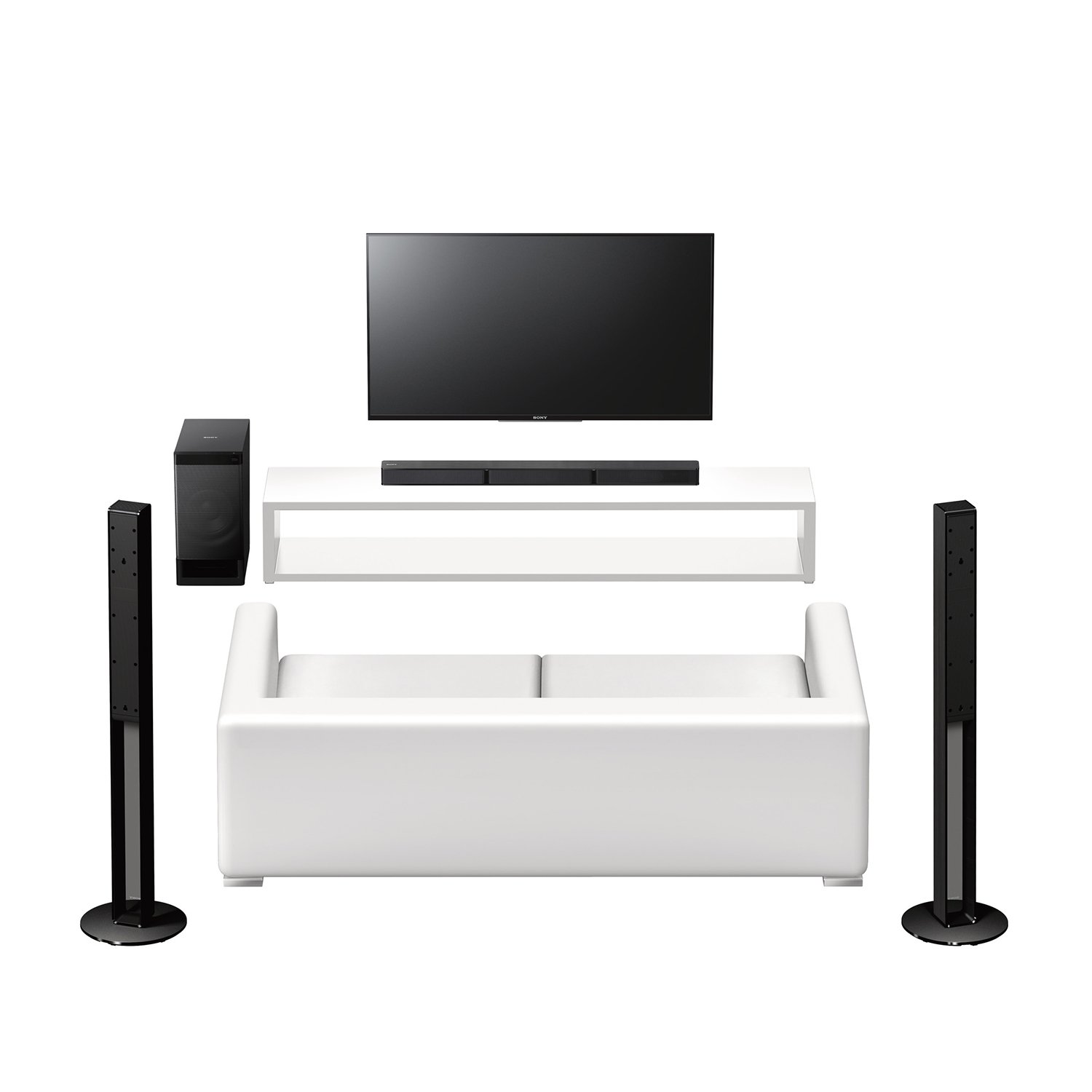
Image: All components of the Sony HT-RT40 Home Theatre System, including the soundbar, subwoofer, two tall-boy rear speakers, remote, and cables.
3. Setup and Placement
Proper placement and connection are crucial for optimal sound performance.
3.1 Speaker Placement
- Soundbar: Place the soundbar centrally below your television.
- Subwoofer: Position the subwoofer on the floor near the television, ideally in a corner for enhanced bass.
- Tall-boy Rear Speakers: Place the two tall-boy speakers behind your listening position, one on the left and one on the right, to create an immersive surround sound field.

Image: A diagram showing the recommended 5.1 channel speaker setup, with the soundbar and subwoofer at the front, and the tall-boy speakers positioned for rear surround sound.
3.2 Connecting the Speakers
Connect the bar speaker, surround speakers, and subwoofer using the provided speaker cables. Ensure correct polarity (positive to positive, negative to negative) for each connection.

Image: Close-up of the subwoofer's rear panel, detailing the color-coded speaker connections and various input ports.
3.3 Connecting to Your Television
The HT-RT40 offers multiple connectivity options for your TV:
- HDMI ARC: For the best audio quality and simplified control, connect the system to your TV's HDMI ARC port using the supplied HDMI cable. This allows audio from the TV to be sent back to the soundbar and enables unified power control.
- Optical Input: If your TV does not have an HDMI ARC port, use an optical cable (sold separately) to connect the TV's optical output to the system's optical input.
- Analog Input: For older TVs, an analog audio cable (sold separately) can be used to connect the TV's audio output to the system's analog input.
Video: This video provides a detailed overview of the Sony HT-RT40 Home Theatre System, including its design, connectivity options like HDMI ARC, USB, NFC, and Bluetooth, and its 5.1 channel surround sound capabilities. It demonstrates the ease of setup and the immersive audio experience it delivers for movies and music.
4. Operating Instructions
4.1 Bluetooth Connectivity
Pair your smartphone or other Bluetooth-enabled devices with the HT-RT40 for wireless audio streaming. You can pair devices manually through the Bluetooth settings on your device.
4.2 NFC (Near Field Communication)
For quick pairing with NFC-enabled smartphones, simply touch your device to the N-mark on the system to establish a connection and start playing music instantly.
4.3 USB Playback
Plug in your USB device to the USB port on the subwoofer to play audio files directly. The system supports various audio formats.

Image: The USB port located on the top of the subwoofer, ready for connecting a USB device for media playback.
4.4 Sony Music Center App
Enhance your control and access to music by using the Sony Music Center app on your smartphone. The app provides seamless access to your favorite tracks, whether stored on your smartphone, USB, or online music services.
5. Features and Performance
The Sony HT-RT40 system is engineered to deliver a powerful and immersive audio experience.
- Real 5.1 Channel Surround Sound: Experience authentic cinema surround sound with a three-channel soundbar, two tall-boy rear speakers, and a powerful subwoofer.
- Dolby Digital: Enjoy dramatic, high-quality surround sound from separate audio channels.
- 600W Total Power Output: Delivers dynamic and impactful audio for movies and music.
- Stylish Tall-boy Speakers: The sleek design of the tall-boy speakers blends seamlessly with modern home decor while providing optimal surround positioning.
Video: This video explains the benefits of integrating a soundbar system with a television, particularly for enhancing the cinematic sound experience from HD TV channels with Dolby Audio. It illustrates how a 5.1ch Dolby Enabled Soundbar, such as the HT-RT40, contributes to a complete high-definition entertainment experience by adding immersive audio.

Image: The complete Sony HT-RT40 system arranged around a television, demonstrating its aesthetic integration into a home entertainment setup.
6. Specifications
| Feature | Detail |
|---|---|
| Model Name | HT-RT40 |
| Speaker Type | Soundbar |
| Special Feature | NFC Enabled |
| Recommended Uses For Product | For Televisions; For Smartphones or Tablets |
| Subwoofer Diameter | 12 Inches |
| Surround Sound Channel Configuration | 5.1 |
| Colour | Black |
| Product Dimensions | 30.5D x 113W x 31.5H Centimeters |
| Item Weight | 8 Kilograms |
| Control Method | Remote |
| Wireless Communication Technology | Bluetooth |
| Speaker Size | 1 Inches |
| Power Source | AC |
| Tweeter Diameter | 12 Millimetres |
| Speakers Nominal Output Power | 100 Watts |
| Audio Wattage | 600 Watts |
| Total USB ports | 1 |
| Date First Available | 6 July 2017 |
7. Troubleshooting
If you encounter issues with your Sony HT-RT40 system, consider the following general troubleshooting steps:
- No Power: Ensure the power cable is securely connected to both the system and a working power outlet.
- No Sound: Check all audio cable connections (HDMI ARC, Optical, Analog). Verify the correct input source is selected on the soundbar and your TV. Ensure the volume is not muted or set too low on both the system and the TV.
- No Surround Sound: Confirm that all speakers are correctly connected to the subwoofer and that the audio source is providing 5.1 channel content.
- Bluetooth Pairing Issues: Ensure the system is in pairing mode and your device's Bluetooth is enabled. Try unpairing and re-pairing the device.
- Distorted Sound: Check for loose connections. Reduce the volume if it's too high. Ensure the audio source is not distorted.
For more detailed troubleshooting, refer to the official Sony support website or contact customer service.
8. Maintenance
To ensure the longevity and optimal performance of your Sony HT-RT40 Home Theatre System, follow these maintenance guidelines:
- Cleaning: Use a soft, dry cloth to clean the surfaces of the soundbar, speakers, and subwoofer. Avoid using liquid cleaners or abrasive materials.
- Ventilation: Ensure that the ventilation openings on the subwoofer and soundbar are not blocked to prevent overheating.
- Environment: Avoid exposing the system to extreme temperatures, humidity, direct sunlight, or dust.
- Cable Management: Keep cables organized and free from kinks or excessive tension to prevent damage.
9. Warranty and Support
Your Sony HT-RT40 Home Theatre System comes with a 1 Year Warranty from the date of purchase. Please retain your proof of purchase for warranty claims.
For product-related queries, technical support, or warranty service, please contact Sony Customer Care:
- Toll-free: 18001037799
- Email: Sonyindia.care@sony.com
Manufacturer: Sony Corporation, 1-7-1, Konan, Minato-ku, Tokyo, 108-0075, Japan.
Imported By: SONY INDIA PRIVATE LIMITED, A-18, Mohan Cooperative Industrial Estate, Mathura Road, New Delhi - 109932.


