1. Important Safety Information
Please read all instructions carefully before using this appliance to ensure safe and efficient operation. Retain this manual for future reference.
- Do not use this heater in the immediate vicinity of a bath, shower, or swimming pool.
- Do not use this heater if it has been dropped.
- Do not use if there are visible signs of damage to the heater.
- Keep children under 3 years of age away unless continuously supervised.
- Ensure the appliance is placed on a stable, flat surface.
- Do not cover the heater to avoid overheating.
- Always unplug the appliance when not in use or before cleaning.
- This appliance is equipped with an anti-tip safety switch that automatically turns off the heater if it tips over.
2. Product Overview
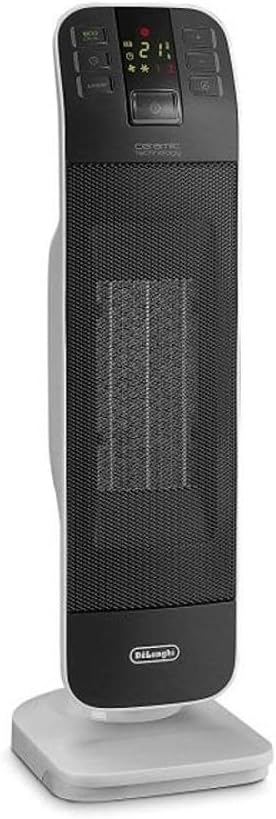
Figure 1: De'Longhi HFX65V20 Tower Fan Heater, front view. This image displays the sleek, tall design of the heater with its control panel at the top and the De'Longhi logo at the base.
The De'Longhi HFX65V20 is a ceramic tower fan heater designed for efficient and quiet heating of indoor spaces. It features advanced ceramic technology for balanced power and energy efficiency, an intuitive LED display, and multiple operating modes.
Key Features:
- Ceramic Technology: Self-regulating heating element adjusts power output based on room temperature.
- Quiet Operation: Optimized airflow for reduced noise, suitable for various environments.
- LED Display: Simple and intuitive electronic controls with a clear LED screen.
- Eco-Energy Function: Optimizes energy consumption while maintaining comfort.
- 2 Power Levels: 2000W and 1200W for flexible heating.
- 24-Hour Timer: Allows programming of daily operation.
- Anti-Freeze Protection: Activates automatically if room temperature drops below 5°C.
- Safety Features: Thermal safety device, room thermostat, and anti-tip switch.
- Remote Control: For convenient operation from a distance.
3. Setup
3.1 Unpacking
- Carefully remove the heater from its packaging.
- Check for any signs of damage during transit. If damaged, do not use the appliance and contact customer support.
- Remove all packaging materials, including any protective films or stickers.
3.2 Placement
- Place the heater on a stable, level surface, ensuring it is not near curtains, furniture, or other flammable materials.
- Maintain a minimum distance of 1 meter (3 feet) from walls and other objects.
- Ensure the air inlet and outlet grilles are not obstructed.
- Do not place the heater directly below a power socket.

Figure 2: The De'Longhi HFX65V20 heater positioned in a living room, demonstrating appropriate placement away from furniture. This image shows the heater standing upright on a carpeted floor next to a sofa.
4. Operating Instructions
4.1 Control Panel and Remote Control

Figure 3: Detailed view of the heater's top control panel with LED display. Buttons include Power, ECO, Timer, Mode, and Oscillation, along with temperature/power adjustment buttons.

Figure 4: The remote control for the De'Longhi HFX65V20, featuring buttons for Power, ECO, Timer, Mode, Oscillation, and temperature/power adjustments, mirroring the main unit's controls.
The heater can be operated using the control panel on the top of the unit or the supplied remote control. Ensure the remote control has working batteries (not supplied).
4.2 Power On/Off
- Plug the appliance into a suitable power outlet.
- Press the Power ( ⏻ ) button on the control panel or remote control to turn the heater on or off.
4.3 Setting Temperature and Power Levels
- Once powered on, use the + and - buttons to adjust the desired temperature. The LED display will show the set temperature.
- Press the MODE button to cycle through the available power levels (e.g., 1200W, 2000W) and fan-only mode.
4.4 Eco-Energy Function
- Press the ECO button to activate the Eco-Energy function.
- In this mode, the heater automatically adjusts its power output to optimize energy consumption while maintaining a comfortable room temperature.
4.5 24-Hour Timer
- Press the TIMER ( ⏱ ) button to set the desired operating time.
- Use the + and - buttons to adjust the timer duration in hours (up to 24 hours).
- The heater will automatically turn off after the set time has elapsed.
4.6 Oscillation Function
- Press the OSCILLATION ( ↻ ) button to activate or deactivate the oscillation feature.
- When active, the heater will rotate from side to side to distribute heat more evenly across the room.
4.7 Anti-Freeze Protection
- This function is automatically active when the heater is plugged in and in standby mode.
- If the room temperature drops below 5°C (41°F), the heater will automatically turn on at a low power setting to prevent freezing.
5. Maintenance
5.1 Cleaning
- Always unplug the heater from the power outlet and allow it to cool completely before cleaning.
- Wipe the exterior surfaces with a soft, damp cloth. Do not use abrasive cleaners or solvents.
- Use a vacuum cleaner with a brush attachment to remove dust from the air inlet and outlet grilles.
- Never immerse the appliance in water or any other liquid.
5.2 Storage
- If the heater will not be used for an extended period, unplug it and store it in its original packaging or a dry, dust-free place.
- Ensure the power cord is neatly coiled and not kinked.
6. Troubleshooting
If you experience issues with your De'Longhi HFX65V20 heater, please consult the table below before contacting customer support.
| Problem | Possible Cause | Solution |
|---|---|---|
| Heater does not turn on. | No power supply. Anti-tip switch activated. Overheat protection activated. | Check if the plug is securely inserted into a working outlet. Ensure the heater is on a flat, stable surface. Unplug the heater, let it cool for 30 minutes, then plug it back in. |
| No heat output. | Fan-only mode selected. Temperature setting too low. Air inlets/outlets blocked. | Press the MODE button to select a heating power level. Increase the desired temperature using the '+' button. Ensure grilles are clear of obstructions. |
| Heater turns off unexpectedly. | Overheat protection activated. Anti-tip switch activated. Timer has expired. | Unplug, cool, and restart. Ensure proper ventilation. Place on a stable surface. Check timer settings and reset if necessary. |
| Remote control not working. | Dead batteries. Obstruction between remote and heater. | Replace batteries. Ensure a clear line of sight to the heater's sensor. |
7. Technical Specifications

Figure 5: Front view of the De'Longhi HFX65V20 heater, highlighting its compact tower design. This image shows the full height and width of the unit.
| Feature | Specification |
|---|---|
| Model | HFX65V20 |
| Brand | DeLonghi |
| Type | Ceramic Tower Fan Heater |
| Power Levels | 2 (1200W, 2000W) |
| Heating Method | Radiant |
| Power Source | Corded Electric |
| Special Features | Remote Control, LED Display, Eco-Energy Function, 24H Timer, Anti-Freeze Protection, Oscillation |
| Product Dimensions (D x W x H) | 8.9D x 7.2W x 24.1H centimetres |
| Indoor/Outdoor Use | Indoor |
| Mounting Type | Floor Mount |
8. Warranty and Customer Support
De'Longhi products are manufactured to high standards and are subject to rigorous quality control. This product is covered by a manufacturer's warranty in accordance with local regulations.
For detailed warranty information, service, or technical assistance, please refer to the warranty card included with your product or visit the official De'Longhi website. When contacting support, please have your model number (HFX65V20) and purchase date available.


