
Unitec 47598
UNITEC 47598 Wireless Motion Detector Plug Instruction Manual
Model: 47598
1. Introduction
This manual provides instructions for the safe and efficient operation of your UNITEC 47598 Wireless Motion Detector Plug. Please read this manual thoroughly before installation and use, and retain it for future reference.
The UNITEC 47598 is designed to automatically switch connected electrical devices on and off based on detected motion, offering convenience and energy saving for temporary indoor lighting applications.
2. Safety Instructions
- Ensure the product is used only indoors. It has an IP20 rating, meaning it is protected against solid objects larger than 12.5mm but has no protection against water.
- Do not exceed the maximum connection power of 2500 W. Overloading can cause damage or fire.
- Only connect to a standard 230 V~, 50 Hz power supply.
- Do not open or attempt to repair the device. Refer all servicing to qualified personnel.
- Keep out of reach of children.
- Avoid placing the motion sensor near heat sources, direct sunlight, or strong air currents, as this may affect its performance.
3. Package Contents
The package should contain the following items:
- 1 x UNITEC Wireless Motion Detector Plug (Adapter Plug)
- 1 x Wireless Motion Sensor
- 1 x CR2477 Button Cell Battery (for the motion sensor, included)
- 1 x Instruction Manual (this document)

Image 1: The UNITEC 47598 Wireless Motion Detector Plug (right) and its accompanying Wireless Motion Sensor (left).
4. Product Overview
4.1 Components
The system consists of two main components:
- Wireless Motion Detector Plug: This unit plugs into a standard wall socket and has an integrated socket for connecting your electrical device. It receives signals from the motion sensor.
- Wireless Motion Sensor: This small, battery-powered unit detects motion and sends a wireless signal to the plug.
4.2 Key Features
- Automatic Switching: Detects motion and automatically switches connected devices on.
- Wide Range: Motion detection range of up to 8 meters for the sensor, and a wireless communication range of up to 15 meters between the sensor and the plug in open spaces.
- Adjustable Switch-off Time: Connected devices will switch off approximately 4 minutes after the last detected motion.
- High Load Capacity: Supports devices up to a maximum of 2500 W.
- Easy Installation: Simple plug-and-play setup for the adapter and flexible placement for the wireless sensor.

Image 2: Key features include automatic switching upon motion detection, an integrated protective contact socket, and a wireless range of up to 15 meters.
5. Setup and Installation
5.1 Installing the Motion Detector Plug
- Insert the UNITEC Wireless Motion Detector Plug into a standard 230V~, 50Hz wall socket.
- Connect the electrical device you wish to control (e.g., a lamp) into the socket on the motion detector plug. Ensure the device's power switch is in the 'ON' position if it has one.
5.2 Installing the Wireless Motion Sensor
The motion sensor is battery-powered and can be placed or mounted in a suitable location.
- Battery Installation: The CR2477 button cell battery is typically pre-installed. If not, open the sensor casing and insert the battery with the correct polarity.
- Placement: Position the motion sensor in an area where it can effectively detect movement. Consider the following:
- The sensor has a detection angle of 100 degrees and a range of up to 8 meters.
- Avoid placing it directly facing windows or heat sources to prevent false triggers.
- Ensure the sensor is within the 15-meter wireless communication range of the plug.
- Mounting: The sensor can be placed on a flat surface or mounted to a wall using appropriate fasteners (not included, if not specified).
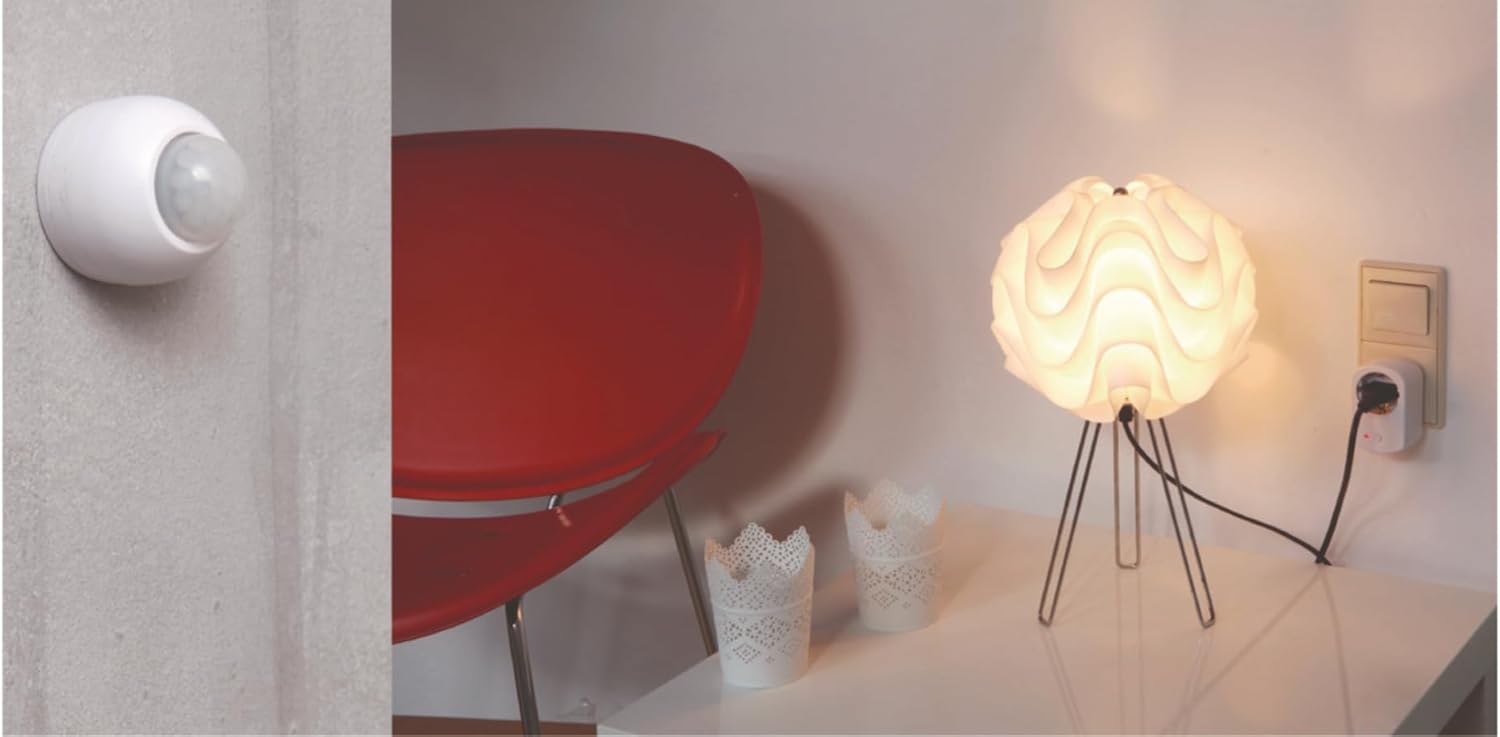
Image 3: Example setup showing the motion sensor mounted on a wall and the plug connected to a lamp in a wall socket.
6. Operation
6.1 Pairing (Initial Setup)
The plug and sensor should be pre-paired. If they are not communicating, follow these steps to pair them:
- Plug the motion detector plug into a wall socket. The red indicator light on the plug may flash or illuminate.
- Press and hold the small button on the motion detector plug for approximately 3-5 seconds until the red indicator light starts flashing rapidly. This indicates it is in pairing mode.
- Within 10 seconds, trigger the motion sensor by waving your hand in front of it. The red indicator light on the plug should stop flashing and remain solid for a moment, then turn off, indicating successful pairing.
- Test the connection by moving in front of the sensor. The connected device should switch on.
6.2 Automatic Switching
Once paired, the system operates automatically:
- When motion is detected by the sensor, it sends a signal to the plug.
- The plug then switches on the connected electrical device.
- The device will remain on as long as motion is continuously detected.
- Approximately 4 minutes after the last detected motion, the plug will switch off the connected device.
7. Maintenance
7.1 Cleaning
- Disconnect the plug from the power outlet before cleaning.
- Wipe the surfaces of both the plug and the sensor with a soft, dry cloth.
- Do not use abrasive cleaners, solvents, or wet cloths, as these can damage the device or cause electrical hazards.
7.2 Battery Replacement (Motion Sensor)
The motion sensor is powered by a CR2477 button cell battery. If the sensor stops responding or the range decreases significantly, the battery may need replacement.
- Carefully open the casing of the wireless motion sensor.
- Remove the old CR2477 battery.
- Insert a new CR2477 battery, ensuring correct polarity (+/-).
- Close the sensor casing securely.
- Test the sensor to ensure it is functioning correctly.
8. Troubleshooting
| Problem | Possible Cause | Solution |
|---|---|---|
| Connected device does not switch on. |
|
|
| Device switches on/off randomly (false triggers). |
|
|
| Device does not switch off after 4 minutes. |
|
|
9. Specifications
| Model Number: | 47598 |
| Brand: | Unitec |
| Power Source: | Adapter (Mains powered for plug) |
| Rated Voltage: | 230 V~; 50 Hz |
| Max. Connection Power: | 2500 W |
| Motion Sensor Battery: | 1 x CR2477 Lithium Button Cell (included) |
| Wireless Range (Sensor to Plug): | Up to 15 meters (in open spaces) |
| Motion Detection Range: | Up to 8 meters |
| Detection Angle: | 100 degrees |
| Switch-off Delay: | Approx. 4 minutes after last motion |
| Protection Rating: | IP20 (Indoor use only) |
| Operating Temperature: | 20°C |
| Product Dimensions (Plug): | Approx. 8.4 cm (H) x 5.3 cm (W) |
| Product Dimensions (Sensor): | Approx. 4.1 cm (H) x 4.1 cm (W) |
| Weight: | 160 g (total product) |
| Recommended Application: | Temporary indoor lighting |
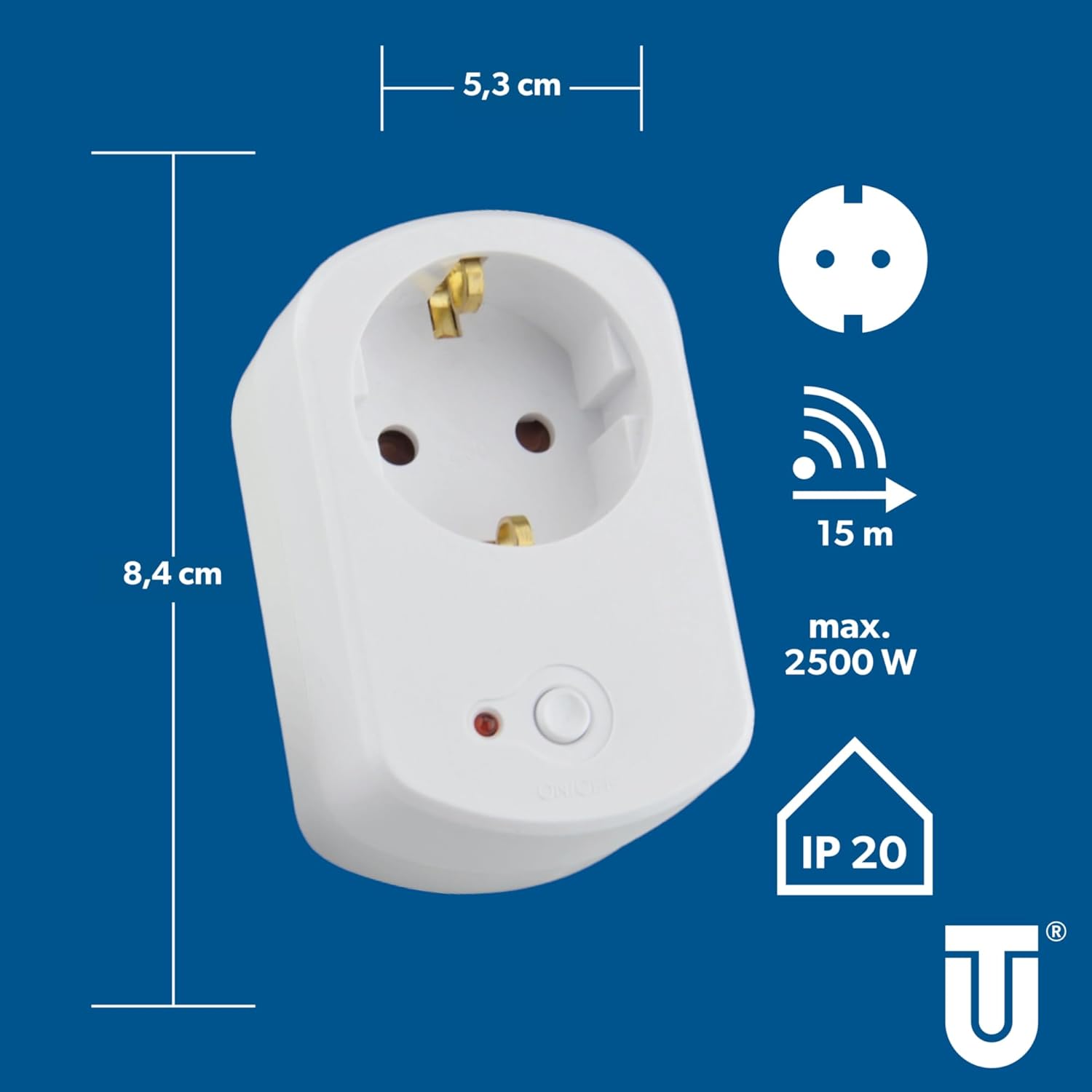
Image 4: Dimensions of the plug unit (approx. 8.4 cm height, 5.3 cm width) and key specifications including 15m max range, 2500W max power, and IP20 rating.

Image 5: Dimensions of the motion sensor (approx. 4.1 cm height, 4.1 cm width) and key specifications including 8m detection range, 100 degree angle, and IP20 rating.
10. Warranty and Support
For warranty information or technical support, please refer to the contact details provided with your purchase or visit the official Unitec website. Keep your proof of purchase for any warranty claims.
Ask a question about this manual
Ask about setup, troubleshooting, compatibility, parts, safety, or missing instructions. Manuals+ will review the question and use this page’s manual context to help answer it.