
EnviteC by Honywell ALC 1
EnviteC AlcoQuant 6020 plus Instruction Manual
Model: ALC 1 | Brand: EnviteC by Honywell
1. Product Overview
The EnviteC AlcoQuant 6020 plus is an advanced breath alcohol analyzer designed for accurate and reliable measurements. It features an electrochemical sensor (E-100) specifically calibrated to detect alcohol, minimizing interference from other substances like essential oils or tobacco odor.
A built-in microcontroller with evaluation software continuously monitors all internal functions to ensure measurement accuracy. The system facilitates short measurement intervals, allowing for efficient and rapid testing. During the sampling process, the AlcoQuant device precisely controls and records the volume of exhaled air, and is capable of detecting attempts to tamper with the sample.

Image 1.1: The EnviteC AlcoQuant 6020 plus device, showing its ergonomic design and display screen.
Key Features:
- Electrochemical sensor (E-100) specifically responds to alcohol.
- New, super sharp display screen for clear readings.
- Sampling system enables short measurement intervals.
- Intuitive and very simple user interface.
- German menu (Display messages).
2. Safety Information
Please read all safety warnings and instructions carefully before operating the device to ensure safe and accurate use.
Important Safety Warning:
- Use only original ACE mouthpieces.
- Using original ACE mouthpieces ensures the accuracy of measurement results.
- Original ACE mouthpieces guarantee 100% hygienic safety.
- Using original ACE mouthpieces ensures the full device warranty remains valid.
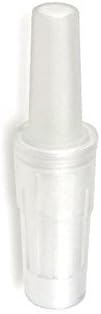
Image 2.1: An original ACE mouthpiece, essential for accurate and hygienic operation.
3. Setup
Before first use, ensure the device is properly prepared.
- Unpack the Device: Carefully remove the AlcoQuant 6020 plus from its packaging. Check for any visible damage.
- Install Batteries: Open the battery compartment (usually located on the back or bottom of the device) and insert the required batteries, observing the correct polarity.
- Attach Mouthpiece: Securely attach a new, original ACE mouthpiece to the designated port on the device. Ensure it clicks into place or is firmly seated to prevent air leakage during testing.
- Power On: Press the power button to turn on the device. The display should illuminate and show the initial startup screen.
- Initial Settings: If prompted, set the date, time, or language according to the on-screen instructions. The device menu is in German.
4. Operating Instructions
Follow these steps for accurate breath alcohol testing.
Performing a Measurement:
- Prepare the Device: Ensure a fresh, original ACE mouthpiece is attached.
- Power On: Press the power button (Χ) to turn on the AlcoQuant 6020 plus. The device will perform a self-check.
- Wait for Readiness: The display will show "Messung starten" (Start Measurement) when the device is ready for a test.
- Provide Breath Sample: Take a deep breath. Place your lips firmly around the mouthpiece and blow steadily and continuously into the device until you hear a click or the device indicates the sample is sufficient. Maintain a consistent breath for the duration of the sample collection.
- View Results: After a few seconds, the measurement result will be displayed on the screen, typically in Promille (BAC).
- Remove Mouthpiece: Carefully remove and dispose of the used mouthpiece. Do not reuse mouthpieces for hygienic reasons.
- Power Off: The device may automatically power off after a period of inactivity, or you can manually turn it off by pressing the power button.
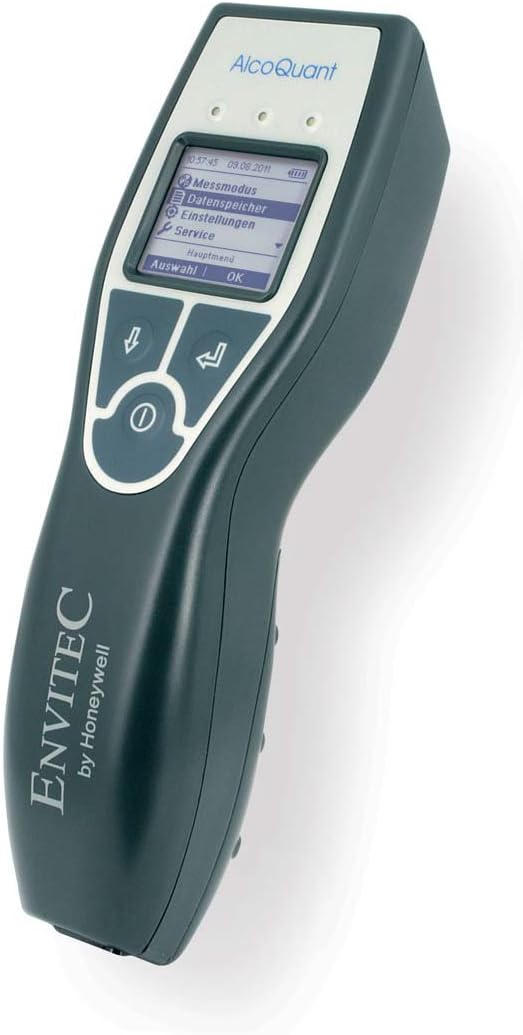
Image 4.1: The device display showing the main menu, including options like "Messmodus" (Measurement Mode) and "Datenspeicher" (Data Storage).

Image 4.2: The device display showing a measurement result of 0.80 Promille (BAC).
Navigating the Menu:
Use the arrow buttons (↓ and ↑) to scroll through menu options. Press the "OK" button (often indicated by a curved arrow ↵ or a checkmark) to select an option. The "Menu" button (often indicated by a square or 'M') allows you to return to the previous screen or main menu.

Image 4.3: An illustration of the AlcoQuant 6020 plus display, demonstrating menu navigation and result display.
5. Maintenance
Proper maintenance ensures the longevity and accuracy of your AlcoQuant 6020 plus.
Cleaning:
- Wipe the exterior of the device with a soft, damp cloth. Do not use abrasive cleaners or solvents.
- Ensure no liquid enters the mouthpiece port or other openings.
- The mouthpieces are single-use and should be disposed of after each test.
Storage:
- Store the device in a cool, dry place, away from direct sunlight and extreme temperatures.
- If storing for an extended period, remove the batteries to prevent leakage.
Calibration:
Like all precision instruments, the AlcoQuant 6020 plus requires periodic calibration to maintain its accuracy. Refer to the manufacturer's recommendations or contact authorized service centers for calibration services. Typically, calibration is recommended annually or after a certain number of tests, as specified in the full product manual.
6. Troubleshooting
This section addresses common issues you might encounter.
| Problem | Possible Cause | Solution |
|---|---|---|
| Device does not power on. | Dead or incorrectly inserted batteries. | Replace batteries with new ones, ensuring correct polarity. |
| Inaccurate or inconsistent readings. | Non-original mouthpiece, improper breath sample, or device needs calibration. | Ensure use of original ACE mouthpieces. Provide a steady, continuous breath. Consider professional calibration. |
| "Error" message on display. | Insufficient breath sample, sensor issue, or internal malfunction. | Repeat the test with a stronger, longer breath. If error persists, contact customer support. |
| Device powers off unexpectedly. | Low battery or automatic shutdown feature. | Replace batteries. This is normal if the device is idle for a period. |
7. Specifications
Detailed technical specifications for the AlcoQuant 6020 plus.
- Manufacturer: Envitec
- Brand: EnviteC by Honywell
- Item Weight: 812 g
- Package Dimensions: 19.5 x 6 x 4.2 cm; 811.93 grams
- Manufacturer Reference: ALC 1
- Manufacturer Serial Number: ALC 1
- ASIN: B073PD7MJ5
- Date First Available on Amazon.com.be: October 5, 2013
- Sensor Type: Electrochemical (E-100)
- Display: Super sharp screen
- User Interface: Intuitive, simple, German menu
8. Warranty and Support
The EnviteC AlcoQuant 6020 plus comes with a full device warranty, provided that only original ACE mouthpieces are used. Please refer to your purchase documentation for specific warranty terms and duration.
Customer Support:
For technical assistance, calibration services, or warranty claims, please contact the manufacturer or your authorized dealer. Keep your purchase receipt and device serial number handy when contacting support.
Manufacturer: Envitec
Brand: EnviteC by Honywell
Model: ALC 1
For further information, please visit the official EnviteC by Honywell website or consult the comprehensive user manual provided with your device.
Ask a question about this manual
Ask about setup, troubleshooting, compatibility, parts, safety, or missing instructions. Manuals+ will review the question and use this page’s manual context to help answer it.